Cisco Implement Wireless Networks (ENWLSI, 300-430) Practice Questions & Study Guide
The Implementing Cisco Enterprise Wireless Networks (ENWLSI) 300-430 certification is a key concentration for the CCNP Enterprise certification track. As organizations increasingly rely on mobile and wireless technologies to drive their business operations, the ability to design, implement, and troubleshoot high-performance wireless networks has become a highly sought-after skill. The 300-430 validates your expertise in leveraging Cisco's advanced wireless features to provide seamless and secure connectivity. It is an essential credential for any network professional looking to specialize in enterprise-grade wireless solutions.
Overview of the Exam
The 300-430 exam is a rigorous assessment that covers the implementation of Cisco enterprise wireless networks. It is a 90-minute exam consisting of approximately 60 questions. The exam is designed to test your knowledge of Cisco's advanced wireless technologies and your ability to apply them to real-world scenarios. From device configuration and QoS to security and troubleshooting, the 300-430 ensures that you have the skills necessary to build and maintain robust wireless infrastructures. Achieving the 300-430 certification proves that you are a highly skilled professional who can handle the technical demands of enterprise-grade wireless deployments.
Target Audience
The 300-430 is intended for network professionals who have a solid understanding of Cisco's enterprise-grade wireless technologies. It is ideal for individuals in roles such as:
1. Wireless Network Engineers
2. Network Administrators
3. Systems Engineers
4. Network Architects
To be successful, candidates should have at least three to five years of experience in enterprise-grade wireless technologies and a thorough understanding of Cisco's wireless products and features.
Key Topics Covered
The 300-430 exam is organized into six main domains:
1. FlexConnect (15%): Implementing Cisco FlexConnect architectures and features.
2. QoS on a Wireless Network (10%): Configuring Quality of Service (QoS) for wireless applications.
3. Multicast (10%): Implementing multicast over wireless networks.
4. Location Services (10%): Configuring Cisco's location-based services and features.
5. Advanced L2 & L3 Roaming (15%): Understanding and implementing advanced roaming technologies.
6. Monitoring (20%): Monitoring and managing Cisco's enterprise-grade wireless networks.
7. Device Hardening (20%): Securing Cisco's wireless devices and infrastructure.
Benefits of Getting Certified
Earning the 300-430 certification provides several significant benefits. First, it offers industry recognition of your specialized expertise in Cisco's enterprise-grade wireless technologies. As a leader in the networking industry, Cisco skills are in high demand across the globe. Second, it can lead to increased career opportunities and higher salary potential in a variety of roles. Third, it demonstrates your commitment to professional excellence and your dedication to staying current with the latest wireless networking practices. By holding this certification, you join a global community of Cisco professionals and gain access to exclusive resources and continuing education opportunities.
Why Choose NotJustExam.com for Your 300-430 Prep?
The 300-430 exam is challenging and requires a deep understanding of Cisco's complex wireless features. NotJustExam.com is the best resource to help you master this material. Our platform offers an extensive bank of practice questions that are designed to mirror the actual exam’s format and difficulty.
What makes NotJustExam.com stand out is our focus on interactive logic and the accuracy of our explanations. We don’t just provide a list of questions; we provide a high-quality learning experience. Every question in our bank includes an in-depth, accurate explanation that helps you understand the technical reasoning behind the correct wireless application. This ensures that you are truly learning the material and building the confidence needed to succeed on the exam. Our content is regularly updated to reflect the latest Cisco features and exam updates. With NotJustExam.com, you can approach your 300-430 exam with the assurance that comes from thorough, high-quality preparation. Start your journey toward becoming a Certified Wireless Professional today with us!
Free Cisco Implement Wireless Networks (ENWLSI, 300-430) Practice Questions Preview
-
Question 1
On a branch office deployment, it has been noted that if the FlexConnect AP is in standalone mode and loses connection to the WLC, all clients are disconnected, and the SSID is no longer advertised. Considering that FlexConnect local switching is enabled, which setting is causing this behavior?
- A. ISE NAC is enabled
- B. 802.11r Fast Transition is enabled
- C. Client Exclusion is enabled
- D. FlexConnect Local Auth is disabled
Correct Answer:
A
Explanation:
The AI suggests that the correct answer is A.
The suggested answer aligns with the provided rationale which highlights the behavior of FlexConnect APs in standalone mode when ISE NAC (RADIUS NAC) is enabled and the connection to the WLC is lost. This scenario leads to client disconnections and SSID suppression because the AP cannot authenticate clients independently.
Here's a detailed breakdown of why the other options are less likely:
- B. 802.11r Fast Transition: This feature primarily deals with improving roaming performance and wouldn't directly cause a complete disconnection and SSID suppression upon WLC connectivity loss.
- C. Client Exclusion: Client exclusion is a feature used to temporarily block misbehaving clients, but it wouldn't typically lead to a complete SSID shutdown when the WLC connection is lost.
- D. FlexConnect Local Auth is disabled: While disabling local authentication would impact new client connections *after* the WLC link is lost, it would not immediately disconnect already authenticated clients. The key issue here is the reliance on a central authority (ISE via the WLC) for authentication, which is lost when the AP goes standalone.
The core issue is the dependency on the WLC for authentication and authorization via ISE NAC. When the FlexConnect AP loses its connection to the WLC in standalone mode, it can no longer validate client credentials against the ISE server. Without successful authentication, the AP will disconnect clients and stop advertising the SSID.
For more information regarding FlexConnect deployments and considerations, refer to the Cisco documentation on FlexConnect. Cisco's documentation explains clearly that RADIUS server is required for authentication. If a FlexConnect AP loses connectivity to the WLC, the AP is unable to reach the RADIUS server and therefore unable to authenticate clients.
It is important to note that, when the FlexConnect AP is in standalone mode and loses connection to the WLC, if the RADIUS is unavailable, all clients are disconnected, and the SSID is no longer advertised.
Citations:
- Cisco FlexConnect Deployment Guide, https://www.cisco.com/c/en/us/td/docs/wireless/controller/8-5/config-guide/b_cg85/flexconnect.html
-
Question 2
An engineer must implement intrusion protection on the WLAN. The AP coverage is adequate and on-channel attacks are the primary concern. The building is historic, which makes adding APs difficult. Which AP mode and submode must be implemented?
- A. AP mode: local, AP submode: none
- B. AP mode: monitor, AP submode: WIPS
- C. AP mode: monitor, AP submode: none
- D. AP mode: local, AP submode: WIPS
Correct Answer:
D
Explanation:
The AI recommends answer D: AP mode: local, AP submode: WIPS.
Reasoning:
The question explicitly states that the primary concern is "on-channel attacks" and that adding APs is difficult. Therefore, utilizing the existing APs to provide Wireless Intrusion Prevention System (WIPS) functionality is the most appropriate solution. Local mode APs can provide WIPS services alongside their normal function when configured with the WIPS submode.
Why other options are incorrect:
- A: AP mode: local, AP submode: none: This configuration would not provide any intrusion protection capabilities, which is a key requirement of the question.
- B: AP mode: monitor, AP submode: WIPS: While monitor mode with WIPS *can* detect intrusions, in monitor mode the AP does not serve clients, which contradicts the requirement for adequate AP coverage mentioned in the question. Monitor mode is also better suited for off-channel attacks.
- C: AP mode: monitor, AP submode: none: Similar to option B, this does not address the intrusion protection requirement. It also does not provide client connectivity.
The suggested answer in the discussion is incorrect. Although aWIPS is suitable for on-channel attacks, it has to be configured properly.
By configuring the APs in local mode with WIPS submode (aWIPS), the engineer can leverage the existing infrastructure for intrusion protection without deploying additional APs.
In summary, local mode with WIPS submode allows for simultaneous client service and intrusion detection/prevention on the same channels, which directly addresses the problem outlined in the question.
Citations:
- Cisco WIPS Deployment Guide, https://www.cisco.com/c/en/us/td/docs/wireless/controller/technotes/7-2/WIPS_Deployment_Guide/WIPS_Deployment_Guide.html
- Understanding Cisco Wireless Intrusion Prevention System (WIPS), https://www.cisco.com/c/en/us/support/docs/wireless/aironet-3600-series-access-point/116045-technote-wips-00.html
-
Question 3
An engineer is implementing a FlexConnect group for access points at a remote location using local switching but central DHCP. Which client feature becomes available only if this configuration is changed?
- A. multicast
- B. static IP
- C. fast roaming
- D. mDNS
Correct Answer:
B
Explanation:
The suggested answer is correct. The correct answer is B: static IP.
Reasoning:
In a FlexConnect setup with local switching and central DHCP, the access points switch client traffic locally but rely on a central DHCP server for IP address assignment. This means that clients must obtain their IP addresses dynamically from the central DHCP server. Static IP addresses are generally not supported in this configuration because the APs do not have a mechanism to validate or manage statically assigned IPs in conjunction with the central DHCP server.
The key feature that becomes unavailable or problematic when central DHCP is enforced is the use of static IP addresses on clients. The central DHCP server manages the IP address pool, and static IPs can cause conflicts and network management issues.
Why other options are incorrect:
- A. Multicast: Multicast functionality is generally not directly dependent on whether DHCP is central or local. It depends more on the network infrastructure's support for multicast protocols.
- C. Fast Roaming: Fast roaming is related to how quickly a client can reassociate with a different AP within the same network and is not directly affected by the DHCP configuration.
- D. mDNS: mDNS (multicast DNS) functionality relies on multicast and the ability for devices to discover services on the local network. While mDNS snooping might have limitations based on the switching architecture, the basic mDNS functionality is not inherently blocked by central DHCP.
Citations:
- FlexConnect Configuration Guide, https://www.cisco.com/c/en/us/td/docs/wireless/controller/8-5/config-guide/b_cg85/flexconnect.html
-
Question 4
A FlexConnect remote office deployment is using five 2702i APs indoors and two 1532i APs outdoors. When a code upgrade is performed and FlexConnect Smart
AP Image Upgrade is leveraged, but no FlexConnect Master AP has been configured, how many image transfers between the WLC and APs will occur?
Correct Answer:
B
Explanation:
The suggested answer is B (2).
Reasoning: In a FlexConnect deployment without a Master AP configured and leveraging Smart AP Image Upgrade, the WLC will transfer the image only to one AP of each model. Since there are two different AP models (2702i and 1532i), the WLC will perform two image transfers: one for the 2702i model and one for the 1532i model. The other APs of the same model will then obtain the image from the first AP of that model that downloaded it. This process is part of the FlexConnect Smart AP Image Upgrade optimization.
Why other options are incorrect:
- A (1): This would only be correct if all APs were the same model.
- C (5): This would be the number of image transfers if only the 2702i model APs downloaded the image individually.
- D (7): This would be the number of image transfers if each AP individually downloaded the image from the WLC. The question specifies that FlexConnect Smart AP Image Upgrade is being used, which prevents this from happening.
Citations:
- Cisco FlexConnect Configuration Example, https://www.cisco.com/c/en/us/support/docs/wireless/4400-series-wireless-lan-controllers/108989-flexconnect-config.html
-
Question 5
Where is a Cisco OEAP enabled on a Cisco Catalyst 9800 Series Wireless Controller?
- A. RF Profile
- B. Flex Profile
- C. Policy Profile
- D. AP Join Profile
Correct Answer:
B
Explanation:
The AI agrees with the suggested answer.
The correct answer is B: Flex Profile.
Reasoning: Cisco OfficeExtend Access Points (OEAPs) are configured within the Flex Profile on a Cisco Catalyst 9800 Series Wireless Controller. The Flex Profile is specifically designed to manage the behavior of APs operating in FlexConnect mode, which is the mode used by OEAPs.
The configuration involves navigating to Configuration > Tags & Profiles > Flex and enabling the Office Extend AP option within the profile.
Why other options are incorrect:
- A: RF Profiles are used to configure radio parameters such as transmit power and channel settings, not OEAP functionality.
- C: Policy Profiles define policies related to security, QoS, and other client-specific settings, but not OEAP settings.
- D: AP Join Profiles handle the initial connection and authentication of APs to the controller, but not the configuration of OEAP-specific features.
-
Question 6
When configuring a Cisco WLC, which CLI command adds a VLAN with VLAN ID of 30 to a FlexConnect group named BranchA-FCG?
- A. config flexconnect BranchA-FCG vlan 30 add
- B. config flexconnect BranchA-FCG vlan add 30
- C. config flexconnect group BranchA-FCG vlan 30 add
- D. config flexconnect group BranchA-FCG vlan add 30
Correct Answer:
D
Explanation:
The AI agrees with the suggested answer, D.
Reasoning: The correct CLI command to add a VLAN with VLAN ID 30 to a FlexConnect group named BranchA-FCG is 'config flexconnect group BranchA-FCG vlan add 30'. This command structure aligns with the Cisco documentation for configuring FlexConnect groups.
Why other options are incorrect:
- Option A is incorrect because the correct syntax includes the "group" keyword after "flexconnect". Also, it places '30' before 'add' which is not the correct order.
- Option B is incorrect for the same reasons as Option A, missing the "group" keyword and incorrect order of '30' and 'add'.
- Option C is incorrect because the order of the 'add' and VLAN ID '30' is reversed.
This command accurately reflects the syntax required to add a VLAN to a FlexConnect group as per Cisco's configuration guidelines.
- Cisco FlexConnect Configuration Example, https://www.cisco.com/c/en/us/td/docs/wireless/controller/8-5/config-guide/b_cg85/flexconnect.html
-
Question 7
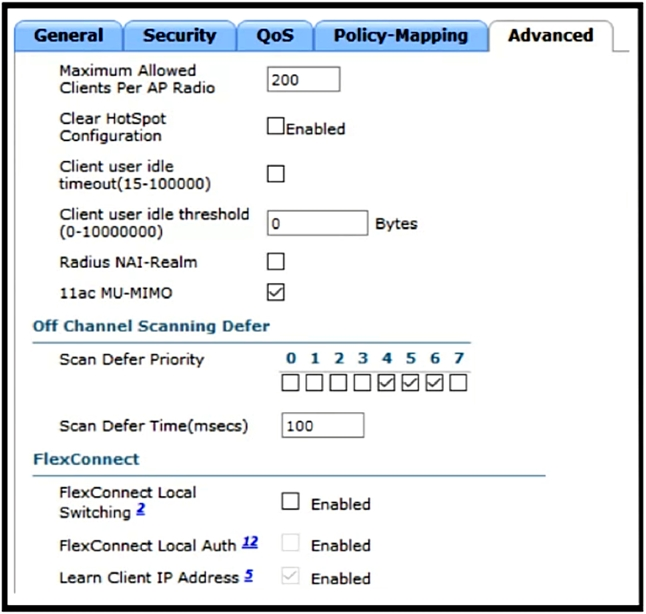
Refer to the exhibit. A customer has implemented Cisco FlexConnect deployments with different WLANs around the globe and is opening a new branch in a different location. The engineer's task is to execute all the wireless configuration and to suggest how to configure the switch ports for new APs. Which configuration must the switching team use on the switch port?
- A. trunk mode
- B. access mode
- C. single VLAN
- D. multiple VLAN
Correct Answer:
A
Explanation:
Based on the question and discussion, the AI agrees with the suggested answer A (trunk mode).
Reasoning:
The question describes a Cisco FlexConnect deployment with different WLANs. FlexConnect, by its nature, allows for local switching of traffic based on WLAN configuration. To support multiple WLANs, each potentially associated with a different VLAN, the switch port connected to the FlexConnect AP must be configured as a trunk port. This allows the AP to tag traffic from different WLANs with their respective VLAN IDs, enabling the switch to correctly forward the traffic. Even if "FlexConnect Local Switching" is unchecked, the fundamental requirement of supporting multiple WLANs necessitates a trunk port.
Why other options are incorrect:
- B. access mode: Access mode ports are designed for a single VLAN. They cannot carry traffic from multiple VLANs, making them unsuitable for FlexConnect deployments with multiple WLANs.
- C. single VLAN: While an access port is for a single VLAN, this doesn't address the underlying need to support multiple VLANs for different WLANs in a FlexConnect environment.
- D. multiple VLAN: This is related to the trunk mode, but not the specific configuration. Trunk mode is the correct command, while multiple VLAN is the purpose of the configuration.
In summary, trunk mode is required to support multiple VLANs associated with different WLANs in the FlexConnect setup, irrespective of the local switching configuration.
-
Question 8
A corporation is spread across different countries and uses MPLS to connect the offices. The senior management wants to utilize the wireless network for all the employees. To ensure strong connectivity and minimize delays, an engineer needs to control the amount of traffic that is traversing between the APs and the central WLC. Which configuration should be used to accomplish this goal?
- A. FlexConnect mode with central switching enabled
- B. FlexConnect mode with central authentication
- C. FlexConnect mode with OfficeExtend enabled
- D. FlexConnect mode with local authentication
Correct Answer:
D
Explanation:
The suggested answer is D: FlexConnect mode with local authentication.
The reason for this recommendation is that FlexConnect with local authentication and switching allows the access points to handle client authentication and traffic forwarding locally, minimizing the amount of traffic that needs to traverse the MPLS network to the central WLC. This directly addresses the requirement to control traffic between the APs and the central WLC, reducing delays and improving connectivity.
Here's why the other options are not as suitable:
- A. FlexConnect mode with central switching enabled: This would force all traffic to be sent back to the central WLC for switching, which contradicts the requirement to minimize traffic traversing between the APs and the central WLC.
- B. FlexConnect mode with central authentication: While authentication happens centrally, the switching may still occur locally depending on the configuration but it doesn't guarantee traffic minimization as effectively as local authentication and switching. Central authentication still requires authentication traffic to traverse the MPLS link.
- C. FlexConnect mode with OfficeExtend enabled: OfficeExtend is designed for extending the corporate network to home offices, which is not explicitly mentioned in the question. The question indicates that all the employees are working in different offices connected by MPLS. Furthermore, enabling OfficeExtend would unnecessarily introduce additional complexity and may not be the most efficient way to control traffic in a multi-country corporate network.
While some discussions suggested OfficeExtend, it's important to note that the scenario describes offices connected via MPLS, making FlexConnect with local authentication a more relevant solution for controlling traffic within the existing network infrastructure.
Citations:
- Cisco FlexConnect, https://www.cisco.com/c/en/us/td/docs/wireless/controller/8-5/config-guide/b_cg85/flexconnect.html
-
Question 9
An engineer configures a Cisco Aironet 600 Series OfficeExtend AP for a user who works remotely. What is configured on the Cisco WLC to allow the user to print a printer on his home network?
- A. split tunneling
- B. SE-connect
- C. FlexConnect
- D. AP failover priority
Correct Answer:
A
Explanation:
The AI agrees with the suggested answer, which is A (Split Tunneling).
Reasoning:
The question asks how to allow a user with a Cisco Aironet 600 Series OfficeExtend AP to print to a printer on their home network. OfficeExtend APs, by default, tunnel all traffic back to the corporate Wireless LAN Controller (WLC). This prevents direct communication between devices connected to the OEAP and the local home network. To enable communication with the local home network, such as allowing the user to print to a local printer, split tunneling must be configured. Split tunneling allows specific traffic (in this case, traffic destined for the home network) to bypass the tunnel and be routed locally.
Why other options are incorrect:
- B. SE-Connect: This option is not a standard feature or configuration related to Cisco Aironet or WLCs, and it doesn't address the issue of local network communication.
- C. FlexConnect: FlexConnect allows APs to switch between connected mode and standalone mode. While FlexConnect APs can have local switching enabled, this is a broader function and not specifically related to the OfficeExtend AP's need for local network access while still tunneling corporate traffic. Although FlexConnect *could* be configured to allow local printing, split tunneling is the direct and simpler solution in the context of an OfficeExtend AP.
- D. AP failover priority: AP failover priority is used to determine which AP takes over in case of a failure. This does not address the problem of allowing local printing on the user's home network.
Citations:
- Configure Split Tunnel on OEAP, https://www.cisco.com/c/en/us/support/docs/wireless/aironet-602-officeextend-access-point/117540-configure-splittunneloeap-00.html
-
Question 10
An engineer must configure a Cisco WLC to support Cisco Aironet 600 Series OfficeExtend APs. Which two Layer 2 security options are supported in this environment? (Choose two.)
- A. Static WEP + 802.1X
- B. WPA+WPA2
- C. Static WEP
- D. CKIP
- E. 802.1X
Correct Answer:
BE
Explanation:
Based on the question and discussion, the AI confirms that the suggested answer of BE is correct.
The primary reason for selecting WPA+WPA2 and 802.1X is that they are supported Layer 2 security options for Cisco Aironet 600 Series OfficeExtend APs. These options provide a robust and secure wireless connection.
The reason for not selecting other options:
- Static WEP is outdated and insecure. While it might technically function, it's not a recommended or secure practice, especially considering modern security standards. Furthermore, it can't be used with .11n data rates.
- CKIP (Cisco Key Integrity Protocol) is not a standard Layer 2 security option in this context.
About This Practice Material
This is independent study material to help you prepare for the Cisco Implement Wireless Networks (ENWLSI, 300-430) exam. It is not affiliated with, endorsed by, or sponsored by CISCO or any certification body. All product names, certification names, trademarks, and exam codes are the property of their respective owners and are used here for descriptive (nominative) purposes only.
We do not provide real exam questions, brain dumps, or any guarantee of passing. All questions are original practice items compiled from publicly available community discussions and AI-generated explanations, aligned to the publicly available exam objectives.