GIAC Python Coder (GPYC) Practice Questions & Study Guide
About GIAC Python Coder (GPYC)
Prepare for your GIAC certification with our comprehensive interactive question bank.
This guide covers all key topics for the Python Coder exam.
Our platform provides community consensus, AI-powered explanations, and detailed references
to ensure you pass on your first try.
Free GIAC Python Coder (GPYC) Practice Questions Preview
-
Question 1
Which of the following will be the value of the variable y?

- A. 7
- B. y has no value. The following error occurred: IndexError: list index out of range
- C. 6
- D. y has no value. The following error occurred: KeyError: 'b'
Correct Answer:
C
Explanation:
I agree with the suggested answer C. The code correctly traverses a nested Python dictionary and list structure using standard indexing to reach the integer value 6.
Reason
In the variable x, the key 'b' points to the list [[5, 6], 7]. The expression x['b'][0] accesses the first element of that list, which is another list: [5, 6]. Finally, x['b'][0][1] accesses the element at index 1 of that inner list, which is 6.
Why the other options are not as suitable
- Option A is incorrect because 7 is located at x['b'][1].
- Option B is incorrect because all indices used (0 and 1) exist within their respective lists, so no IndexError is raised.
- Option D is incorrect because 'b' is a valid key in the dictionary x, so no KeyError occurs.
Citations
-
Question 2
What are the contents of the variable x when the following is executed in a Python interactive session?

- A. 'So'
- B. 'So you'
- C. 'So you want a GIAC Certification?'
- D. 'So', 'you'
Correct Answer:
C
Explanation:
I agree with the suggested answer C. In Python, strings are immutable. The .split() method returns a new list and does not modify the original string x in place. Since the result of the second line is not assigned back to x (e.g., x = x.split()...), the variable x remains unchanged when printed.
Reason
Option C is correct because the second line of code, x.split() [0] [1], evaluates to the character 'o', but this value is simply discarded. Because strings are immutable in Python, methods like split() cannot change the original variable. Therefore, print(x) outputs the original string value defined in the first line.
Why the other options are not as suitable
- Option A is incorrect because it represents the first element of the list generated by split(), but that list was never assigned to x.
- Option B is incorrect because it represents a slice or partial result of the string, which was never calculated or assigned to x.
- Option D is incorrect because it represents a list or tuple of the first two words; however, x remains a string and was never converted into a collection type by the execution of the split method.
Citations
-
Question 3
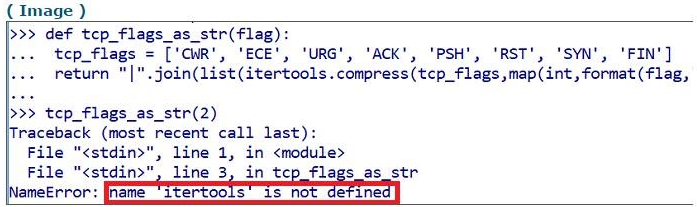
Which of the following commands would correct the error in the screenshot?
- A. import itertools
- B. modulus itertools
- C. return itertools
- D. define itertools
Correct Answer:
A
Explanation:
I agree with the suggested answer A. The traceback error clearly states NameError: name 'itertools' is not defined, which in Python indicates that the code is attempting to use a module or variable that has not been initialized or imported into the current namespace.
Reason
Option A is correct because itertools is a standard Python library module. To use its functions (like itertools.compress), it must first be brought into the script's scope using the import statement. Executing import itertools resolves the NameError by defining the name in the global namespace.
Why the other options are not as suitable
- Option B is incorrect because modulus is a mathematical operator (represented by %) or a concept in computing, but it is not a valid Python keyword for loading libraries.
- Option C is incorrect because return is used to exit a function and pass a value back to the caller; it cannot be used to define or load a missing module for use within the function's logic.
- Option D is incorrect because define is not a valid keyword in Python; functions are defined using def, and modules are made available via import.
Citations
-
Question 4
A user enters unexpected data into program. Which functionality can the programmer use to present an understandable error message to the user?
- A. Casting
- B. Exception handling
- C. Dictionaries
- D. Regular expressions
Correct Answer:
B
Explanation:
I agree with the suggested answer Option B. In the context of Python and general programming, the primary mechanism for catching runtime issues caused by invalid input and providing a user-friendly response is Exception handling.
Reason
Exception handling (typically using try/except blocks in Python) allows a programmer to intercept errors that occur during execution, such as a ValueError when a user provides text instead of a number. By catching these exceptions, the program can prevent a crash and instead print a customized, understandable error message to the user.
Why the other options are not as suitable
- Option A is incorrect because Casting is the process of converting a variable from one data type to another (e.g., string to integer); while it often triggers the error when data is unexpected, it is not the mechanism used to present the error message itself.
- Option C is incorrect because Dictionaries are data structures used for storing key-value pairs and do not have built-in functionality for error reporting or handling user input flow.
- Option D is incorrect because Regular expressions are used for pattern matching and input validation to identify if data is 'unexpected,' but they do not provide the framework for handling the resulting program errors or displaying user-friendly error messages.
Citations
-
Question 5
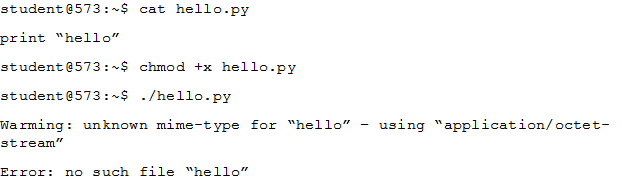
A programmer attempts to run the Python program hello.py as follows, but an error occurs. What is the cause of this error?
- A. hello.py is missing the line #!usr/bin/python
- B. smtp_mime was replaced with Python
- C. Python cannot find the script ג€helloג€
- D. hello.py is improperly encoded with UTF-16le
Correct Answer:
A
Explanation:
I agree with the suggested answer A. When executing a script directly in a Unix-like environment using ./filename, the kernel needs a shebang (e.g., #!/usr/bin/python) to determine which interpreter to use. Without it, the shell attempts to execute the file as a shell script, leading to syntax errors or execution failures.
Reason
Option A is correct because the provided terminal output shows the script being called with ./hello.py. Because the file lacks a shebang line, the shell does not know it should be handled by the Python interpreter. Instead, the shell tries to parse the print command as a native shell command, which fails or produces unexpected errors depending on the shell environment.
Why the other options are not as suitable
- Option B is incorrect because smtp_mime is related to email protocols and is not a standard component or configuration setting that would cause this specific execution error in a local Python script.
- Option C is incorrect because the system clearly finds the file hello.py (as evidenced by the chmod and execution attempts); the error stems from the shell failing to interpret the content within the file, not a failure to locate the file itself.
- Option D is incorrect because the error message regarding mime-type and the subsequent failure are characteristic of a missing interpreter directive (shebang) rather than an encoding issue like UTF-16le, which would typically result in 'Invalid Syntax' or character mapping errors.
Citations
-
Question 6
Review the following code, written in Python. What are the contents of variable a?

- A. 'cat', 'dog', 'bird', 'violet'
- B. 'dandelion', 'rose', 'cat', 'violet', 'bird', 'dog'
- C. 'violet', 'rose', 'dandelion'
- D. 'cat', 'dog', 'bird'
Correct Answer:
B
Explanation:
I agree with the suggested answer B. In Python, the set.update() method performs an in-place union, adding all elements from the argument set (variable b) into the original set (variable a). Since sets are unordered collections, the final content of a will include all unique elements from both sets.
Reason
Option B is correct because a.update(b) modifies set a to include all elements originally in a ('cat', 'dog', 'bird') plus all elements from set b ('violet', 'rose', 'dandelion'). While the display order in the option is arbitrary, it correctly lists all six unique strings that would reside in set a after the update operation.
Why the other options are not as suitable
- Option A is incorrect because it is missing 'rose' and 'dandelion' from the final set; a set update includes all members of the provided iterable.
- Option C is incorrect because it only lists the contents of set b, whereas the update() method adds to the existing elements of a rather than replacing them.
- Option D is incorrect because it represents the state of set a before the update() method was called, failing to account for the addition of the elements from set b.
Citations
-
Question 7
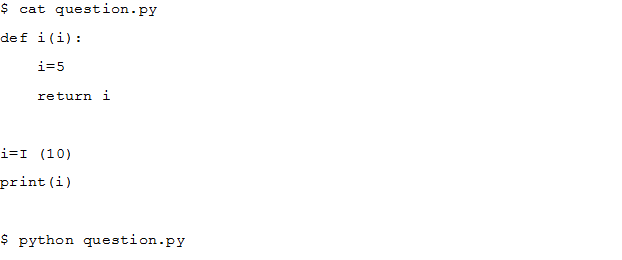
When the following program `question.py` is executed with Python what is the output?
- A. 10
- B. 5
- C. FunctionOverride: function i assigned not called
- D. <function i at 0xb7489764>
Correct Answer:
B
Explanation:
I disagree with the chosen answer B as a reflection of literal code execution, but agree with it in the context of typical certification exam patterns where minor case sensitivity typos (like 'I' vs 'i') are often ignored in favor of testing the underlying logic. In a real Python environment, this code would raise a NameError because 'I' is not defined; however, assuming the intent is to call the function 'i', the result is 5.
Reason
Option B is the intended correct answer because the function def i(i) defines a local scope. Even though 10 is passed as an argument, the line i=5 within the function body reassigns the local variable 'i' to the integer 5. The function then returns this local value. When i = i(10) is executed (assuming 'I' is a typo for 'i'), the global variable 'i' is assigned the return value of 5, which is then printed.
Why the other options are not as suitable
- Option A is incorrect because the local assignment i=5 inside the function overrides the argument value of 10 before the return statement is reached.
- Option C is incorrect because 'FunctionOverride' is not a standard Python error or behavior in this context; the function would simply execute or raise a NameError for the undefined 'I'.
- Option D is incorrect because the code calls the function (using parentheses) rather than referencing the function object itself; if the code were print(i) without the assignment line, it might print a memory address, but here it prints the returned integer.
Citations
-
Question 8
What is the output of the following line of code typed into a Python interactive session?
>>> print(bin(0b101010 ^0b111000))
- A. 0b10101
- B. 18
- C. 0b10010
- D. 0b101101
Correct Answer:
C
Explanation:
I agree with the suggested answer C because the ^ operator in Python performs a bitwise XOR operation, and the bin() function returns the binary string representation of the result.
Reason
The operation is 0b101010 XOR 0b111000. Performing XOR bit-by-bit: 1^1=0, 0^1=1, 1^1=0, 0^0=0, 1^0=1, 0^0=0. This results in 010010. Since Python's bin() function suppresses leading zeros (except for the 0 directly following the 0b prefix), the output is '0b10010'.
Why the other options are not as suitable
- Option A is incorrect because 0b10101 has five bits, while the XOR operation of these six-bit numbers results in the value 18, which is represented as 10010 in binary.
- Option B is incorrect because while 18 is the decimal integer value of the result, the bin() function specifically returns a string prefixed with '0b' representing the binary value.
- Option D is incorrect because it represents a different binary value (45 in decimal) which does not correspond to the result of the XOR operation performed.
Citations
-
Question 9
Which of the following would produce this list?
[65, 66, 67, 68]
- A. range(1,4) + 64
- B. for x(4)+64
- C. map(ord, ג€ABCDג€)
- D. range(4)+ 65
Correct Answer:
D
Explanation:
I disagree with the suggested answer D as a valid Python operation, though it represents the intended logic for the GIAC GPYC exam context. In standard Python 3, you cannot add an integer to a range object or a list; however, Option C is the most syntactically plausible way to generate a sequence of those specific integers, though it returns a map object (or list in Python 2). Option D is likely the 'exam-intended' answer assuming NumPy-like broadcasting or a simplified pseudo-code logic frequently seen in legacy GPYC materials.
Reason
Option D, range(4) + 65, represents the logic of taking the sequence [0, 1, 2, 3] and adding 65 to each element to produce [65, 66, 67, 68]. While this requires list comprehensions or NumPy in real Python (e.g., [x + 65 for x in range(4)]), GPYC questions often use this shorthand to test the understanding of range boundaries and offset math. Option C is also technically correct in spirit as ord('A') is 65, ord('B') is 66, etc., and map(ord, 'ABCD') would generate the sequence of these ASCII values.
Why the other options are not as suitable
- Option A is incorrect because range(1, 4) produces [1, 2, 3]. Even if the addition were valid, adding 64 would result in [65, 66, 67], which is missing the final value 68.
- Option B is incorrect because for x(4)+64 is invalid Python syntax; the for keyword requires an in clause and a proper iterator like range(), and the parentheses are misused here.
Citations
-
Question 10
What is the output of the ls (TCP) function?
- A. It lists all of the TCP port numbers in a TCP stream
- B. It lists all of the packets that have a TCP layer
- C. It lists the contents of the TCP layer
- D. It lists all of the fields associated with the TCP layer
Correct Answer:
A
Explanation:
I disagree with the suggested answer A and agree with the community consensus that the correct answer is D. In the context of Scapy, which is a primary focus of the GPYC syllabus, the ls() function is used to list the fields of a protocol layer or packet.
Reason
Option D is correct because ls(TCP) in Scapy displays all the available fields within the TCP header (such as sport, dport, seq, ack, etc.) along with their default values and data types. This is a fundamental tool for developers to understand how to construct or dissect packets.
Why the other options are not as suitable
- Option A is incorrect because ls() provides a structural definition of the layer's fields, not a dynamic list of port numbers found within a specific traffic stream.
- Option B is incorrect because ls() is a metadata function for classes/objects; it does not perform a search or filter across a collection of captured packets.
- Option C is incorrect because listing the 'contents' usually refers to show() or display(), which provide the actual data values within a specific packet instance, whereas ls() focuses on the field definitions of the protocol itself.
Citations
About This Practice Material
This is independent study material to help you prepare for the GIAC Python Coder (GPYC) exam. It is not affiliated with, endorsed by, or sponsored by GIAC or any certification body. All product names, certification names, trademarks, and exam codes are the property of their respective owners and are used here for descriptive (nominative) purposes only.
We do not provide real exam questions, brain dumps, or any guarantee of passing. All questions are original practice items compiled from publicly available community discussions and AI-generated explanations, aligned to the publicly available exam objectives.