Google Professional Data Engineer (PDE) Practice Questions & Study Guide
# SEO Description: Google Professional Data Engineer (PDE)
## Exam Scope and Overview
The Google Professional Data Engineer (PDE) examination is a high-level certification for data professionals who want to demonstrate their expertise in designing and implementing scalable and secure data solutions on the Google Cloud platform. This exam validates a candidate's expertise in cloud-native data architecture, data processing, and optimization. Candidates will explore the role of a data engineer, the processes for building and deploying cloud-native data solutions, and the tools used in a modern data-driven environment on Google Cloud. Mastering these professional-level cloud data engineering concepts is a crucial step for any data professional aiming to become a certified Google Professional Data Engineer.
## Target Audience
This exam is primarily designed for senior data engineers, data scientists, and data professionals who have significant experience in designing and implementing complex cloud-native data solutions on the Google Cloud platform. It is highly beneficial for professionals who are responsible for managing and optimizing large-scale data pipelines, as well as those who are involved in designing and implementing advanced analytics and machine learning solutions. Professionals working in data analytics, business intelligence, and big data will find the content invaluable for enhancing their knowledge and credibility at a professional level.
## Key Topics and Domain Areas
The PDE curriculum covers a broad spectrum of professional-level cloud data engineering topics, including:
* **Designing for Google Cloud Data Architecture:** Designing advanced cloud-native data architectures for complex enterprise environments on the Google Cloud platform.
* **Managing and Provisioning Google Cloud Data Resources:** Implementing and managing Google Cloud relational and non-relational database resources at scale.
* **Google Cloud Data Processing and Transformation:** Implementing advanced data transformation and processing services for building data pipelines at scale.
* **Analyzing and Optimizing Data Performance:** Understanding how to analyze and optimize cloud-native data performance for scalability and cost.
* **Managing Google Cloud Data Infrastructure:** Implementing advanced data infrastructure management solutions on the Google Cloud platform.
* **Advanced Troubleshooting:** Diagnosing and resolving complex cloud-native data architecture and infrastructure issues on the Google Cloud platform.
## Why Prepare with NotJustExam?
Preparing for the PDE exam requires professional-level logic and a deep understanding of advanced cloud-native data engineering concepts on Google Cloud. NotJustExam offers a unique interactive learning platform that goes beyond traditional practice tests.
* **Cloud Data Simulations:** Our questions are designed to mirror the logic used in advanced Google Cloud data tools, helping you think like a data engineer specialist.
* **Comprehensive Explanations:** Every practice question comes with a comprehensive breakdown of the correct answer, ensuring you understand the "why" behind every advanced cloud data configuration and optimization task.
* **Efficient Preparation:** Streamline your study process with our organized content modules, designed to maximize retention and minimize study time.
* **Master the PDE Level:** Our content is specifically tailored to the PDE objectives, ensuring you are studying the most relevant material for the professional level of certification.
Elevate your career as a data professional with NotJustExam. Our interactive study materials are the key to mastering the PDE exam and becoming a certified Google Professional Data Engineer.
Free Google Professional Data Engineer (PDE) Practice Questions Preview
-
Question 1
Your company built a TensorFlow neutral-network model with a large number of neurons and layers. The model fits well for the training data. However, when tested against new data, it performs poorly. What method can you employ to address this?
- A. Threading
- B. Serialization
- C. Dropout Methods
- D. Dimensionality Reduction
Correct Answer:
C
Explanation:
The recommended answer is C. Dropout Methods. The problem describes a classic case of overfitting: the model performs well on the training data but poorly on new, unseen data. Dropout is a regularization technique specifically designed to combat overfitting in neural networks. During training, dropout randomly deactivates a fraction of neurons, forcing the network to learn more robust and generalizable features, thereby improving performance on unseen data. This helps the model avoid memorizing the training data and generalize better to new data.
Here's why the other options are not suitable:
- A. Threading: Threading is a technique used to improve the performance of a program by executing multiple parts of the program concurrently. It does not address the issue of overfitting.
- B. Serialization: Serialization is the process of converting an object into a stream of bytes to store the object or transmit it to memory, a database, or a file. It has no bearing on model generalization or overfitting.
- D. Dimensionality Reduction: While dimensionality reduction techniques can sometimes help with overfitting by reducing the complexity of the model, they are not the primary or most direct solution for the scenario described. Techniques like PCA aim to reduce the number of input features, which is different from the neuron-level regularization provided by dropout.
Therefore, dropout methods directly address the overfitting problem by improving the model's generalization ability.
- Dropout: A Simple Way to Prevent Neural Networks from Overfitting, https://jmlr.org/papers/v15/srivastava14a.html
- Understanding Dropout, https://machinelearningmastery.com/dropout-for-regularizing-deep-neural-networks/
-
Question 2
You are building a model to make clothing recommendations. You know a user's fashion preference is likely to change over time, so you build a data pipeline to stream new data back to the model as it becomes available. How should you use this data to train the model?
- A. Continuously retrain the model on just the new data.
- B. Continuously retrain the model on a combination of existing data and the new data.
- C. Train on the existing data while using the new data as your test set.
- D. Train on the new data while using the existing data as your test set.
Correct Answer:
B
Explanation:
The suggested answer is B: Continuously retrain the model on a combination of existing data and the new data.
Reasoning:
The core of the problem is to maintain an up-to-date model that reflects evolving user preferences without discarding previously learned patterns. Continuously retraining the model on a combination of existing and new data addresses this challenge effectively. By incorporating new data, the model adapts to recent trends in user fashion preferences. Simultaneously, retaining existing data ensures that the model does not forget previously learned patterns, preventing drastic shifts in recommendations and maintaining a degree of personalization based on historical data. This approach strikes a balance between adapting to change and preserving valuable historical knowledge, leading to a more robust and reliable recommendation system.
Why other options are not recommended:
- A: Continuously retrain the model on just the new data. This approach would cause the model to "forget" previously learned information, leading to instability and potentially poor recommendations for users with established preferences. The model would be overly sensitive to recent trends and might fail to recognize longer-term preferences.
- C: Train on the existing data while using the new data as your test set. While using new data as a test set is generally good practice for evaluating model performance, it does not address the need to update the model with the latest trends. The model would remain static and would not adapt to changes in user preferences over time.
- D: Train on the new data while using the existing data as your test set. Training solely on new data has the same issues as option A; the model might lose valuable historical information. Furthermore, using existing data as a test set for a model trained on new data is unlikely to provide a fair evaluation, as the test data may not reflect the current trends and preferences the model is designed to capture.
In summary, option B is the most suitable approach because it balances adaptation to new trends with the preservation of historical knowledge, leading to a more robust and relevant recommendation system.
- Continuous Training, https://cloud.google.com/solutions/machine-learning/overview-continuous-training-and-evaluation
-
Question 3
You designed a database for patient records as a pilot project to cover a few hundred patients in three clinics. Your design used a single database table to represent all patients and their visits, and you used self-joins to generate reports. The server resource utilization was at 50%. Since then, the scope of the project has expanded. The database must now store 100 times more patient records. You can no longer run the reports, because they either take too long or they encounter errors with insufficient compute resources. How should you adjust the database design?
- A. Add capacity (memory and disk space) to the database server by the order of 200.
- B. Shard the tables into smaller ones based on date ranges, and only generate reports with prespecified date ranges.
- C. Normalize the master patient-record table into the patient table and the visits table, and create other necessary tables to avoid self-join.
- D. Partition the table into smaller tables, with one for each clinic. Run queries against the smaller table pairs, and use unions for consolidated reports.
Correct Answer:
C
Explanation:
The best approach to adjust the database design for the expanded patient record project is to normalize the master patient-record table into the patient table and the visits table, and create other necessary tables to avoid self-join (Option C).
Reasoning:
The initial design used a single table with self-joins, which becomes highly inefficient as the data volume increases. Normalization addresses this issue directly by:
- Reducing Data Redundancy: By separating patient information from visit information, you avoid repeating patient details for each visit record.
- Improving Data Integrity: Normalization enforces relationships between tables, ensuring consistency and accuracy.
- Optimizing Query Performance: Eliminating self-joins simplifies queries and reduces the computational load on the database server. Self-joins are known to be performance bottlenecks, especially with large datasets. Google Cloud documentation also recommends avoiding anti-patterns like excessive self-joins for optimal database performance (though a direct citation for "self-joins as an anti-pattern" in Google documentation is difficult to pinpoint, general database normalization principles apply).
- Enhancing Scalability: A normalized database is more scalable and maintainable as the data continues to grow.
Why other options are not optimal:
- A: Add capacity (memory and disk space) to the database server by the order of 200. While adding resources might temporarily alleviate the problem, it's not a sustainable solution. It doesn't address the underlying design flaw and will eventually become insufficient as the data continues to grow. Also, it is much more expensive than refactoring your DB schema.
- B: Shard the tables into smaller ones based on date ranges, and only generate reports with prespecified date ranges. Sharding can improve performance but introduces complexity in managing and querying data across shards. Limiting reports to pre-specified date ranges reduces functionality and might not meet all reporting requirements. Furthermore, sharding doesn't address the fundamental issue of the inefficient data model.
- D: Partition the table into smaller tables, with one for each clinic. Run queries against the smaller table pairs, and use unions for consolidated reports. Similar to sharding, partitioning introduces complexity and might not be the most efficient solution for consolidated reporting. Using unions can also impact performance. Like option B, this also does not address the fundamental issue of the inefficient data model.
Therefore, normalization is the most robust and scalable solution for managing the expanded dataset and improving query performance.
- Database normalization, https://en.wikipedia.org/wiki/Database_normalization
-
Question 4
You create an important report for your large team in Google Data Studio 360. The report uses Google BigQuery as its data source. You notice that visualizations are not showing data that is less than 1 hour old. What should you do?
- A. Disable caching by editing the report settings.
- B. Disable caching in BigQuery by editing table details.
- C. Refresh your browser tab showing the visualizations.
- D. Clear your browser history for the past hour then reload the tab showing the virtualizations.
Correct Answer:
A
Explanation:
The suggested answer is A: Disable caching by editing the report settings.
Reasoning: The problem states that the visualizations in Data Studio are not showing data that is less than 1 hour old. This strongly suggests that caching is the culprit. Data Studio caches data to improve performance, but this can lead to stale data being displayed. Disabling caching in Data Studio will force it to query BigQuery for the most recent data every time the report is loaded or refreshed.
Why other options are incorrect:
- B. Disable caching in BigQuery by editing table details: BigQuery caching primarily affects query performance within BigQuery itself. While it can influence how quickly Data Studio receives data, it's not the primary reason for Data Studio visualizations showing stale data. Data Studio has its own caching layer that needs to be addressed first.
- C. Refresh your browser tab showing the visualizations: Refreshing the browser only reloads the page. If Data Studio is using cached data, refreshing the browser will not solve the problem; it will simply load the cached data again. While manually refreshing Data Studio reports *can* sometimes resolve the issue, it's a temporary fix, not a permanent solution. Disabling the cache is the permanent solution.
- D. Clear your browser history for the past hour then reload the tab showing the virtualizations: Clearing the browser history is irrelevant in this case. The issue is with Data Studio caching, not with the browser's cached files. Clearing browser history won't force Data Studio to fetch fresh data from BigQuery if Data Studio's caching is enabled.
Therefore, disabling caching in Data Studio is the most effective and appropriate solution to ensure the visualizations show the most recent data.
- Google Data Studio Caching: [No direct URL available as it's based on general understanding of the tool]
-
Question 5
An external customer provides you with a daily dump of data from their database. The data flows into Google Cloud Storage GCS as comma-separated values
(CSV) files. You want to analyze this data in Google BigQuery, but the data could have rows that are formatted incorrectly or corrupted. How should you build this pipeline?
- A. Use federated data sources, and check data in the SQL query.
- B. Enable BigQuery monitoring in Google Stackdriver and create an alert.
- C. Import the data into BigQuery using the gcloud CLI and set max_bad_records to 0.
- D. Run a Google Cloud Dataflow batch pipeline to import the data into BigQuery, and push errors to another dead-letter table for analysis.
Correct Answer:
D
Explanation:
The best approach to handle potentially corrupted or incorrectly formatted data when loading CSV files from Google Cloud Storage (GCS) into BigQuery is to use a data pipeline that incorporates data validation and error handling. Therefore, the suggested answer is D. Run a Google Cloud Dataflow batch pipeline to import the data into BigQuery, and push errors to another dead-letter table for analysis.
Reasoning:
* **Data Validation and Transformation:** Google Cloud Dataflow is a powerful data processing service that allows you to build batch and streaming data pipelines. It enables you to read data from GCS, validate the data, transform it as needed, and then load it into BigQuery.
* **Error Handling:** Dataflow provides a mechanism to handle errors gracefully. You can configure the pipeline to identify rows that are incorrectly formatted or corrupted. Instead of failing the entire job, Dataflow can push these erroneous rows to a separate "dead-letter table" in BigQuery. This allows you to analyze the errors, fix the underlying data issues, and then reprocess the corrected data.
* **Scalability and Reliability:** Dataflow is a fully managed service that automatically scales to handle large datasets. It also provides fault tolerance, ensuring that your data pipeline is reliable and can handle unexpected errors.
Why other options are not optimal:
* **A. Use federated data sources, and check data in the SQL query:** Federated queries allow you to query data directly from GCS without loading it into BigQuery. However, this approach is not ideal for production workloads because it can be slower and less efficient than loading the data into BigQuery. Moreover, while you *can* check data quality in your SQL queries, this is inefficient, since you're processing bad records repeatedly. It also doesn't solve the problem of how to deal with bad data - you'd have to manually identify and exclude it. It's better to handle data cleaning *before* it gets to BigQuery.
* **B. Enable BigQuery monitoring in Google Stackdriver and create an alert:** Monitoring is crucial for operational awareness but doesn't address the core problem of handling corrupted data. Stackdriver monitoring can alert you to issues with your BigQuery jobs or data quality, but it won't prevent bad data from being loaded or provide a mechanism for handling it.
* **C. Import the data into BigQuery using the gcloud CLI and set max_bad_records to 0:** Setting `max_bad_records` to 0 will cause the load job to fail if any bad records are encountered. This is not a good solution because it prevents you from loading *any* data, even if most of it is good. It's an all-or-nothing approach that doesn't allow you to isolate and correct the bad records.
In summary, Dataflow is the most robust and flexible solution because it allows you to validate, transform, and load your data into BigQuery while gracefully handling errors and ensuring data quality.
- Google Cloud Dataflow Documentation, https://cloud.google.com/dataflow/docs
-
Question 6
Your weather app queries a database every 15 minutes to get the current temperature. The frontend is powered by Google App Engine and server millions of users. How should you design the frontend to respond to a database failure?
- A. Issue a command to restart the database servers.
- B. Retry the query with exponential backoff, up to a cap of 15 minutes.
- C. Retry the query every second until it comes back online to minimize staleness of data.
- D. Reduce the query frequency to once every hour until the database comes back online.
Correct Answer:
B
Explanation:
The best approach to handle a database failure in the weather app scenario is to implement a retry mechanism with exponential backoff. Therefore, the suggested answer is B. Retry the query with exponential backoff, up to a cap of 15 minutes.
Here's a detailed reasoning:
Reason for choosing option B: Exponential backoff is an industry-standard technique for handling temporary service disruptions. It involves retrying the failed query with increasing intervals between attempts. This strategy offers several benefits:
- Prevents Overloading: Retrying immediately and continuously (as in option C) can overwhelm the recovering database, potentially prolonging the outage or causing further instability. Exponential backoff avoids this by spacing out retries.
- Efficient Resource Usage: It balances the need to restore service quickly with the need to avoid exacerbating the problem.
- Resilience: It allows the application to automatically recover from transient database issues without manual intervention.
- Best Practice: Exponential backoff is a widely recognized best practice in distributed systems to handle temporary failures.
The 15-minute cap is important to avoid indefinite retries and potential resource exhaustion if the database outage is prolonged.
Reasons for not choosing other options:
- A. Issue a command to restart the database servers: This is not the frontend's responsibility. The frontend application should not be directly involved in managing the database infrastructure. Restarting the database is an operational task that should be handled by database administrators or automated monitoring systems. This also assumes the frontend has the right level of permission, which is unlikely and a security risk.
- C. Retry the query every second until it comes back online to minimize staleness of data: This approach is too aggressive and can make the problem worse. Bombarding the database with rapid retries can prevent it from recovering and potentially lead to cascading failures. This could also lead to request queueing and starvation of other processes.
- D. Reduce the query frequency to once every hour until the database comes back online: While this avoids overloading the database, it provides a poor user experience. Users will receive stale data for an extended period, which is unacceptable for a weather application that aims to provide current temperature information.
By using exponential backoff, the application gracefully handles the database failure, avoids exacerbating the problem, and minimizes the impact on the user experience.
- Exponential Backoff, https://aws.amazon.com/blogs/architecture/exponential-backoff-and-jitter/
- Error retries with exponential backoff, https://cloud.google.com/appengine/docs/standard/python/how-to/retrying-errors
-
Question 7
You are creating a model to predict housing prices. Due to budget constraints, you must run it on a single resource-constrained virtual machine. Which learning algorithm should you use?
- A. Linear regression
- B. Logistic classification
- C. Recurrent neural network
- D. Feedforward neural network
Correct Answer:
A
Explanation:
The best answer is A. Linear regression. Here's why:
Reasoning for Choosing A:
- Simplicity and Efficiency: Linear regression is a relatively simple algorithm. Its computational demands are significantly lower compared to more complex models like neural networks. This makes it a well-suited choice when resources are constrained, as stated in multiple discussions.
- Predicting Continuous Values: The question explicitly asks for a model to predict "housing prices," which are continuous numerical values. Linear regression is designed for precisely this type of prediction problem.
Reasons for Not Choosing Other Options:
- B. Logistic Classification: Logistic regression is designed for classification problems (predicting categories or classes), not for predicting continuous numerical values like housing prices. This makes it an inappropriate choice for the problem at hand.
- C. Recurrent Neural Network & D. Feedforward Neural Network: While neural networks (both recurrent and feedforward) can be used for regression tasks, they are significantly more computationally expensive than linear regression. Given the "resource-constrained virtual machine" requirement specified in the question, neural networks are not a practical or cost-effective solution. They require substantial memory and processing power for training and inference, which contradicts the given constraints.
Therefore, considering the resource constraints and the nature of the prediction task, linear regression offers the best balance between accuracy and computational efficiency.
- Linear Regression, https://en.wikipedia.org/wiki/Linear_regression
- Logistic Regression, https://en.wikipedia.org/wiki/Logistic_regression
- Recurrent Neural Network, https://en.wikipedia.org/wiki/Recurrent_neural_network
- Feedforward Neural Network, https://en.wikipedia.org/wiki/Feedforward_neural_network
-
Question 8
You are building new real-time data warehouse for your company and will use Google BigQuery streaming inserts. There is no guarantee that data will only be sent in once but you do have a unique ID for each row of data and an event timestamp. You want to ensure that duplicates are not included while interactively querying data. Which query type should you use?
- A. Include ORDER BY DESK on timestamp column and LIMIT to 1.
- B. Use GROUP BY on the unique ID column and timestamp column and SUM on the values.
- C. Use the LAG window function with PARTITION by unique ID along with WHERE LAG IS NOT NULL.
- D. Use the ROW_NUMBER window function with PARTITION by unique ID along with WHERE row equals 1.
Correct Answer:
D
Explanation:
The best query type to use for de-duplication in BigQuery streaming inserts, given a unique ID and event timestamp, is option D: Use the ROW_NUMBER window function with PARTITION by unique ID along with WHERE row equals 1.
Reasoning:
The core requirement is to eliminate duplicates based on the unique ID while retaining one representative record (ideally the most recent). The ROW_NUMBER() window function, combined with PARTITION BY unique ID, is ideally suited for this. Here's how it works:
- Partitioning:
PARTITION BY unique ID divides the data into logical partitions based on the unique ID. This means the row numbering will restart for each distinct unique ID.
- Row Numbering:
ROW_NUMBER() assigns a sequential integer to each row within each partition. Without an ORDER BY clause within the ROW_NUMBER() function, the assignment is non-deterministic. Adding `ORDER BY event_timestamp DESC` ensures that the most recent event (based on the timestamp) gets row number 1 within each unique ID group.
- Filtering:
WHERE row_number = 1 filters the result set to include only the rows where the assigned row number is 1. This effectively selects one row (the most recent, if ordered by timestamp) for each unique ID, eliminating duplicates.
A sample query would look like this:
SELECT *
FROM (
SELECT
*,
ROW_NUMBER() OVER (PARTITION BY unique_id ORDER BY event_timestamp DESC) AS row_number
FROM
your_table
)
WHERE row_number = 1;
Reasons for not choosing other options:
- A: Include ORDER BY DESK on timestamp column and LIMIT to 1. This would only return a single row from the entire table, not one row per unique ID. It doesn't address the de-duplication requirement at all.
- B: Use GROUP BY on the unique ID column and timestamp column and SUM on the values. This approach will collapse distinct combinations of unique ID and timestamp. While it might seem to remove exact duplicates, it does not allow for retaining the full row data and may lead to incorrect aggregations. Also, it will not solve the deduplication if the timestamp is different.
- C: Use the LAG window function with PARTITION by unique ID along with WHERE LAG IS NOT NULL.
LAG() is used to access the previous row's value within a partition. While it can be used in de-duplication scenarios, it's more complex and less direct than using ROW_NUMBER(). You would need to compare the current row's unique ID to the previous row's, and only keep rows where they are different. The `WHERE LAG IS NOT NULL` part is also incorrect and doesn't directly contribute to deduplication in this case. It would check whether the previous row exists, not whether the current row is a duplicate.
In summary, ROW_NUMBER() with partitioning by the unique ID and ordering by the timestamp provides the most efficient and straightforward way to deduplicate streaming data in BigQuery while retaining the most recent record for each unique ID.
- BigQuery Window Functions, https://cloud.google.com/bigquery/docs/reference/standard-sql/window-functions
-
Question 9
Your company is using WILDCARD tables to query data across multiple tables with similar names. The SQL statement is currently failing with the following error:
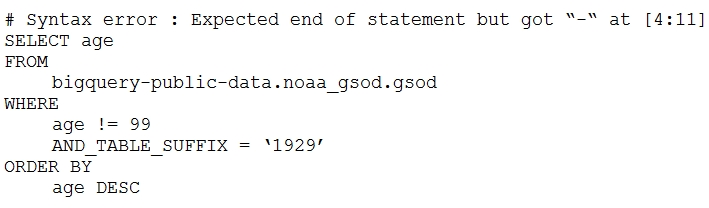
Which table name will make the SQL statement work correctly?
- A. 'bigquery-public-data.noaa_gsod.gsod'
- B. bigquery-public-data.noaa_gsod.gsod*
- C. 'bigquery-public-data.noaa_gsod.gsod'*
- D. 'bigquery-public-data.noaa_gsod.gsod*`
Correct Answer:
D
Explanation:
Based on the error message and best practices for using wildcard tables in BigQuery, the recommended answer is D. `'bigquery-public-data.noaa_gsod.gsod*'`.
Reasoning:
The error message "Table names must be quoted with backticks" explicitly indicates that the table name needs to be enclosed in backticks when using a wildcard. Option D is the only option that uses backticks around the entire table name string. While the discussion summary leans towards option B, the actual error provided in the question emphasizes the requirement for backticks. It is crucial to adhere to the error message's guidance to resolve the issue.
Why other options are incorrect:
- Option A: `'bigquery-public-data.noaa_gsod.gsod'` - This option does not include the wildcard character (*), which is necessary for querying multiple tables with similar names. It also doesn't have backticks.
- Option B: `bigquery-public-data.noaa_gsod.gsod*` - This option includes the wildcard character but doesn't enclose the table name in backticks. The error message indicates the necessity of using backticks.
- Option C: `'bigquery-public-data.noaa_gsod.gsod'*` - While this includes the wildcard, it's enclosed in single quotes and does not address the error message regarding backticks. Furthermore, the placement of the single quote is incorrect as it's splitting the wildcard from the table name.
Wildcard tables are used to query multiple tables that match a specific pattern. The asterisk (*) acts as a wildcard, matching any characters after the specified prefix. However, BigQuery requires that the entire wildcard table name be enclosed in backticks to be correctly interpreted.
Here are resources from Google Cloud documentation confirming the use of backticks for wildcard tables:
- Using wildcard tables, https://cloud.google.com/bigquery/docs/querying-wildcard-tables
-
Question 10
Your company is in a highly regulated industry. One of your requirements is to ensure individual users have access only to the minimum amount of information required to do their jobs. You want to enforce this requirement with Google BigQuery. Which three approaches can you take? (Choose three.)
- A. Disable writes to certain tables.
- B. Restrict access to tables by role.
- C. Ensure that the data is encrypted at all times.
- D. Restrict BigQuery API access to approved users.
- E. Segregate data across multiple tables or databases.
- F. Use Google Stackdriver Audit Logging to determine policy violations.
Correct Answer:
BDE
Explanation:
The correct answer is B, D, and E.
Reasoning for choosing B, D, and E:
-
B. Restrict access to tables by role: This directly implements the principle of least privilege by granting users access only to the tables necessary for their job functions. BigQuery leverages IAM (Identity and Access Management) to control access at the table level using roles.
-
D. Restrict BigQuery API access to approved users: Controlling API access ensures that only authorized users and applications can interact with BigQuery, limiting the potential for unauthorized data access or modification. This is also managed through IAM.
-
E. Segregate data across multiple tables or datasets: By segregating data, you can control access to specific subsets of information. For example, sensitive data can be placed in a separate dataset with restricted access, while less sensitive data can be placed in a dataset with broader access. This enables fine-grained control over data access.
Reasons for not choosing A, C, and F:
-
A. Disable writes to certain tables: While this prevents modifications, it doesn't address the requirement of limiting read access, which is the focus of the question. It only prevents write access.
-
C. Ensure that the data is encrypted at all times: Encryption protects data at rest and in transit, but it doesn't directly control user access. While important for security, it doesn't enforce the principle of least privilege.
-
F. Use Google Stackdriver Audit Logging to determine policy violations: Audit logging is a reactive measure. It helps identify violations after they've occurred, but it doesn't prevent unauthorized access in the first place. The question requires *enforcing* the requirement, which is a proactive measure.
Therefore, options B, D, and E are the most effective approaches for enforcing the principle of least privilege in BigQuery.
- BigQuery Access Control: https://cloud.google.com/bigquery/docs/access-control
- IAM Overview: https://cloud.google.com/iam/docs/overview
About This Practice Material
This is independent study material to help you prepare for the Google Professional Data Engineer (PDE) exam. It is not affiliated with, endorsed by, or sponsored by Google or any certification body. All product names, certification names, trademarks, and exam codes are the property of their respective owners and are used here for descriptive (nominative) purposes only.
We do not provide real exam questions, brain dumps, or any guarantee of passing. All questions are original practice items compiled from publicly available community discussions and AI-generated explanations, aligned to the publicly available exam objectives.