Microsoft Windows Server Hybrid Admin Associate (AZ-801) Practice Questions & Study Guide
The Configuring Windows Server Hybrid Advanced Services (AZ-801) is the premier certification for IT professionals who want to demonstrate their expertise in managing and securing advanced Windows Server services across on-premises, hybrid, and cloud environments. As organizations increasingly adopt hybrid cloud models, the ability to build and manage robust, scalable, and secure infrastructures that bridge the gap between local data centers and Microsoft Azure has become a highly sought-after skill. The AZ-801 validates your core knowledge of advanced Windows Server technologies, including high availability, disaster recovery, security, and migration in a hybrid context. It is an essential milestone for any professional looking to lead in the age of modern hybrid administration.
Overview of the Exam
The AZ-801 exam is a rigorous assessment that covers the implementation and management of advanced Windows Server hybrid services. It is a 120-minute exam consisting of approximately 40-60 questions. The exam is designed to test your knowledge of advanced Windows Server technologies and your ability to apply them to real-world hybrid scenarios. From high availability and disaster recovery using Failover Clustering and Azure Site Recovery to advanced security and migration, the AZ-801 ensures that you have the skills necessary to build and maintain modern hybrid environments. Achieving the AZ-801 certification proves that you are a highly skilled professional who can handle the technical demands of enterprise-grade hybrid administration.
Target Audience
The AZ-801 is intended for IT professionals who have a solid understanding of Windows Server and Microsoft Azure services. It is ideal for individuals in roles such as:
1. Windows Server Administrators
2. Hybrid Cloud Administrators
3. Systems Engineers
4. Network Administrators
To qualify for the Microsoft Certified: Windows Server Hybrid Administrator Associate certification, candidates must pass both the AZ-800 and the AZ-801 exams.
Key Topics Covered
The AZ-801 exam is organized into several main domains:
1. Secure Windows Server On-Premises and Hybrid Infrastructures (25-30%): Implementing and managing advanced security solutions across hybrid environments.
2. Implement and Manage Windows Server High Availability (10-15%): Configuring and managing high-availability solutions using Failover Clustering.
3. Implement Disaster Recovery (10-15%): Designing and implementing disaster recovery solutions using Azure Site Recovery and backup features.
4. Migrate Servers and Workloads (20-25%): Implementing migration solutions for Windows Server workloads to Azure.
5. Monitor and Troubleshoot Windows Server Environments (20-25%): Monitoring performance and health of hybrid environments and identifying and resolving issues.
Benefits of Getting Certified
Earning the AZ-801 certification provides several significant benefits. First, it offers industry recognition of your specialized expertise in Microsoft's hybrid infrastructure technologies. As a leader in the hybrid cloud industry, Microsoft skills are in high demand across the globe. Second, it can lead to increased career opportunities and higher salary potential in a variety of roles. Third, it demonstrates your commitment to professional excellence and your dedication to staying current with the latest hybrid administration practices. By holding this certification, you join a global community of Microsoft professionals and gain access to exclusive resources and continuing education opportunities.
Why Choose NotJustExam.com for Your AZ-801 Prep?
The AZ-801 exam is challenging and requires a deep understanding of Windows Server's advanced features in a hybrid context. NotJustExam.com is the best resource to help you master this material. Our platform offers an extensive bank of practice questions that are designed to mirror the actual exam’s format and difficulty.
What makes NotJustExam.com stand out is our focus on interactive logic and the accuracy of our explanations. We don’t just provide a list of questions; we provide a high-quality learning experience. Every question in our bank includes an in-depth, accurate explanation that helps you understand the technical reasoning behind the correct administration solutions. This ensures that you are truly learning the material and building the confidence needed to succeed on the exam. Our content is regularly updated to reflect the latest Microsoft features and exam updates. With NotJustExam.com, you can approach your AZ-801 exam with the assurance that comes from thorough, high-quality preparation. Start your journey toward becoming a Certified Hybrid Administrator today with us!
Free Microsoft Windows Server Hybrid Admin Associate (AZ-801) Practice Questions Preview
-
Question 1
Note: This question is part of a series of questions that present the same scenario. Each question in the series contains a unique solution that might meet the stated goals. Some question sets might have more than one correct solution, while others might not have a correct solution.
After you answer a question in this section, you will NOT be able to return to it. As a result, these questions will not appear in the review screen.
You have a server named Server1 that runs Windows Server.
You need to ensure that only specific applications can modify the data in protected folders on Server1.
Solution: From Virus & threat protection, you configure Controlled folder access.
Does this meet the goal?
Correct Answer:
A
Explanation:
I agree with the suggested answer A. Controlled folder access is specifically designed to prevent unauthorized or malicious applications from modifying files in protected directories.
Reason
The solution is correct because Controlled folder access (a feature of Microsoft Defender Antivirus) monitors apps that attempt to make changes to files in protected folders. By default, it blocks unknown or untrusted apps and allows only those on a specific allowed apps list, directly meeting the requirement to ensure only specific applications can modify the data.
Why the other options are not as suitable
- Option B is incorrect because the proposed solution Controlled folder access is the precise security mechanism within Windows Server and Windows 10/11 intended for this purpose. Selecting 'No' would imply that this feature does not perform the required task, which is factually inaccurate in the context of Windows Defender security capabilities.
Citations
-
Question 2
Note: This question is part of a series of questions that present the same scenario. Each question in the series contains a unique solution that might meet the stated goals. Some question sets might have more than one correct solution, while others might not have a correct solution.
After you answer a question in this section, you will NOT be able to return to it. As a result, these questions will not appear in the review screen.
You have a server named Server1 that runs Windows Server.
You need to ensure that only specific applications can modify the data in protected folders on Server1.
Solution: From Virus & threat protection, you configure Tamper Protection
Does this meet the goal?
Correct Answer:
B
Explanation:
I agree with the suggested answer B (No) because Tamper Protection is designed to protect security settings from being disabled by unauthorized users or malware, rather than controlling application-level access to specific data folders.
Reason
The correct answer is B (No) because the scenario describes a need for Controlled folder access. Controlled folder access is a feature within Microsoft Defender Antivirus that monitors applications for attempts to modify files in protected folders and blocks those that are not on an approved list. This is the specific mechanism intended to protect data folders from ransomware and unauthorized modification.
Why the other options are not as suitable
- Option A is incorrect because Tamper Protection focuses on locking down Microsoft Defender Antivirus configuration settings (such as real-time protection, cloud-delivered protection, and security intelligence updates). It prevents malicious apps or local users from turning off your antivirus, but it does not manage or restrict which applications can write data to specific disk directories or user folders.
Citations
-
Question 3
Note: This question is part of a series of questions that present the same scenario. Each question in the series contains a unique solution that might meet the stated goals. Some question sets might have more than one correct solution, while others might not have a correct solution.
After you answer a question in this section, you will NOT be able to return to it. As a result, these questions will not appear in the review screen.
You have a server named Server1 that runs Windows Server.
You need to ensure that only specific applications can modify the data in protected folders on Server1.
Solution: From App & browser control, you configure the Exploit protection settings.
Does this meet the goal?
Correct Answer:
B
Explanation:
I agree with the suggested answer B. The proposed solution is incorrect because Exploit protection is designed to mitigate memory-based attacks and system vulnerabilities, not to manage folder access permissions for specific applications.
Reason
Option B is correct because the described solution fails to address the requirement. To ensure only specific applications can modify data in protected folders, you must use Controlled folder access, which is a feature found under Virus & threat protection settings in Windows Security, rather than Exploit protection.
Why the other options are not as suitable
- Option A is incorrect because Exploit protection (found in App & browser control) focuses on techniques like ASLR (Address Space Layout Randomization) and DEP (Data Execution Prevention). It does not provide the Controlled folder access functionality required to whitelist specific applications for data modification in protected directories.
Citations
-
Question 4
DRAG DROP -
You have an on-premises Active Directory Domain Services (AD DS) domain that syncs with an Azure Active Directory (Azure AD) tenant.
The AD DS domain contains a domain controller named DC1. DC1 does NOT have internet access.
You need to configure password security for on-premises users. The solution must meet the following requirements:
✑ Prevent the users from using known weak passwords.
✑ Prevent the users from using the company name in passwords.
What should you do? To answer, drag the appropriate configurations to the correct targets. Each configuration may be used once, more than once, or not at all.
You may need to drag the split bar between panes or scroll to view content.
NOTE: Each correct selection is worth one point.
Select and Place:
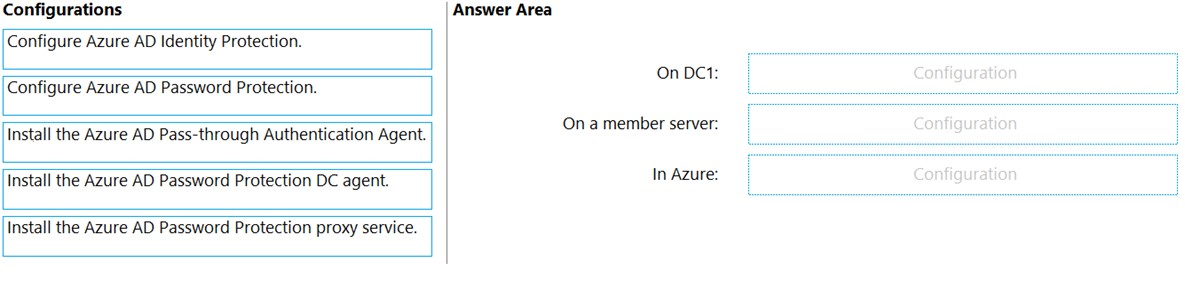
Correct Answer:
See interactive view.
Explanation:
I agree with the suggested answer. The configuration correctly maps the components of Azure AD Password Protection (now Microsoft Entra Password Protection) to their required locations to protect on-premises AD DS environments.
Reason
Install the Azure AD Password Protection DC agent on DC1 is correct because the DC agent must be installed on every Domain Controller that needs to validate password changes against the banned password list. Install the Azure AD Password Protection proxy service on a member server is correct because DC1 lacks internet access; the proxy service acts as a gateway between the internal DC agents and the Azure service. Configure Azure AD Password Protection in Azure is correct because the global settings, including the Custom banned password list (for the company name) and Enforce password protection on Active Directory Domain Services, are managed centrally in the Azure portal.
Why the other options are not as suitable
Configure Azure AD Identity Protection is incorrect because Identity Protection focuses on risk-based conditional access and identity compromise detection (like leaked credentials or sign-in risk) rather than enforcing specific password string policies. Install the Azure AD Pass-through Authentication Agent is incorrect because Pass-through Authentication is a sign-on method that validates passwords against on-premises AD, but it does not provide the mechanism to enforce banned or custom password lists during password changes.
Citations
-
Question 5
Correct Answer:
See interactive view.
Explanation:
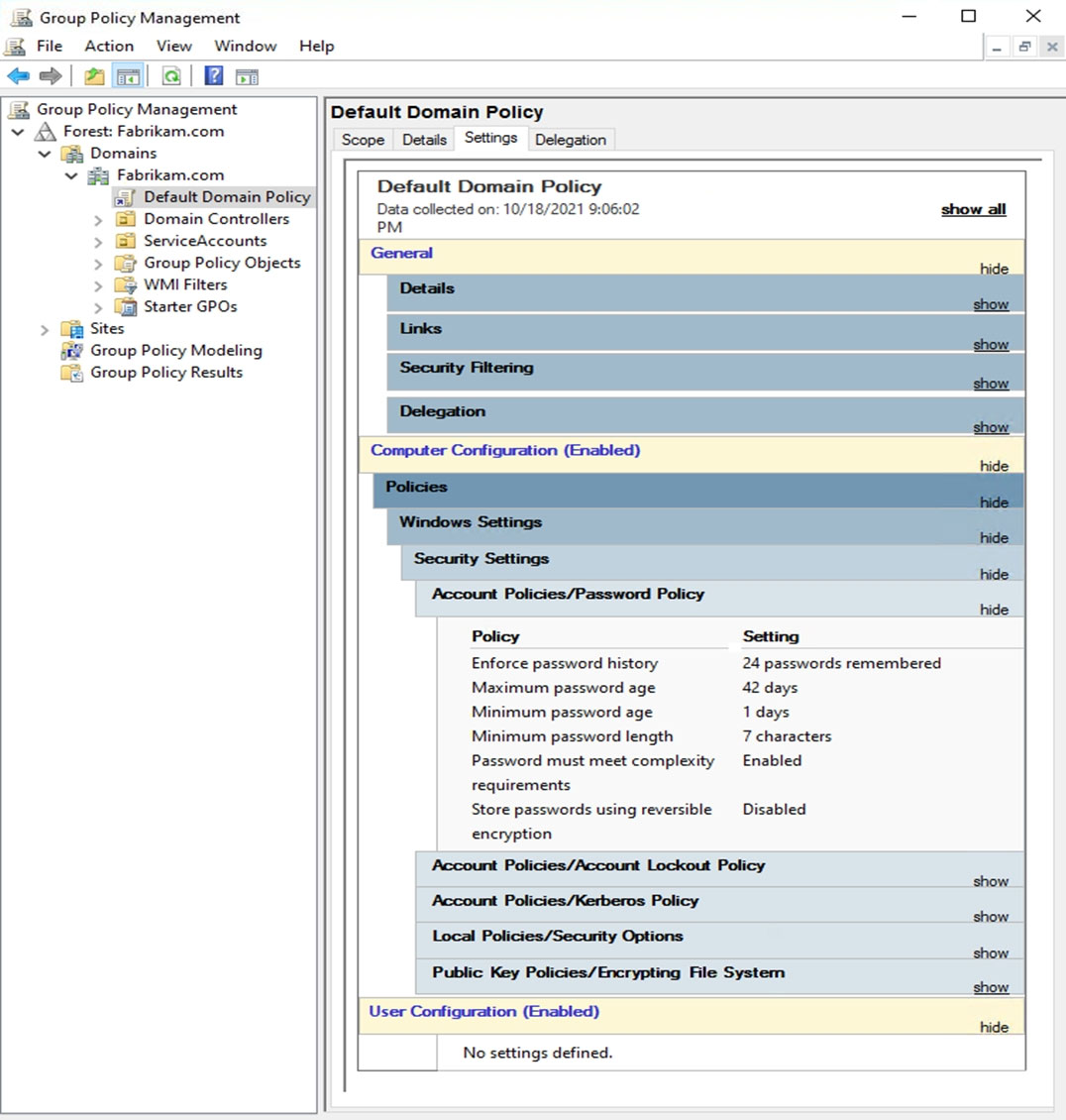
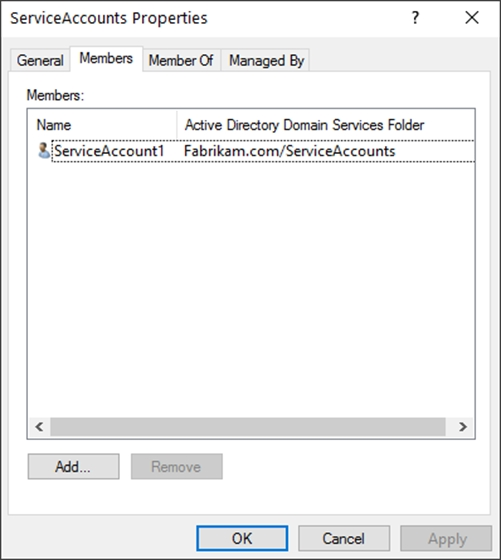
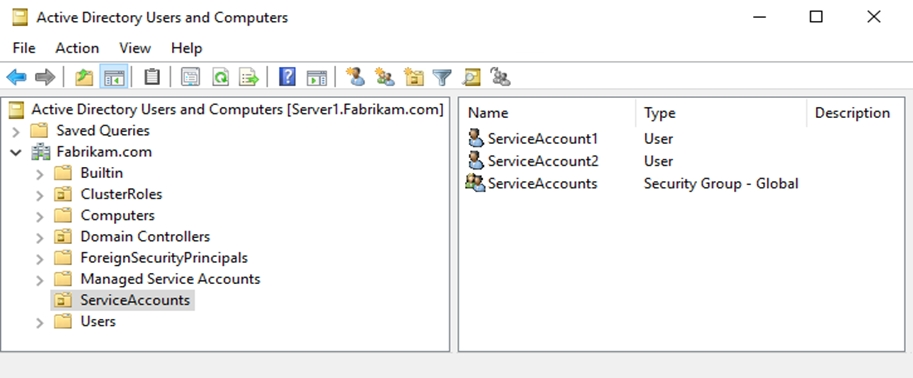
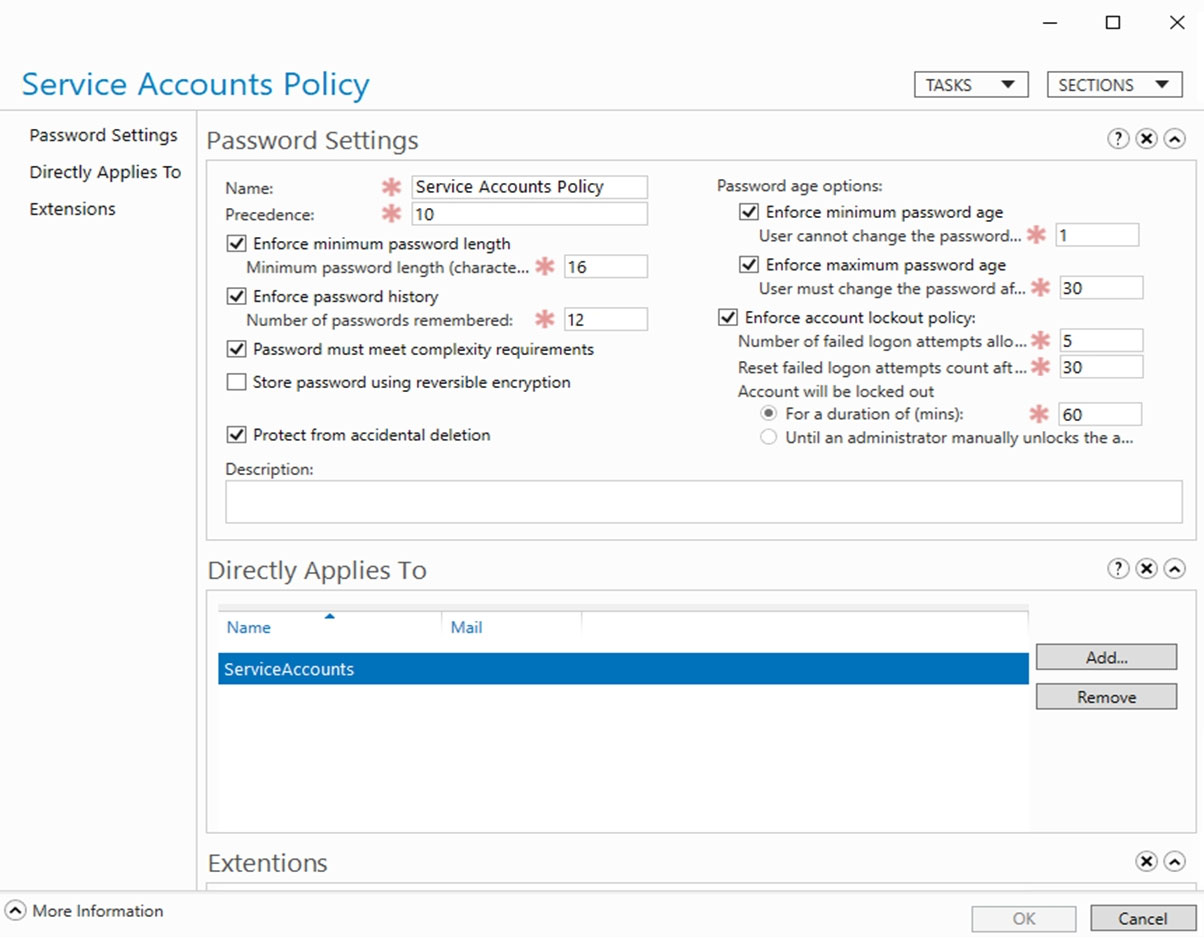
I agree with the suggested answer and the majority of the community discussion. The logic hinges on how Password Settings Objects (PSOs), which provide Fine-Grained Password Policies, are applied directly to users or groups and override the Default Domain Policy GPO settings.
Reason
The first statement is Yes because ServiceAccount1 is a member of the Service Accounts security group. Since the Service Accounts Policy (PSO) is applied directly to that group and specifies a Minimum password length of 16, it overrides the domain-wide policy of 7. The second statement is No because ServiceAccount2 is not a member of the Service Accounts group; it only resides in the ServiceAccounts OU. PSOs cannot be applied to OUs, so ServiceAccount2 falls back to the Default Domain Policy which only requires 7 characters. The third statement is No because the password P@$$w0rd1 is only 10 characters long, which fails the 16-character minimum requirement set in the Service Accounts Policy.
Why the other options are not as suitable
Statement 2 is incorrect as 'Yes' because ServiceAccount2 is not a member of the group targeted by the PSO, and PSOs do not inherit through OU membership. Statement 3 is incorrect as 'Yes' because while the password P@$$w0rd1 meets complexity requirements, it fails the length requirement of 16 characters defined in the PSO exhibit.
Citations
-
Question 6
DRAG DROP -
Your network contains an Active Directory Domain Services (AD DS) domain.
You need to implement a solution that meets the following requirements:
✑ Ensures that the members of the Domain Admins group are allowed to sign in only to domain controllers
✑ Ensures that the lifetime of Kerberos Ticket Granting Ticket (TGT) for the members of the Domain Admins group is limited to one hour
Which three actions should you perform in sequence? To answer, move the appropriate actions from the list of actions to the answer area and arrange them in the correct order.
Select and Place:
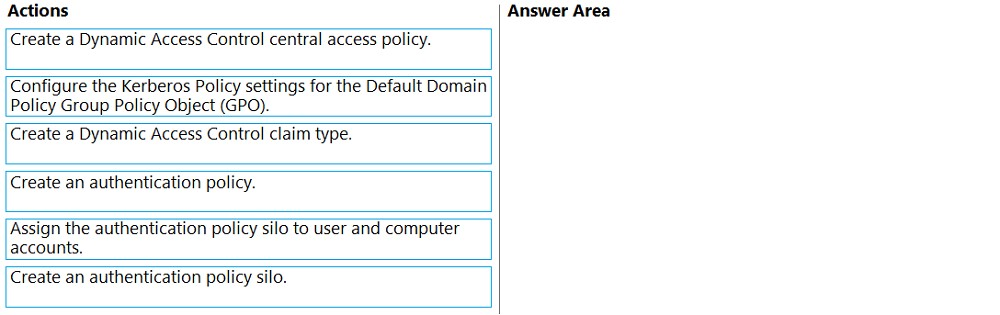
Correct Answer:
See interactive view.
Explanation:
I agree with the suggested answer shown in the second image. To implement Authentication Policies and Authentication Policy Silos, the domain must first support Claims, which requires a specific KDC configuration in Group Policy. Furthermore, Active Directory Administrative Center requires a policy to exist before it can be assigned to a silo.
Reason
Create an authentication policy is the necessary first step because a policy defines the TGT lifetime (1 hour) and must exist before it can be associated with a silo. Create an authentication policy silo comes next to provide the container that will enforce the relationship between the restricted users (Domain Admins) and the target hosts (Domain Controllers). Assign the authentication policy silo to user and computer accounts is the final step to bind the specific AD DS objects to the silo, ensuring the restrictions are active for those specific accounts.
Why the other options are not as suitable
Configure the Kerberos Policy settings for the Default Domain Policy Group Policy Object (GPO) is incorrect because while it can set a TGT lifetime, it applies domain-wide and cannot restrict sign-ins to specific hosts like Authentication Policy Silos can. Create a Dynamic Access Control claim type is a prerequisite step that occurs within the AD schema/configuration, but in the context of this specific sequence for silos, the core workflow focuses on the policy and silo objects themselves. Create a Dynamic Access Control central access policy is used for file system permissions and File Server Resource Manager, not for restricting Kerberos interactive sign-in locations or TGT lifetimes.
Citations
-
Question 7
You have an Azure virtual machine named VM1 that runs Windows Server.
You plan to deploy a new line-of-business (LOB) application to VM1.
You need to ensure that the application can create child processes.
What should you configure on VM1?
- A. Microsoft Defender Credential Guard
- B. Microsoft Defender Application Control
- C. Microsoft Defender SmartScreen
- D. Exploit protection
Correct Answer:
D
Explanation:
I agree with the suggested answer D. Exploit protection is a feature within Microsoft Defender for Endpoint that specifically includes a mitigation rule to prevent an application from creating child processes.
Reason
Option D is correct because Exploit protection provides a granular set of mitigations for both the operating system and individual applications. One of these specific application-level settings is Disallow child processes, which prevents an app from spawning new processes—a common technique used by malware to escalate privileges or maintain persistence.
Why the other options are not as suitable
- Option A is incorrect because Microsoft Defender Credential Guard uses virtualization-based security to isolate secrets (like NTLM password hashes and Kerberos Ticket Granting Tickets) to prevent pass-the-hash attacks, but it does not control process spawning.
- Option B is incorrect because Microsoft Defender Application Control (WDAC) is a policy-based mechanism that determines which drivers and applications are allowed to run on a system based on digital signatures; it does not manage child process behavior for a running application.
- Option C is incorrect because Microsoft Defender SmartScreen is a cloud-based anti-phishing and anti-malware component that checks URLs and files against a reputation list, primarily protecting users from downloading or running malicious files from the web.
Citations
-
Question 8
Correct Answer:
See interactive view.
Explanation:
I agree with the suggested answer. To ensure that only authenticated computer accounts can connect to the members in the domain while minimizing administrative effort, GPO1 should be applied to both the Domain Controllers and Domain Servers OUs.
Reason
The requirement is to ensure authentication (require it) for computer accounts. GPO1 uses Kerberos V5, which is the native and most efficient authentication method for Active Directory Domain Services (AD DS) environments. By selecting 'Require authentication', you ensure that only accounts capable of authenticating can establish a connection. Since all components (Domain Controllers, Servers, and Client Computers) are part of the contoso.com domain, they all support Kerberos V5 natively, making this the solution with the least administrative overhead.
Why the other options are not as suitable
GPO2 is incorrect because it only 'Requests' authentication; if a connection cannot authenticate, it will still be allowed to fall back to an unauthenticated state, failing the requirement to ensure only authenticated accounts connect. GPO3 is incorrect because it 'Requires' X.509 certificates, which involves significant administrative effort to deploy and manage a Public Key Infrastructure (PKI) compared to using existing Kerberos tickets. GPO4 is incorrect because it both 'Requests' (allowing unauthenticated fallback) and uses the more complex X.509 certificate method.
Citations
-
Question 9
You have 100 Azure virtual machines that run Windows Server. The virtual machines are onboarded to Microsoft Defender for Cloud.
You need to shut down a virtual machine automatically if Microsoft Defender for Cloud generates the "Antimalware disabled in the virtual machine" alert for the virtual machine.
What should you use in Microsoft Defender for Cloud?
- A. a logic app
- B. a workbook
- C. a security policy
- D. adaptive network hardening
Correct Answer:
A
Explanation:
I agree with the suggested answer. Logic Apps are the standard mechanism for automated remediation in Microsoft Defender for Cloud through the Workflow automation feature.
Reason
Option A is correct because Microsoft Defender for Cloud uses Workflow automation to trigger Azure Logic Apps in response to security alerts. A Logic App can be designed with a connector to perform actions such as shutting down an Azure Virtual Machine when a specific alert, like "Antimalware disabled in the virtual machine," is detected.
Why the other options are not as suitable
- Option B is incorrect because a workbook is used for data visualization, reporting, and monitoring within the Azure portal, not for triggering automated remediation actions.
- Option C is incorrect because a security policy defines the desired configuration and compliance requirements, but it does not contain the logic to execute operational tasks like shutting down a VM.
- Option D is incorrect because adaptive network hardening is a feature that provides recommendations to restrict Network Security Group (NSG) traffic based on machine learning patterns; it is not a general-purpose automation tool for responding to antimalware alerts.
Citations
-
Question 10
You have a Microsoft Sentinel deployment and 100 Azure Arc-enabled on-premises servers. All the Azure Arc-enabled resources are in the same resource group.
You need to onboard the servers to Microsoft Sentinel. The solution must minimize administrative effort.
What should you use to onboard the servers to Microsoft Sentinel?
- A. Azure Automation
- B. Azure Policy
- C. Azure virtual machine extensions
- D. Microsoft Defender for Cloud
Correct Answer:
B
Explanation:
I agree with the suggested answer, Option B. Using Azure Policy is the most efficient way to onboard multiple Azure Arc-enabled servers at scale with minimal administrative effort.
Reason
Azure Policy allows you to assign a definition (such as 'Configure Azure Arc-enabled Windows machines to run Microsoft Sentinel') to a resource group or subscription. By using the deployIfNotExists effect, the policy automatically installs the required Log Analytics agent or Azure Monitor Agent and connects them to the workspace, ensuring all 100 servers are onboarded and remain compliant automatically.
Why the other options are not as suitable
- Option A is incorrect because while Azure Automation can run scripts to install agents, it requires more manual setup and maintenance of Runbooks compared to the native governance provided by policy.
- Option C is incorrect because manually applying Azure virtual machine extensions to 100 individual servers would involve significant administrative effort and does not provide an automated way to ensure future servers are also onboarded.
- Option D is incorrect because while Microsoft Defender for Cloud can assist with security posture, it typically uses Azure Policy under the hood for large-scale agent deployment; choosing Policy directly is the more fundamental and precise tool for the specific task of resource-wide onboarding.
Citations
About This Practice Material
This is independent study material to help you prepare for the Microsoft Windows Server Hybrid Admin Associate (AZ-801) exam. It is not affiliated with, endorsed by, or sponsored by Microsoft or any certification body. All product names, certification names, trademarks, and exam codes are the property of their respective owners and are used here for descriptive (nominative) purposes only.
We do not provide real exam questions, brain dumps, or any guarantee of passing. All questions are original practice items compiled from publicly available community discussions and AI-generated explanations, aligned to the publicly available exam objectives.