Databricks Data Engineer Professional (DEP) Practice Questions & Study Guide
The Databricks Certified Data Engineer Professional certification is the premier credential for data professionals who want to demonstrate their mastery of building and managing complex, high-performance data pipelines using the Databricks Lakehouse Platform. As organizations increasingly adopt lakehouse architectures to drive business operations, the ability to design and manage robust, scalable, and secure data solutions has become a highly sought-after skill. The Databricks certification validates your expertise in leveraging the Databricks platform for advanced data engineering tasks. It is an essential credential for any professional looking to lead in the age of modern data engineering.
Overview of the Exam
The Data Engineer Professional certification exam is a rigorous assessment that covers the advanced use of the Databricks platform for data engineering. It is a 120-minute exam consisting of 60 multiple-choice questions. The exam is designed to test your knowledge of the Databricks Lakehouse Platform and your ability to apply it to real-world data engineering scenarios. From data lakehouse architecture and ETL optimization to data governance and security, the certification ensures that you have the skills necessary to build and maintain modern data solutions. Achieving the Databricks certification proves that you are a highly skilled professional who can handle the technical demands of enterprise-grade data engineering.
Target Audience
The Data Engineer Professional certification is intended for data engineers and developers who have a deep understanding of the Databricks Lakehouse Platform. It is ideal for individuals in roles such as:
1. Senior Data Engineers
2. Data Architects
3. Technical Leads
4. Solution Architects
To be successful, candidates should have at least one to two years of hands-on experience in using the Databricks platform for advanced data engineering tasks and a thorough understanding of Databricks' products and features.
Key Topics Covered
The Data Engineer Professional certification exam is organized into five main domains:
1. Data Systems Architecture (30%): Designing and implementing complex lakehouse architectures using Delta Lake.
2. Advanced Data Transformations (30%): Implementing high-performance data transformation pipelines using Spark SQL and Python.
3. Advanced Incremental Processing (20%): Implementing sophisticated incremental data processing pipelines using Delta Live Tables and Auto Loader.
4. Production Operations (10%): Managing and monitoring large-scale data pipelines using Databricks Jobs and DLT.
5. Advanced Data Governance and Security (10%): Ensuring enterprise-grade data security and governance using Unity Catalog and other features.
Benefits of Getting Certified
Earning the Databricks Data Engineer Professional certification provides several significant benefits. First, it offers industry recognition of your specialized expertise in Databricks technologies. As a leader in the big data industry, Databricks skills are in high demand across the globe. Second, it can lead to increased career opportunities and higher salary potential in a variety of roles. Third, it demonstrates your commitment to professional excellence and your dedication to staying current with the latest data engineering practices. By holding this certification, you join a global community of Databricks professionals and gain access to exclusive resources and continuing education opportunities.
Why Choose NotJustExam.com for Your Data Engineering Prep?
The Data Engineer Professional certification exam is challenging and requires a deep understanding of Databricks' complex features. NotJustExam.com is the best resource to help you master this material. Our platform offers an extensive bank of practice questions that are designed to mirror the actual exam’s format and difficulty.
What makes NotJustExam.com stand out is our focus on interactive logic and the accuracy of our explanations. We don’t just provide a list of questions; we provide a high-quality learning experience. Every question in our bank includes an in-depth, accurate explanation that helps you understand the technical reasoning behind the correct data engineering solutions. This ensures that you are truly learning the material and building the confidence needed to succeed on the exam. Our content is regularly updated to reflect the latest Databricks features and exam updates. With NotJustExam.com, you can approach your Data Engineer exam with the assurance that comes from thorough, high-quality preparation. Start your journey toward becoming a Certified Data Engineer today with us!
Free Databricks Data Engineer Professional (DEP) Practice Questions Preview
-
Question 1
An upstream system has been configured to pass the date for a given batch of data to the Databricks Jobs API as a parameter. The notebook to be scheduled will use this parameter to load data with the following code: df = spark.read.format("parquet").load(f"/mnt/source/(date)")
Which code block should be used to create the date Python variable used in the above code block?
- A. date = spark.conf.get("date")
- B. input_dict = input()date= input_dict["date"]
- C. import sysdate = sys.argv[1]
- D. date = dbutils.notebooks.getParam("date")
- E. dbutils.widgets.text("date", "null")date = dbutils.widgets.get("date")
Correct Answer:
E
Explanation:
Based on the discussion and the question's context, the AI agrees with the suggested answer E. The most appropriate way to handle parameters passed to a Databricks notebook from the Jobs API is to use `dbutils.widgets`. This method allows you to define a widget (which acts as a parameter) and then retrieve its value. The provided code block `dbutils.widgets.text("date", "null")\ndate = dbutils.widgets.get("date")` correctly sets up a text widget named "date" with a default value of "null" and then retrieves the value of that widget into the `date` variable.
Reasoning:
The question specifies that the date is passed to the Databricks Jobs API as a parameter. Databricks widgets are designed to handle such parameters passed into notebooks, particularly when scheduled via the Jobs API. By creating a widget, you explicitly define a named parameter that can be populated by the Jobs API. Subsequently, `dbutils.widgets.get("date")` retrieves the value passed for the "date" parameter. This approach ensures a clean and maintainable way to manage external parameters within Databricks notebooks.
Reasons for not choosing other options:
- Option A: `date = spark.conf.get("date")` - `spark.conf.get()` is used to retrieve Spark configuration properties, not parameters passed from the Jobs API. While you could technically set a Spark configuration property, it's not the intended or standard way to pass parameters to a Databricks notebook from an external system.
- Option B: `input_dict = input()\ndate= input_dict["date"]` - The `input()` function is used to read input from the console, which is not how parameters are passed from the Databricks Jobs API. This option is interactive and not suitable for automated jobs.
- Option C: `import sys\ndate = sys.argv[1]` - `sys.argv` contains command-line arguments passed to a Python script. While Databricks notebooks can technically access command-line arguments, it's not the recommended method for passing parameters from the Jobs API. Widgets provide a more integrated and manageable approach.
- Option D: `date = dbutils.notebooks.getParam("date")` - While `dbutils.notebooks.getParam()` can retrieve parameters passed to a notebook, it is generally used when one notebook calls another notebook. It's less appropriate for directly receiving parameters from the Databricks Jobs API compared to using widgets. The documentation suggests widgets are the primary mechanism for job parameters.
In summary, `dbutils.widgets` is the most robust and officially supported way to handle parameters passed from the Databricks Jobs API to a Databricks notebook.
- dbutils.widgets documentation, https://docs.databricks.com/en/notebooks/widgets.html
-
Question 2
The Databricks workspace administrator has configured interactive clusters for each of the data engineering groups. To control costs, clusters are set to terminate after 30 minutes of inactivity. Each user should be able to execute workloads against their assigned clusters at any time of the day.
Assuming users have been added to a workspace but not granted any permissions, which of the following describes the minimal permissions a user would need to start and attach to an already configured cluster.
- A. "Can Manage" privileges on the required cluster
- B. Workspace Admin privileges, cluster creation allowed, "Can Attach To" privileges on the required cluster
- C. Cluster creation allowed, "Can Attach To" privileges on the required cluster
- D. "Can Restart" privileges on the required cluster
- E. Cluster creation allowed, "Can Restart" privileges on the required cluster
Correct Answer:
D
Explanation:
The AI agrees with the suggested answer of D ("Can Restart" privileges on the required cluster).
Reasoning:
The question specifically asks for the *minimal* permissions needed to start and attach to an *already configured* cluster. The key here is "already configured." The cluster already exists, and the user simply needs to be able to bring it up from a terminated state and connect to it. The "Can Restart" permission directly addresses this requirement. When a cluster is terminated due to inactivity, it needs to be restarted before a user can attach to it and run workloads. The "Can Restart" permission allows a user to do exactly that, assuming the cluster is already created.
Why other options are not suitable:
- A. "Can Manage" privileges on the required cluster: This is more permission than necessary. "Can Manage" allows a user to modify the cluster configuration, which is not required to simply start and attach to it.
- B. Workspace Admin privileges, cluster creation allowed, "Can Attach To" privileges on the required cluster: Workspace Admin is an extremely high level of permission and unnecessary. Cluster creation is irrelevant since the cluster already exists. "Can Attach To" is required after the cluster is running, but this option misses the crucial element of restarting the terminated cluster.
- C. Cluster creation allowed, "Can Attach To" privileges on the required cluster: Similar to option B, cluster creation is not needed, and it doesn't address restarting a terminated cluster. "Can Attach To" is a necessary but insufficient permission.
- E. Cluster creation allowed, "Can Restart" privileges on the required cluster: Cluster creation is not needed because the cluster is already configured. "Can Restart" is the correct permission, but the inclusion of "cluster creation" makes this option not minimal.
Therefore, "Can Restart" is the minimal permission needed to restart and then attach to the cluster.
Citations:
- Databricks Cluster Access Control, https://docs.databricks.com/security/access-control/cluster-access-control.html
-
Question 3
When scheduling Structured Streaming jobs for production, which configuration automatically recovers from query failures and keeps costs low?
- A. Cluster: New Job Cluster;Retries: Unlimited;Maximum Concurrent Runs: Unlimited
- B. Cluster: New Job Cluster;Retries: None;Maximum Concurrent Runs: 1
- C. Cluster: Existing All-Purpose Cluster;Retries: Unlimited;Maximum Concurrent Runs: 1
- D. Cluster: New Job Cluster;Retries: Unlimited;Maximum Concurrent Runs: 1
- E. Cluster: Existing All-Purpose Cluster;Retries: None;Maximum Concurrent Runs: 1
Correct Answer:
D
Explanation:
The AI agrees with the suggested answer of D. Here's the reasoning:
Reasoning:
- Choosing New Job Cluster: Using a "New Job Cluster" ensures that the cluster is specifically provisioned for the Structured Streaming job and automatically terminates when the job is complete. This helps in optimizing costs, as resources are not allocated unnecessarily.
- Unlimited Retries: Setting "Retries: Unlimited" allows the job to automatically recover from transient failures. Structured Streaming jobs often require continuous operation, and automatic retries are crucial for ensuring data processing continuity.
- Maximum Concurrent Runs: 1: Limiting "Maximum Concurrent Runs" to 1 ensures that only one instance of the job runs at a time. This prevents resource contention and potential data inconsistency issues, particularly when dealing with stateful streaming computations.
- Cost Optimization: Databricks Jobs, especially when configured with "New Job Cluster", is designed to automatically terminate the cluster upon job completion, leading to significant cost savings compared to keeping an "Existing All-Purpose Cluster" running continuously.
Why other options are not optimal:
- Option A: Unlimited concurrent runs can lead to resource contention and increased costs, especially if multiple instances of the streaming job are running simultaneously.
- Option B: Disabling retries ("Retries: None") is not suitable for production streaming jobs, as it will cause the job to fail without attempting recovery in case of temporary issues.
- Option C: Using an "Existing All-Purpose Cluster" might seem convenient, but it can be less cost-effective because the cluster remains active even when the streaming job is idle. Additionally, it can introduce resource contention with other workloads running on the same cluster.
- Option E: Similar to option B, disabling retries is not recommended for production environments. Furthermore, using an "Existing All-Purpose Cluster" might not be as cost-effective as using a "New Job Cluster" that automatically terminates.
In summary, creating a "New Job Cluster" with "Unlimited" retries and setting "Maximum Concurrent Runs" to 1 provides the best balance between fault tolerance, resource utilization, and cost efficiency for production Structured Streaming jobs.
Citations:
- Databricks Jobs: https://docs.databricks.com/workflows/index.html
-
Question 4
The data engineering team has configured a Databricks SQL query and alert to monitor the values in a Delta Lake table. The recent_sensor_recordings table contains an identifying sensor_id alongside the timestamp and temperature for the most recent 5 minutes of recordings.
The below query is used to create the alert:

The query is set to refresh each minute and always completes in less than 10 seconds. The alert is set to trigger when mean (temperature) > 120. Notifications are triggered to be sent at most every 1 minute.
If this alert raises notifications for 3 consecutive minutes and then stops, which statement must be true?
- A. The total average temperature across all sensors exceeded 120 on three consecutive executions of the query
- B. The recent_sensor_recordings table was unresponsive for three consecutive runs of the query
- C. The source query failed to update properly for three consecutive minutes and then restarted
- D. The maximum temperature recording for at least one sensor exceeded 120 on three consecutive executions of the query
- E. The average temperature recordings for at least one sensor exceeded 120 on three consecutive executions of the query
Correct Answer:
E
Explanation:
The suggested answer is E, which states that "The average temperature recordings for at least one sensor exceeded 120 on three consecutive executions of the query." This is the most likely explanation for the alert triggering for three consecutive minutes and then stopping.
Reasoning:
The Databricks SQL query calculates the average temperature per sensor (`GROUP BY sensor_id`). The alert is triggered when the mean (average) temperature is greater than 120. Therefore, for the alert to trigger, at least one sensor's average temperature must have exceeded 120. The alert firing for three consecutive minutes implies this condition was met for three consecutive query executions. After that, the average temperature of all sensors dropped under 120 which stops the alerts.
Reasons for excluding other options:
- A: "The total average temperature across all sensors exceeded 120 on three consecutive executions of the query." - The query groups by `sensor_id`, so the alert triggers based on individual sensor averages, not the overall average across all sensors.
- B: "The recent_sensor_recordings table was unresponsive for three consecutive runs of the query" - If the table was unresponsive, the query would likely fail and the alert might not even run, or generate an error. The problem states the query completes within 10 seconds.
- C: "The source query failed to update properly for three consecutive minutes and then restarted" - If the query failed, it's unlikely the alert would trigger consistently for three minutes. The problem states the query completes within 10 seconds.
- D: "The maximum temperature recording for at least one sensor exceeded 120 on three consecutive executions of the query" - The alert is based on the *average* temperature, not the maximum. A single high reading wouldn't necessarily trigger the alert if the average is below 120.
Citations:
- Databricks SQL Alerts, https://docs.databricks.com/sql/user/queries/query-alerts.html
- Delta Lake, https://delta.io/
-
Question 5
A junior developer complains that the code in their notebook isn't producing the correct results in the development environment. A shared screenshot reveals that while they're using a notebook versioned with Databricks Repos, they're using a personal branch that contains old logic. The desired branch named dev-2.3.9 is not available from the branch selection dropdown.
Which approach will allow this developer to review the current logic for this notebook?
- A. Use Repos to make a pull request use the Databricks REST API to update the current branch to dev-2.3.9
- B. Use Repos to pull changes from the remote Git repository and select the dev-2.3.9 branch.
- C. Use Repos to checkout the dev-2.3.9 branch and auto-resolve conflicts with the current branch
- D. Merge all changes back to the main branch in the remote Git repository and clone the repo again
- E. Use Repos to merge the current branch and the dev-2.3.9 branch, then make a pull request to sync with the remote repository
Correct Answer:
B
Explanation:
The AI assistant agrees with the suggested answer B.
Reasoning:
The problem describes a situation where a developer is on an outdated personal branch and needs to access the correct `dev-2.3.9` branch in Databricks Repos. Option B, "Use Repos to pull changes from the remote Git repository and select the dev-2.3.9 branch," directly addresses this by first pulling the latest changes from the remote repository, which would include making the `dev-2.3.9` branch available locally, and then allowing the developer to select the correct branch. This is the standard Git workflow for updating a local repository and switching to a desired branch.
Reasons for not choosing other options:
- Option A: "Use Repos to make a pull request and use the Databricks REST API to update the current branch to dev-2.3.9" - Making a pull request is irrelevant at this stage as the developer first needs to access the correct branch locally. Using the Databricks REST API to update the current branch is not the standard workflow for branch switching and seems unnecessarily complex.
- Option C: "Use Repos to checkout the dev-2.3.9 branch and auto-resolve conflicts with the current branch" - Checking out the `dev-2.3.9` branch might work, but without pulling first, the local repository might not be aware of the remote branch. Auto-resolving conflicts at this stage is also premature.
- Option D: "Merge all changes back to the main branch in the remote Git repository and clone the repo again" - Merging back to main and re-cloning is an extreme and unnecessary measure. It's inefficient and could introduce unintended changes to the main branch.
- Option E: "Use Repos to merge the current branch and the dev-2.3.9 branch, then make a pull request to sync with the remote repository" - Merging the current branch with `dev-2.3.9` before even reviewing the `dev-2.3.9` branch is risky, as the current branch contains old logic. Making a pull request after this merge could propagate the outdated code.
Therefore, option B is the most direct and appropriate approach to resolve the issue.
- Databricks Repos, https://docs.databricks.com/repos/index.html
- Git documentation on pulling changes, https://git-scm.com/docs/git-pull
- Git documentation on checking out branches, https://git-scm.com/docs/git-checkout
-
Question 6
The security team is exploring whether or not the Databricks secrets module can be leveraged for connecting to an external database.
After testing the code with all Python variables being defined with strings, they upload the password to the secrets module and configure the correct permissions for the currently active user. They then modify their code to the following (leaving all other variables unchanged).
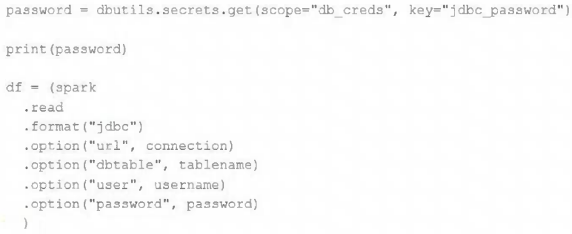
Which statement describes what will happen when the above code is executed?
- A. The connection to the external table will fail; the string "REDACTED" will be printed.
- B. An interactive input box will appear in the notebook; if the right password is provided, the connection will succeed and the encoded password will be saved to DBFS.
- C. An interactive input box will appear in the notebook; if the right password is provided, the connection will succeed and the password will be printed in plain text.
- D. The connection to the external table will succeed; the string value of password will be printed in plain text.
- E. The connection to the external table will succeed; the string "REDACTED" will be printed.
Correct Answer:
E
Explanation:
Based on the question and discussion, the AI agrees with the suggested answer, which is E.
Reasoning:
The Databricks secrets module is designed to protect sensitive information like passwords. When a secret is accessed using `dbutils.secrets.get()`, Databricks replaces the actual secret value with the string "REDACTED" in the notebook output to prevent accidental exposure. However, the actual secret value is still available to the code for use in connecting to the external database. Therefore, the connection will succeed, and "REDACTED" will be printed.
Why other options are incorrect:
-
A: The connection will succeed, so this option is incorrect.
-
B: Databricks secrets are not designed to prompt interactive input. They retrieve values stored securely within Databricks. Additionally, there is no functionality that saves encoded passwords to DBFS.
-
C: Similar to option B, Databricks secrets do not prompt for interactive input, and they redact the password instead of printing it in plain text.
-
D: While the connection will succeed, the password will be replaced by "REDACTED" in the output, not printed in plain text.
The behavior of the Databricks secrets module is consistent with the Databricks documentation regarding secrets and redaction.
Therefore, the most accurate description of what will happen is that the connection to the external table will succeed; the string "REDACTED" will be printed.
Citations:
- Databricks Secrets, https://docs.databricks.com/security/secrets/index.html
-
Question 7
The data science team has created and logged a production model using MLflow. The following code correctly imports and applies the production model to output the predictions as a new DataFrame named preds with the schema "customer_id LONG, predictions DOUBLE, date DATE".
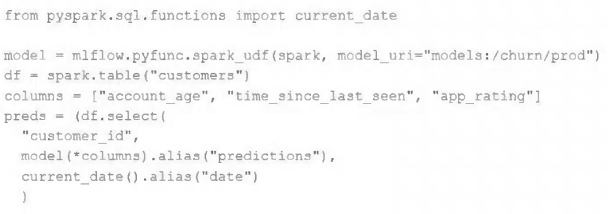
The data science team would like predictions saved to a Delta Lake table with the ability to compare all predictions across time. Churn predictions will be made at most once per day.
Which code block accomplishes this task while minimizing potential compute costs?
- A. preds.write.mode("append").saveAsTable("churn_preds")
- B. preds.write.format("delta").save("/preds/churn_preds")
- C.
- D.
- E.
Correct Answer:
A
Explanation:
The AI agrees with the suggested answer of option A.
The best approach to save the churn predictions to a Delta Lake table, compare predictions over time, and minimize compute costs is to use the `append` mode when writing to the table. This avoids overwriting existing data and allows for historical comparison. Writing directly to a Delta table without specifying the format relies on the default format, which is often Delta Lake in modern Spark environments.
Reasoning:
- Option A is the most straightforward and efficient way to append data to a Delta Lake table. `preds.write.mode("append").saveAsTable("churn_preds")` appends the new predictions to the existing "churn_preds" table, preserving the historical data and allowing for comparison across time. The append mode ensures that new predictions are added without overwriting the existing data. Since the default format for `saveAsTable` is Delta in most modern Spark setups, there's no need to explicitly specify the format.
- Options C, D, and E involve partitioning and overwriting, which are not ideal for comparing predictions across time and can lead to unnecessary data loss. Overwriting the table daily (as suggested by the "overwrite" mode in Options C, D, and E) would remove the ability to compare historical predictions without implementing additional data archival or versioning mechanisms. Partitioning might be useful for very large tables, but it adds complexity and is not essential for the stated requirements.
- Option B is close, but does not create a managed table. `preds.write.format("delta").save("/preds/churn_preds")` saves the data as a Delta table in the specified path, but it does not register it as a table in the metastore. This means you would need to use the `create table using delta` command or `spark.read.format("delta").load()` to access the data, which adds an extra step. The `saveAsTable` method in Option A automatically registers the table, making it more convenient.
Why other options are not ideal:
- Option B: It saves the data as a Delta table but doesn't register it as a managed table in the metastore, requiring additional steps to access it. Also, it doesn't specify the append mode, which means the default behavior (error if the path exists) would prevent it from working as intended for daily updates.
- Options C, D, and E: These options involve partitioning and overwriting, which are not suitable for the requirement of comparing predictions across time. Overwriting the table daily would eliminate historical data, and partitioning adds complexity without providing a significant benefit in this scenario.
By using `append` mode and `saveAsTable`, the code efficiently adds new predictions to the Delta Lake table daily while retaining historical data for comparison, addressing all requirements with minimal complexity.
Citations:
- Delta Lake Documentation, https://docs.delta.io/latest/
- Spark SQL Programming Guide, https://spark.apache.org/docs/latest/sql-programming-guide.html
-
Question 8
An upstream source writes Parquet data as hourly batches to directories named with the current date. A nightly batch job runs the following code to ingest all data from the previous day as indicated by the date variable:
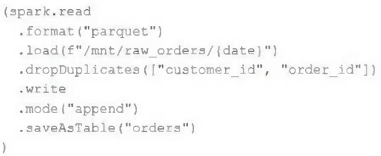
Assume that the fields customer_id and order_id serve as a composite key to uniquely identify each order.
If the upstream system is known to occasionally produce duplicate entries for a single order hours apart, which statement is correct?
- A. Each write to the orders table will only contain unique records, and only those records without duplicates in the target table will be written.
- B. Each write to the orders table will only contain unique records, but newly written records may have duplicates already present in the target table.
- C. Each write to the orders table will only contain unique records; if existing records with the same key are present in the target table, these records will be overwritten.
- D. Each write to the orders table will only contain unique records; if existing records with the same key are present in the target table, the operation will fail.
- E. Each write to the orders table will run deduplication over the union of new and existing records, ensuring no duplicate records are present.
Correct Answer:
B
Explanation:
Based on the question and the discussion, the AI agrees with the suggested answer B.
The provided code snippet utilizes the `.dropDuplicates()` function in Spark. This function operates on the current DataFrame being processed.
Here's a detailed reasoning:
- `.dropDuplicates()` behavior: The `.dropDuplicates(["customer_id", "order_id"])` line ensures that within the DataFrame being written to the `orders` table in each batch, there will be no duplicate records based on the composite key `customer_id` and `order_id`. This means each write to the table contains unique records.
- Potential for duplicates in the target table: The `.dropDuplicates()` function **does not** check for or remove duplicates that might already exist in the target `orders` table from previous batches. If the upstream system occasionally produces duplicate entries for a single order hours apart (as stated in the question), these duplicates will be present in different hourly batches. The nightly job will process each batch, remove duplicates within that batch, and then append the (internally unique) batch to the `orders` table. Consequently, the `orders` table can contain duplicate records across different days.
Let's analyze why the other options are incorrect:
- A: Incorrect. It is incorrect because the records in target table can have duplicate entries.
- C: Incorrect. The provided code does not include logic to overwrite existing records in the target table. It performs an append operation.
- D: Incorrect. The append operation will not fail if duplicates exist in the target table. It will simply add the new records (which are unique within the current batch) to the table.
- E: Incorrect. The `.dropDuplicates()` function only operates on the new records being written in the current batch and does not perform deduplication across the union of new and existing records in the target table.
In summary, the `.dropDuplicates()` function ensures uniqueness within each batch being written, but does not prevent duplicates from existing in the target table across multiple batches. Therefore, option B is the correct answer.
Citations:
- Apache Spark Documentation on dropDuplicates, https://spark.apache.org/docs/latest/api/python/reference/api/pyspark.sql.DataFrame.dropDuplicates.html
-
Question 9
A junior member of the data engineering team is exploring the language interoperability of Databricks notebooks. The intended outcome of the below code is to register a view of all sales that occurred in countries on the continent of Africa that appear in the geo_lookup table.
Before executing the code, running SHOW TABLES on the current database indicates the database contains only two tables: geo_lookup and sales.
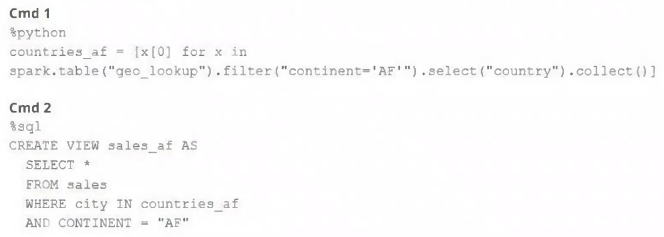
Which statement correctly describes the outcome of executing these command cells in order in an interactive notebook?
- A. Both commands will succeed. Executing show tables will show that countries_af and sales_af have been registered as views.
- B. Cmd 1 will succeed. Cmd 2 will search all accessible databases for a table or view named countries_af: if this entity exists, Cmd 2 will succeed.
- C. Cmd 1 will succeed and Cmd 2 will fail. countries_af will be a Python variable representing a PySpark DataFrame.
- D. Both commands will fail. No new variables, tables, or views will be created.
- E. Cmd 1 will succeed and Cmd 2 will fail. countries_af will be a Python variable containing a list of strings.
Correct Answer:
E
Explanation:
Based on the provided context and discussion, the AI agrees with the suggested answer E.
The reasoning is as follows:
- Command 1 will succeed: The first command uses `%python` to execute Python code. It fetches data from the `geo_lookup` table using Spark SQL, filters it, and then collects the 'country' column into a Python list named `countries_af`. This operation is valid and will result in `countries_af` being a Python variable containing a list of strings.
- Command 2 will fail: The second command uses `%sql` to execute SQL code. It attempts to use the Python variable `countries_af` directly in a SQL `WHERE` clause using the syntax `IN ($countries_af)`. This will not work because SQL cannot directly interpret or access Python variables in this way within Databricks notebooks. The SQL engine will treat `$countries_af` as a literal string, which is not the intended behavior, and will lead to a syntax error or an incorrect query execution.
Let's analyze why the other options are incorrect:
- Option A is incorrect: Because Cmd 2 will fail, so no `sales_af` view will be created. Also, the assumption that `countries_af` and `sales_af` will be registered as views is false.
- Option B is incorrect: Cmd 2 will fail because it's trying to use a Python variable directly in a SQL context without proper bridging.
- Option C is incorrect: While Cmd 1 does succeed and `countries_af` is a Python variable, it will be a Python list, not a PySpark DataFrame.
- Option D is incorrect: Cmd 1 will succeed in creating the python variable `countries_af`.
The key concept here is the separation between the Python and SQL contexts within Databricks notebooks, and the necessity of using appropriate mechanisms to pass data between them. In this scenario, directly referencing a Python variable within a SQL query without proper conversion or use of a Spark DataFrame is invalid. Therefore, only option E correctly identifies that the first command will succeed while the second will fail due to this context issue. The variable `countries_af` will exist as a Python list, not as a SQL-accessible entity.
-
Question 10
A Delta table of weather records is partitioned by date and has the below schema: date DATE, device_id INT, temp FLOAT, latitude FLOAT, longitude FLOAT
To find all the records from within the Arctic Circle, you execute a query with the below filter: latitude > 66.3
Which statement describes how the Delta engine identifies which files to load?
- A. All records are cached to an operational database and then the filter is applied
- B. The Parquet file footers are scanned for min and max statistics for the latitude column
- C. All records are cached to attached storage and then the filter is applied
- D. The Delta log is scanned for min and max statistics for the latitude column
- E. The Hive metastore is scanned for min and max statistics for the latitude column
Correct Answer:
D
Explanation:
The AI agrees with the suggested answer, which is D. The Delta log is scanned for min and max statistics for the latitude column.
Reasoning:
Delta Lake enhances data lake reliability by providing ACID transactions and scalable metadata handling. For query optimization, Delta Lake automatically collects statistics about the data in each file, including min and max values for columns. These statistics are stored in the Delta log. When a query with a filter like `latitude > 66.3` is executed, Delta Lake uses these statistics in the Delta log to perform partition pruning and data skipping. It scans the Delta log to determine which files contain data that could possibly satisfy the filter condition, significantly reducing the amount of data that needs to be read.
Why other options are incorrect:
- A: "All records are cached to an operational database and then the filter is applied" - This is incorrect because Delta Lake is designed to avoid loading all records. Loading all records into an operational database would be highly inefficient, especially for large datasets.
- B: "The Parquet file footers are scanned for min and max statistics for the latitude column" - While Parquet files do contain metadata, Delta Lake doesn't directly scan individual Parquet footers for statistics during query execution. It relies on the aggregated statistics in the Delta log.
- C: "All records are cached to attached storage and then the filter is applied" - Similar to option A, caching all records is inefficient and not how Delta Lake is designed to operate.
- E: "The Hive metastore is scanned for min and max statistics for the latitude column" - The Hive metastore primarily stores schema and partitioning information. While it can be integrated with Delta Lake, the min/max statistics used for data skipping are stored within the Delta log, not the Hive metastore.
Citations:
- Delta Lake Documentation, https://docs.delta.io/latest/index.html
About This Practice Material
This is independent study material to help you prepare for the Databricks Data Engineer Professional (DEP) exam. It is not affiliated with, endorsed by, or sponsored by Databricks or any certification body. All product names, certification names, trademarks, and exam codes are the property of their respective owners and are used here for descriptive (nominative) purposes only.
We do not provide real exam questions, brain dumps, or any guarantee of passing. All questions are original practice items compiled from publicly available community discussions and AI-generated explanations, aligned to the publicly available exam objectives.