Microsoft DevOps Engineer Expert (AZ-400) Practice Questions & Study Guide
The Designing and Implementing Microsoft DevOps Solutions (AZ-400) is the premier certification for professionals who want to demonstrate their expertise in building and managing DevOps solutions using Microsoft Azure and other tools. As organizations increasingly adopt DevOps practices to drive their digital transformation and improve software delivery, the ability to design and implement robust, scalable, and secure DevOps pipelines has become a highly sought-after skill. The AZ-400 validates your expert-level knowledge of DevOps principles, practices, and tools. It is an essential milestone for any professional looking to lead in the age of modern software engineering.
Overview of the Exam
The AZ-400 exam is a rigorous assessment that covers the design and implementation of DevOps solutions in Azure. It is a 120-minute exam consisting of approximately 40-60 questions. The exam is designed to test your knowledge of DevOps technologies and your ability to apply them to real-world development scenarios. From planning and instrumenting DevOps to implementing CI/CD, managing source control, and ensuring security and compliance, the AZ-400 ensures that you have the skills necessary to build modern, efficient cloud-managed DevOps environments. Achieving the AZ-400 certification proves that you are a highly skilled professional who can handle the technical demands of DevOps engineering.
Target Audience
The AZ-400 is intended for DevOps professionals who have a solid understanding of Azure services and modern software development practices. It is ideal for individuals in roles such as:
1. DevOps Engineers
2. Site Reliability Engineers (SREs)
3. Software Engineers
4. Solutions Architects
5. IT Managers and Directors
To qualify for the Microsoft Certified: DevOps Engineer Expert certification, candidates must have already achieved either the Azure Administrator Associate or the Azure Developer Associate certification and pass the AZ-400 exam.
Key Topics Covered
The AZ-400 exam is organized into several main domains:
1. Configure Processes and Communications (10-15%): Designing and implementing effective DevOps processes and communication strategies.
2. Design and Implement Source Control (15-20%): Designing and implementing source control solutions using Git and other tools.
3. Design and Implement Build and Release Pipelines (40-45%): Designing and implementing CI/CD pipelines using Azure Pipelines and other tools.
4. Develop a Security and Compliance Plan (10-15%): Designing and implementing security and compliance features for DevOps pipelines.
5. Implement an Instrumentation Strategy (10-15%): Designing and implementing monitoring and logging solutions for DevOps pipelines.
Benefits of Getting Certified
Earning the AZ-400 certification provides several significant benefits. First, it offers industry recognition of your elite expertise in Microsoft's DevOps technologies. As a leader in the cloud industry, Microsoft skills are in high demand across the globe. Second, it can lead to high-level career opportunities and significantly higher salary potential in a variety of senior roles. Third, it demonstrates your commitment to professional excellence and your dedication to staying current with the latest DevOps practices. By holding this certification, you join a global community of Microsoft professionals and gain access to exclusive resources and continuing education opportunities.
Why Choose NotJustExam.com for Your AZ-400 Prep?
The AZ-400 exam is challenging and requires a deep understanding of Azure's complex DevOps features. NotJustExam.com is the best resource to help you master this material. Our platform offers an extensive bank of practice questions that are designed to mirror the actual exam’s format and difficulty.
What makes NotJustExam.com stand out is our focus on interactive logic and the accuracy of our explanations. We don’t just provide a list of questions; we provide a high-quality learning experience. Every question in our bank includes an in-depth, accurate explanation that helps you understand the technical reasoning behind the correct DevOps solution. This ensures that you are truly learning the material and building the confidence needed to succeed on the exam. Our content is regularly updated by subject matter experts to reflect the latest Azure features and DevOps trends. With NotJustExam.com, you can approach your AZ-400 exam with the assurance that comes from thorough, high-quality preparation. Start your journey toward becoming a Certified DevOps Engineer today with us!
Free Microsoft DevOps Engineer Expert (AZ-400) Practice Questions Preview
-
Question 1
You are configuring project metrics for dashboards in Azure DevOps.
You need to configure a chart widget that measures the elapsed time to complete work items once they become active.
Which of the following is the widget you should use?
- A. Cumulative Flow Diagram
- B. Burnup
- C. Cycle time
- D. Burndown
Correct Answer:
C
Explanation:
I agree with the chosen answer C. The Cycle Time widget is specifically designed to measure the elapsed time from when a work item becomes active to when it is completed, which directly matches the requirement described in the question.
Reason
Option C, Cycle Time, is correct because it measures the time it takes for a team to complete work items once they begin actively working on them — that is, from the moment a work item transitions to an active state until it reaches a completed state. This is exactly the metric described in the question: 'elapsed time to complete work items once they become active.' In Azure DevOps, the Cycle Time widget is available on dashboards and provides a scatter plot or rolling average view of this metric, helping teams understand their delivery pace and identify outliers.
Why the other options are not as suitable
- Option A is incorrect because the Cumulative Flow Diagram (CFD) widget visualizes the count of work items in various states over time. It is primarily used to identify bottlenecks and monitor workflow stability, not to measure the elapsed time for individual work items once they become active.
- Option B is incorrect because the Burnup chart tracks the total amount of work completed versus the total scope over time. It is used to monitor progress toward a goal or sprint target, not to measure elapsed time from when work items become active.
- Option D is incorrect because the Burndown chart tracks the amount of remaining work over time within a sprint or release. It shows how quickly work is being consumed, not the elapsed time from when individual work items become active to completion.
Citations
-
Question 2
You need to consider the underlined segment to establish whether it is accurate.
The Burnup widget measures the elapsed time from creation of work items to their completion.
Select `No adjustment required` if the underlined segment is accurate. If the underlined segment is inaccurate, select the accurate option.
- A. No adjustment required.
- B. Lead time
- C. Test results trend
- D. Burndown
Correct Answer:
B
Explanation:
I agree with the chosen answer B. The statement in the question incorrectly attributes the definition of 'elapsed time from creation of work items to their completion' to the Burnup widget. This definition actually belongs to the Lead time widget in Azure DevOps.
Reason
Option B (Lead time) is correct because the Lead Time widget in Azure DevOps specifically measures the total elapsed time from the creation of a work item to its completion (i.e., when it reaches a closed or done state). The Burnup widget, by contrast, tracks progress toward a goal by showing the total scope of work versus the amount of work completed over time — it does not measure elapsed time per work item. Replacing 'Burnup widget' with 'Lead time' makes the statement accurate.
Why the other options are not as suitable
- Option A is incorrect because the underlined segment ('Burnup widget') is inaccurate. The Burnup widget does not measure elapsed time from creation to completion of work items; it visualizes cumulative work completed versus total scope over a time period. No adjustment is therefore required is wrong.
- Option C is incorrect because the Test results trend widget displays a trend of test results (pass/fail counts, pass rate) over a pipeline's test runs. It has nothing to do with measuring elapsed time from work item creation to completion.
- Option D is incorrect because the Burndown widget tracks the remaining work (stories, tasks, etc.) over a sprint or release period to show how quickly work is being completed relative to the plan. It does not measure the elapsed time from creation of individual work items to their completion.
Citations
-
Question 3
You are making use of Azure DevOps manage build pipelines, and also deploy pipelines.
The development team is quite large, and is regularly added to.
You have been informed that the management of users and licenses must be automated when it can be.
Which of the following is a task that can't be automated?
- A. Group membership changes
- B. License assignment
- C. Assigning entitlements
- D. License procurement
Correct Answer:
D
Explanation:
I agree with the chosen answer D. License procurement is the task that cannot be automated. Procuring licenses involves purchasing decisions, budget approvals, vendor negotiations, and contractual agreements — all of which require human intervention. The other three tasks (group membership changes, license assignment, and assigning entitlements) can all be automated using Azure DevOps group rules, Azure Active Directory dynamic groups, PowerShell scripts, or the Azure DevOps REST API.
Reason
Option D (License procurement) is correct because purchasing new licenses from Microsoft or a Microsoft partner is a business and financial process that inherently requires human decision-making, budget approval, and contractual agreement. There is no Azure DevOps or Azure AD mechanism that automatically purchases additional licenses on your behalf. This is fundamentally different from managing or assigning already-purchased licenses, which can be automated.
Why the other options are not as suitable
- Option A is incorrect because group membership changes can be automated. Azure DevOps supports Group Rules that automatically assign access levels and project memberships when users are added to an Azure Active Directory group. Azure AD also supports dynamic group membership rules that add/remove users based on attributes.
- Option B is incorrect because license assignment can be automated through Azure AD group-based licensing and Azure DevOps group rules, which automatically assign the appropriate access level (e.g., Basic, Basic + Test Plans) to users who join a designated group.
- Option C is incorrect because assigning entitlements can be automated via the Azure DevOps REST API, PowerShell scripts, or group rules in Azure DevOps that map Azure AD group membership to specific access entitlements and project permissions automatically.
Citations
-
Question 4
You have been tasked with strengthening the security of your team's development process.
You need to suggest a security tool type for the Continuous Integration (CI) phase of the development process.
Which of the following is the option you would suggest?
- A. Penetration testing
- B. Static code analysis
- C. Threat modeling
- D. Dynamic code analysis
Correct Answer:
B
Explanation:
I agree with the chosen answer B. Static code analysis is the most appropriate security tool type for the Continuous Integration (CI) phase because it analyzes source code without executing it, allowing vulnerabilities to be caught early before code is merged into the main codebase.
Reason
Option B (Static code analysis) is correct because it examines source code or compiled binaries without executing the application. This makes it perfectly suited for the CI pipeline, where code is built and validated before being merged. Tools like SonarQube, Checkmarx SAST, and Microsoft Security Code Analysis integrate directly into CI/CD pipelines to detect security weaknesses, code quality issues, and vulnerabilities early in the development lifecycle — a principle known as shift-left security.
Why the other options are not as suitable
- Option A (Penetration testing) is incorrect because it requires a fully deployed, live environment to simulate real-world attacks. It cannot be performed during the CI phase where no running application exists yet — it is typically done post-deployment.
- Option C (Threat modeling) is incorrect because it is a design-phase activity used to identify potential threats and define mitigations before code is written. It is not an automated tool integrated into a CI pipeline.
- Option D (Dynamic code analysis) is incorrect because it evaluates an application during runtime by executing it. Like penetration testing, it requires a live running environment, making it unsuitable for the CI phase where the goal is to analyze code before deployment.
Citations
-
Question 5
Your company is currently making use of Team Foundation Server 2013 (TFS 2013), but intend to migrate to Azure DevOps.
You have been tasked with supplying a migration approach that allows for the preservation of Team Foundation Version Control changesets dates, as well as the changes dates of work items revisions. The approach should also allow for the migration of all TFS artifacts, while keeping migration effort to a minimum.
You have suggested upgrading TFS to the most recent RTW release.
Which of the following should also be suggested?
- A. Installing the TFS kava SDK
- B. Using the TFS Database Import Service to perform the upgrade.
- C. Upgrading PowerShell Core to the latest version.
- D. Using the TFS Integration Platform to perform the upgrade.
Correct Answer:
B
Explanation:
I agree with the chosen answer B. The TFS Database Import Service (also known as the Azure DevOps Migration Tool) is the recommended high-fidelity migration path from TFS to Azure DevOps. Combined with upgrading TFS to the latest RTW release first, it preserves TFVC changeset dates, work item revision change dates, and migrates all TFS artifacts with minimal effort.
Reason
Option B is correct because the TFS Database Import Service is Microsoft's officially supported tool for migrating TFS collections to Azure DevOps Services. It performs a database-level migration, which means it preserves all historical metadata including TFVC changeset dates and work item revision change dates. It also migrates all TFS artifacts (work items, builds, test plans, version control history, etc.) with the least manual effort. The prerequisite is that TFS must first be upgraded to the most recent RTW release before the import can be performed, which aligns perfectly with the already-suggested upgrade step.
Why the other options are not as suitable
- Option A is incorrect because the TFS Java SDK (likely what 'TFS kava SDK' refers to) is a development library for interacting with TFS APIs programmatically. It is not a migration tool and does not facilitate a full TFS-to-Azure DevOps migration with preserved dates and artifacts.
- Option C is incorrect because upgrading PowerShell Core has no direct relevance to TFS-to-Azure DevOps migration. It is a scripting runtime and does not provide any migration capability for TFS artifacts, changeset dates, or work item revisions.
- Option D is incorrect because the TFS Integration Platform is an older, third-party-style tool that supports migrations between TFS instances but does not preserve TFVC changeset dates or work item revision dates. It also does not migrate all TFS artifacts and requires significantly more manual configuration effort compared to the Database Import Service.
Citations
-
Question 6
DRAG DROP -
You have an on-premises Bitbucket Server with a firewall configured to block inbound Internet traffic. The server is used for Git-based source control.
You intend to manage the build and release processes using Azure DevOps. This plan requires you to integrate Azure DevOps and Bitbucket.
Which of the following will allow for this integration? Answer by dragging the correct options from the list to the answer area.
Select and Place:
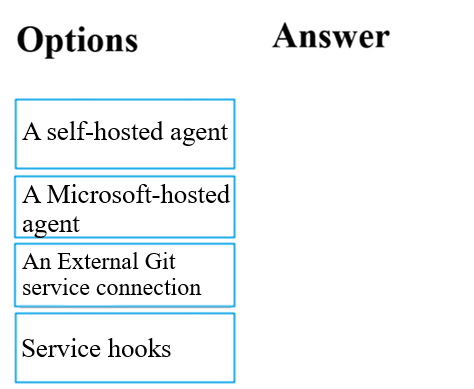
Correct Answer:
See interactive view.
Explanation:
I agree with the suggested answer. The two correct options are A self-hosted agent and An External Git service connection. This combination is the documented Microsoft solution for integrating Azure DevOps Pipelines with an on-premises Bitbucket Server that blocks inbound internet traffic.
Reason
A self-hosted agent is correct because it can be installed within the on-premises network, giving it direct access to the Bitbucket Server. Self-hosted agents only require outbound connections to Azure Pipelines — they do not require any inbound firewall rules to be opened on the Bitbucket Server side. This makes them the right choice when inbound internet traffic is blocked. An External Git service connection is correct because it is the Azure DevOps service connection type used to connect to an external or on-premises Git repository such as Bitbucket Server. When paired with a self-hosted agent (which can resolve the internal server name and reach it locally), the service connection provides the configuration link between the Azure DevOps pipeline and the Bitbucket repository. Microsoft's documentation explicitly states: 'Make sure that the name of the server you specified when creating the service connection is resolvable from the self-hosted agents.'
Why the other options are not as suitable
A Microsoft-hosted agent is incorrect because Microsoft-hosted agents run in Azure's cloud infrastructure and cannot reach an on-premises Bitbucket Server that blocks all inbound internet traffic. There is no way for a Microsoft-hosted agent to traverse the firewall to access the private server. Service hooks are incorrect because Service hooks in Azure DevOps are designed to trigger actions on external services (e.g., creating a Trello card or sending a notification) when events occur in an Azure DevOps project. They are not a mechanism for connecting Azure Pipelines to an on-premises Git source repository. Furthermore, Service hooks for Bitbucket apply to Bitbucket Cloud, not on-premises Bitbucket Server with a blocking firewall.
Citations
-
Question 7
You are currently developing a project for a client that will be managing work items via Azure DevOps.
You want to make sure that the work item process you use for the client allows for requirements, change requests, risks, and reviews to be tracked.
Which of the following is the option you would choose?
- A. Basic
- B. Agile
- C. Scrum
- D. CMMI
Correct Answer:
D
Explanation:
Agree. The correct answer is D, CMMI. This is unanimously supported by the community and aligns with official Microsoft documentation.
Reason
CMMI (Capability Maturity Model Integration) is the process template in Azure DevOps specifically designed to support formal, governance-heavy project management. It includes work item types (WITs) such as Requirements, Change Requests, Risks, Reviews, Tasks, Bugs, Features, Epics, and more. This makes it the only option among the four that natively supports all four of the specified tracking categories: requirements, change requests, risks, and reviews. It is based on the Capability Maturity Model Integration framework, which emphasizes process improvement, risk management, and formal change control — exactly what the question describes.
Why the other options are not as suitable
- Option A is incorrect because the Basic process is the simplest process template in Azure DevOps, offering only three work item types: Epics, Issues, and Tasks. It does not include dedicated work items for requirements, change requests, risks, or reviews.
- Option B is incorrect because the Agile process template focuses on agile software development practices, providing work item types such as User Stories, Features, Tasks, and Bugs. While it supports agile workflows well, it lacks dedicated work items for change requests, risks, and reviews.
- Option C is incorrect because the Scrum process template is designed around Scrum methodology, providing work item types such as Product Backlog Items, Sprint Tasks, Impediments, and Bugs. It does not include native work item types for requirements, change requests, risks, or reviews as defined in a CMMI context.
Citations
-
Question 8
Note: The question is included in a number of questions that depicts the identical set-up. However, every question has a distinctive result. Establish if the solution satisfies the requirements.
You run the Register-AzureRmAutomationDscNode command in your company's environment.
You need to make sure that your company's test servers remain correctly configured, regardless of configuration drift.
Solution: You set the -ConfigurationMode parameter to ApplyOnly.
Does the solution meet the goal?
Correct Answer:
B
Explanation:
I agree with the chosen answer B (No). Setting -ConfigurationMode to ApplyOnly does not address configuration drift, which is the core requirement. The correct mode to use would be ApplyAndAutocorrect, which continuously monitors and corrects drift automatically.
Reason
Option B (No) is correct because ApplyOnly instructs DSC to apply the configuration once and then do nothing further. It does not monitor for configuration drift, nor does it automatically reapply the configuration if the server's state changes. Since the requirement is to ensure servers remain correctly configured regardless of configuration drift, this mode is inadequate. The appropriate -ConfigurationMode value is ApplyAndAutocorrect, which applies the configuration initially and then periodically checks and automatically corrects any detected drift, ensuring continuous compliance with the desired state.
Why the other options are not as suitable
- Option A is incorrect because setting -ConfigurationMode to ApplyOnly only applies the configuration at registration time and performs no subsequent drift detection or correction. After the initial application, DSC will not check whether the node's state has changed or drifted from the desired configuration. This directly contradicts the requirement to keep servers correctly configured regardless of configuration drift.
Citations
-
Question 9
Note: The question is included in a number of questions that depicts the identical set-up. However, every question has a distinctive result. Establish if the solution satisfies the requirements.
You run the Register-AzureRmAutomationDscNode command in your company's environment.
You need to make sure that your company's test servers remain correctly configured, regardless of configuration drift.
Solution: You set the -ConfigurationMode parameter to ApplyAndMonitor.
Does the solution meet the goal?
Correct Answer:
B
Explanation:
I agree with the chosen answer B (No). Setting -ConfigurationMode to ApplyAndMonitor does not meet the requirement of keeping servers correctly configured regardless of configuration drift. ApplyAndMonitor only reports drift in logs but does not remediate it. The correct mode to use is ApplyAndAutocorrect, which actively corrects any deviation from the desired state.
Reason
Option B (No) is correct because ApplyAndMonitor is the default DSC configuration mode that applies a configuration initially and then only monitors and logs any subsequent drift from the desired state. It does NOT automatically correct configuration drift. Since the goal is to ensure servers 'remain correctly configured regardless of configuration drift,' this mode falls short. The appropriate mode is ApplyAndAutocorrect, which causes the Local Configuration Manager (LCM) to re-apply the desired configuration whenever drift is detected, actively remediating any unauthorized changes.
Why the other options are not as suitable
- Option A is incorrect because setting -ConfigurationMode to ApplyAndMonitor does not satisfy the requirement. While this mode does apply a configuration and checks for drift, it only reports discrepancies in logs rather than correcting them. Servers would not remain correctly configured if someone or something changes their state, making this mode insufficient for the stated goal of maintaining correct configuration regardless of drift.
Citations
-
Question 10
Note: The question is included in a number of questions that depicts the identical set-up. However, every question has a distinctive result. Establish if the solution satisfies the requirements.
You run the Register-AzureRmAutomationDscNode command in your company's environment.
You need to make sure that your company's test servers remain correctly configured, regardless of configuration drift.
Solution: You set the -ConfigurationMode parameter to ApplyAndAutocorrect.
Does the solution meet the goal?
Correct Answer:
A
Explanation:
I agree with the chosen answer A (Yes). Setting the -ConfigurationMode parameter to ApplyAndAutocorrect directly addresses the requirement of keeping servers correctly configured regardless of configuration drift, as it actively monitors and re-applies the desired state configuration whenever drift is detected.
Reason
Option A (Yes) is correct because the ApplyAndAutocorrect configuration mode in Azure Automation DSC (via the Register-AzureRmAutomationDscNode command) instructs the Local Configuration Manager (LCM) to apply the DSC configuration initially and then periodically check the node's state. If the node has drifted from the desired state, the LCM logs the discrepancy and automatically re-applies the configuration to bring it back into compliance. This is precisely the behavior needed to ensure servers 'remain correctly configured, regardless of configuration drift.' The three available modes are ApplyOnly (applies once, no monitoring), ApplyAndMonitor (applies and monitors but does NOT correct drift), and ApplyAndAutocorrect (applies, monitors, and automatically corrects drift). Only ApplyAndAutocorrect satisfies the requirement to remediate configuration drift automatically.
Why the other options are not as suitable
- Option B is incorrect because the solution does meet the goal. The ApplyAndAutocorrect mode is specifically designed to handle configuration drift by automatically detecting and correcting any deviations from the desired state, which is exactly what the requirement asks for. Choosing 'No' would imply the solution is insufficient, which is not the case.
Citations
About This Practice Material
This is independent study material to help you prepare for the Microsoft DevOps Engineer Expert (AZ-400) exam. It is not affiliated with, endorsed by, or sponsored by Microsoft or any certification body. All product names, certification names, trademarks, and exam codes are the property of their respective owners and are used here for descriptive (nominative) purposes only.
We do not provide real exam questions, brain dumps, or any guarantee of passing. All questions are original practice items compiled from publicly available community discussions and AI-generated explanations, aligned to the publicly available exam objectives.