Microsoft 365 Fundamentals (MS-900) Practice Questions & Study Guide
The Microsoft 365 Fundamentals (MS-900) is the ideal entry point for anyone looking to begin their journey into the world of Microsoft's cloud-based productivity and collaboration solutions. As organizations increasingly rely on Microsoft 365 to drive their digital transformation and improve productivity, the ability to understand and navigate its ecosystem has become a fundamental skill for all IT and business professionals. The MS-900 validates your foundational knowledge of Microsoft 365 services, including productivity, collaboration, and security. It is an essential first step for anyone aspiring to become a Microsoft 365 administrator, business analyst, or technical manager.
Overview of the Exam
The MS-900 exam is a multiple-choice assessment that covers a broad range of Microsoft 365 topics. It is a 60-minute exam consisting of approximately 40-60 questions. The exam is designed to test your understanding of core Microsoft 365 concepts, including the business value of the platform, the role of each application, and the various services within the Microsoft 365 portfolio. From productivity and collaboration to security, compliance, and privacy, the MS-900 ensures that you have the skills necessary to understand how Microsoft 365 can help organizations achieve their business goals. Achieving the MS-900 certification proves that you have the solid foundation necessary to progress to more advanced Microsoft 365 certifications and specialized roles.
Target Audience
The MS-900 is intended for a broad range of professionals who are new to Microsoft 365. It is ideal for individuals in roles such as:
1. Aspiring Microsoft 365 Administrators
2. Business Analysts and Project Managers
3. IT Managers and Technical Leads
4. Business Stakeholders
5. Students and Recent Graduates
6. Sales and Marketing Professionals in the IT industry
The MS-900 is for those who want to establish a strong technical foundation and prove their commitment to the Microsoft 365 field.
Key Topics Covered
The MS-900 exam is organized into several main domains:
1. Describe Cloud Concepts (10-15%): Understanding basic cloud concepts like IaaS, PaaS, and SaaS, and the benefits of cloud computing.
2. Describe Core Microsoft 365 Services and Concepts (50-55%): Understanding the core services within Microsoft 365, including productivity, collaboration, and management.
3. Describe Security, Compliance, Privacy, and Trust in Microsoft 365 (15-20%): Understanding how Microsoft protects its customers through security, compliance, and privacy features.
4. Describe Microsoft 365 Pricing and Support (10-15%): Understanding Microsoft 365's pricing models and support options.
Benefits of Getting Certified
Earning the MS-900 certification provides several significant benefits. First, it offers industry recognition of your foundational expertise in Microsoft's productivity technologies. As a leader in the cloud industry, Microsoft skills are in high demand across the globe. Second, it can lead to entry-level career opportunities and provide a clear path for professional advancement. Third, it demonstrates your commitment to professional excellence and your dedication to staying current with the latest technology trends. By holding this certification, you join a global community of Microsoft professionals and gain access to exclusive resources and continuing education opportunities.
Why Choose NotJustExam.com for Your MS-900 Prep?
The MS-900 exam covers a broad spectrum of topics, and NotJustExam.com is the best resource to help you master this material. Our platform offers an extensive bank of practice questions that are designed to mirror the actual exam’s format and difficulty.
What makes NotJustExam.com stand out is our focus on interactive logic and the accuracy of our explanations. We don’t just provide a list of questions; we provide a high-quality learning experience. Every question in our bank includes an in-depth, accurate explanation that helps you understand the underlying Microsoft 365 concepts. This ensures that you are truly learning the material and building the confidence needed to succeed on the exam. Our content is regularly updated to reflect the latest Microsoft features and exam updates. With NotJustExam.com, you can approach your MS-900 exam with the assurance that comes from thorough, high-quality preparation. Start your Microsoft 365 journey with us today!
Free Microsoft 365 Fundamentals (MS-900) Practice Questions Preview
-
Question 1
DRAG DROP -
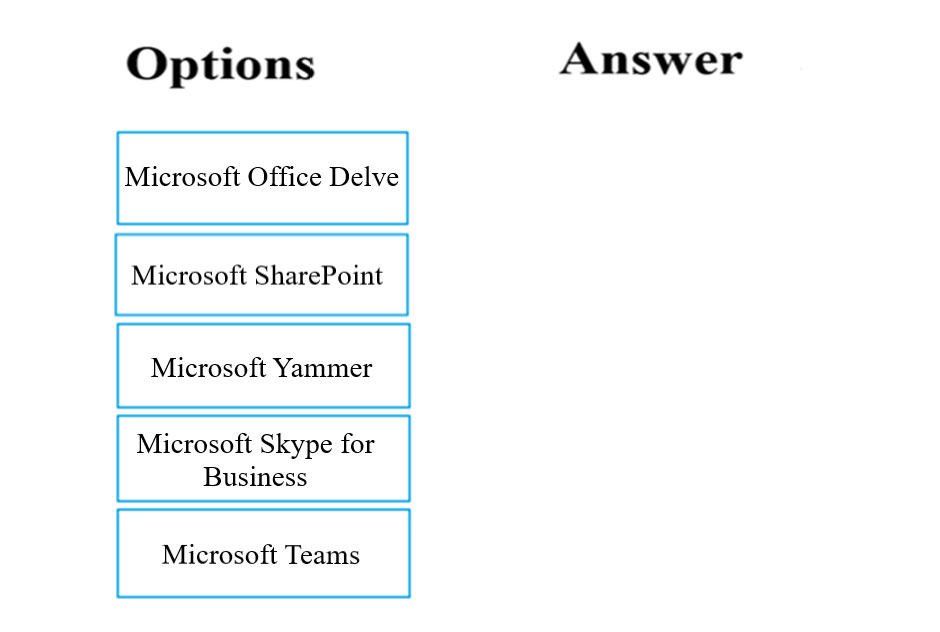
Your company plans to migrate from on-premises to a hybrid cloud deployment.
You are required to make sure that the Microsoft platform used for the migration offers hybrid abilities.
Which of the following options meet the requirement? Answer by dragging the correct option/s from the list to the answer area.
Select and Place:
Correct Answer:
See interactive view.
Explanation:
Based on the analysis of the question and the strong community consensus from the discussion content, the AI recommended answer disagrees with the full scope of the provided suggested answer and instead recommends Microsoft SharePoint and Microsoft Skype for Business.
The reason for choosing Microsoft SharePoint and Microsoft Skype for Business is as follows:
- These two services are explicitly identified in the discussion as supporting robust hybrid configurations. This enables seamless integration and migration capabilities between on-premises and cloud environments, directly addressing the requirement for "hybrid abilities" in a cloud deployment scenario.
- This consensus is supported by references to Microsoft documentation on hybrid cloud architecture, reinforcing their established roles in hybrid deployments.
The reasons for not including other options mentioned in the suggested answer are:
- Microsoft Teams: The discussion content explicitly states that any opinions suggesting Microsoft Teams are refuted by the community. This is because there is no on-premises version of Microsoft Teams that facilitates a true hybrid deployment in the same way as SharePoint or Skype for Business. While Teams integrates with on-premises services (like Exchange or SharePoint), it doesn't operate as a directly migratable hybrid platform with an on-premises component in the way the question implies for foundational "hybrid abilities".
- Microsoft Office Delve: While Microsoft Office Delve is a valuable component of Microsoft 365, its primary function is content discovery and organization, leveraging data from services like SharePoint, Exchange, and OneDrive. It does not inherently offer the foundational "hybrid abilities" for migration that are present in platforms like SharePoint or Skype for Business, which have specific architectural models for bridging on-premises and cloud environments for user and data migration. Therefore, it does not directly meet the criteria of a platform providing hybrid capabilities for migration in this context.
Citations:
- Architecture of Microsoft hybrid cloud scenarios, https://docs.microsoft.com/en-us365/enterprise/architecture-of-microsoft-hybrid-cloud-scenarios
-
Question 2
You need to consider the underlined segment to establish whether it is accurate.
All applications will remain in a hybrid environment after migrating to Microsoft Azure.
Select `No adjustment required` if the underlined segment is accurate. If the underlined segment is inaccurate, select the accurate option.
- A. No adjustment required.
- B. Applications that manage sensitive information
- C. Applications where access requires a USB-token device
- D. All legacy applications
Correct Answer:
D
Explanation:
Based on the question content and the comprehensive discussion, the AI assistant **agrees with the suggested answer D**. The original underlined segment, "All applications will remain in a hybrid environment after migrating to Microsoft Azure," is inaccurate because it implies that every single application will perpetually stay in a hybrid state. In reality, a hybrid environment is typically a transitional phase for many applications, or a permanent state for a *subset* of applications, particularly legacy ones.
Reason for choosing this answer:
The most accurate replacement for the underlined segment is All legacy applications.
-
The reason for choosing this answer is that legacy applications frequently present significant challenges for direct migration to cloud environments. Many older applications were not designed with cloud-native principles in mind, meaning they often require extensive upgrades, significant re-architecture, or even complete re-platforming to function optimally in Azure. This can involve substantial time, cost, and effort.
-
Furthermore, highly customized legacy applications may not have readily available cloud alternatives or direct migration paths without compromising their unique functionalities. As a result, organizations often choose to keep these applications running on-premises while integrating them with cloud services, thereby establishing a hybrid environment. This approach allows organizations to leverage cloud benefits for new or more compatible applications while maintaining essential legacy systems that are too complex or costly to migrate fully. This is a common and practical scenario described in cloud adoption frameworks.
Reasons for not choosing the other answers:
-
Option A. No adjustment required: This option is incorrect because the statement "All applications will remain in a hybrid environment" is an overgeneralization. Cloud migration strategies often involve moving suitable applications entirely to the cloud (lift-and-shift, re-platform, re-factor, re-architect) and potentially decommissioning others, not keeping all of them in a hybrid state indefinitely. A hybrid environment is a strategic choice for specific workloads or a transitional phase, not a universal outcome for all applications.
-
Option B. Applications that manage sensitive information: While some organizations might choose to keep applications managing highly sensitive information on-premises due to specific regulatory or compliance requirements, modern cloud platforms like Microsoft Azure offer robust security features, advanced encryption capabilities, and comprehensive compliance certifications (e.g., ISO 27001, HIPAA, GDPR, FedRAMP). Services like Azure Information Protection (AIP), Azure Security Center (now Microsoft Defender for Cloud), and Azure Key Vault are designed to protect sensitive data effectively in the cloud. Therefore, sensitivity alone is generally not a barrier to cloud migration, assuming proper cloud security practices are implemented.
-
Option C. Applications where access requires a USB-token device: This scenario describes a very specific technical limitation. While applications that rely on physical hardware dongles or USB tokens for licensing or access might indeed be challenging to run directly in a standard cloud virtual machine environment, this represents a niche use case rather than a broad category of applications that would universally remain in a hybrid environment. The challenges posed by legacy architecture and compatibility are far more widespread than those related to specific hardware dependencies.
Citations:
- What is a hybrid cloud?, https://azure.microsoft.com/en-us/resources/cloud-computing-dictionary/what-is-hybrid-cloud
- Microsoft Cloud Adoption Framework for Azure - Migrate, https://learn.microsoft.com/en-us/azure/cloud-adoption-framework/migrate/
- Security on Azure, https://azure.microsoft.com/en-us/resources/security-on-azure/
- Azure Information Protection, https://azure.microsoft.com/en-us/products/azure-information-protection
-
Question 3
Note: The question is included in a number of questions that depicts the identical set-up. However, every question has a distinctive result. Establish if the solution satisfies the requirements.
Your company plans to move their Server environment to the cloud.
You have been tasked with identifying a cloud model that allows for the current email environment to be upgraded, while also reducing server and application maintenance.
You need to make sure that the requirements are met.
Solution: You recommend the Platform as a service (PaaS) model.
Does the solution meet the goal?
Correct Answer:
B
Explanation:
The AI recommends that the suggested answer (B) is correct.
Reason for choosing B (No):
The question asks for a cloud model that allows for upgrading the current email environment while simultaneously reducing server maintenance and application maintenance.
While Platform as a Service (PaaS) significantly reduces server maintenance by abstracting away the underlying infrastructure (servers, operating systems, networking), it typically still leaves the responsibility of managing, patching, and upgrading the *application itself* to the customer. For an email environment, users generally expect a fully managed service where they do not need to concern themselves with the operational aspects of the email application.
Software as a Service (SaaS) is the cloud model that fully addresses all parts of the requirement. With SaaS, the cloud provider manages the entire application and its underlying infrastructure. This means the provider handles all server maintenance, application upgrades, patching, and operational management. A classic example of an email environment delivered as SaaS is Microsoft 365's Exchange Online. By adopting SaaS for email, the company would achieve a complete reduction in both server and application maintenance, as the service is consumed as a ready-to-use application.
Reason for not choosing A (Yes - PaaS meets the goal):
The proposed solution recommends the Platform as a Service (PaaS) model. While PaaS does reduce the burden of server management (as the underlying operating system and infrastructure are managed by the cloud provider), it does not completely eliminate the need for application maintenance for a standard email system. In a PaaS model, the customer is typically responsible for deploying, configuring, and managing the email application itself, including applying updates, patches, and ensuring its availability. The goal specifically includes reducing "application maintenance," which is best achieved by a SaaS offering for a standard email system where the vendor manages the entire application stack. PaaS is more suitable for developers who want to build, run, and manage their own applications without the complexity of managing the underlying infrastructure.
Citations
- What is IaaS, PaaS, and SaaS?
https://learn.microsoft.com/en-us/azure/cloud-adoption-framework/get-started/what-is-iaas-paas-saas
- Describe cloud computing models - Describe Software as a Service (SaaS)
https://learn.microsoft.com/en-us/training/modules/describe-cloud-computing-models/2-describe-software-service
- Describe cloud computing models - Describe Platform as a Service (PaaS)
https://learn.microsoft.com/en-us/training/modules/describe-cloud-computing-models/3-describe-platform-service
-
Question 4
Note: The question is included in a number of questions that depicts the identical set-up. However, every question has a distinctive result. Establish if the solution satisfies the requirements.
Your company plans to move their Server environment to the cloud.
You have been tasked with identifying a cloud model that allows for the current email environment to be upgraded, while also reducing server and application maintenance.
You need to make sure that the requirements are met.
Solution: You recommend the Infrastructure as a service (IaaS) model.
Does the solution meet the goal?
Correct Answer:
B
Explanation:
The AI assistant agrees with the suggested answer, which states that the solution does not meet the goal. Therefore, the recommended answer is B. No.
Reasoning:
The company's goal is to upgrade its current email environment while significantly reducing both server and application maintenance. The proposed solution, Infrastructure as a Service (IaaS), does not fully meet these requirements, particularly the reduction in application maintenance.
Reasons for choosing this answer (B. No):
- For an email environment requiring reduced server and application maintenance, Software as a Service (SaaS) is the most suitable cloud model. SaaS solutions, such as Microsoft Exchange Online, are designed to deliver a complete, ready-to-use application. In this model, the cloud provider (e.g., Microsoft) is responsible for all aspects of the email service, including the underlying infrastructure, operating systems, application software management, upgrades, and patching. This directly addresses the requirement to reduce both server and application maintenance, as the customer only manages user access and configuration.
- SaaS also transforms IT spending from a Capital Expenditure (CAPEX) model to an Operational Expenditure (OPEX) model, as the need for on-premises server equipment and associated software licenses is eliminated.
Reasons for not choosing other answers:
- Infrastructure as a Service (IaaS), while allowing the company to move its server environment to the cloud and potentially reduce server hardware maintenance, still places the responsibility for managing the operating system, middleware, and application software (including the email application itself, its configurations, and upgrades) on the customer. This contradicts the requirement to reduce "application maintenance" and ensure continuous upgrades for the email service without significant customer intervention. Thus, IaaS does not fully meet the specified goals.
- Platform as a Service (PaaS) was briefly mentioned in the discussion but is not the primary fit for a pre-built, fully managed email service. PaaS is typically used for developing, running, and managing custom applications without the complexity of building and maintaining the infrastructure. While it abstracts away the operating system and infrastructure, it still requires the customer to manage the application code and configuration. For a complete, off-the-shelf email service, SaaS is more appropriate as it delivers the entire application ready to use, minimizing customer management overhead.
Citations:
- Cloud computing service models - IaaS, PaaS, SaaS
https://azure.microsoft.com/en-us/resources/cloud-computing-dictionary/what-are-iaas-paas-saas
- What is SaaS?
https://azure.microsoft.com/en-us/resources/cloud-computing-dictionary/what-is-saas
- What is IaaS?
https://azure.microsoft.com/en-us/resources/cloud-computing-dictionary/what-is-iaas
-
Question 5
Note: The question is included in a number of questions that depicts the identical set-up. However, every question has a distinctive result. Establish if the solution satisfies the requirements.
Your company plans to move their Server environment to the cloud.
You have been tasked with identifying a cloud model that allows for the current email environment to be upgraded, while also reducing server and application maintenance.
You need to make sure that the requirements are met.
Solution: You recommend the Software as a service (SaaS) model.
Does the solution meet the goal?
Correct Answer:
A
Explanation:
The AI assistant agrees with the suggested answer, which is A.
Reason for choosing this answer:
The question asks for a cloud model that allows for the current email environment to be upgraded while also significantly reducing server and application maintenance. The Software as a Service (SaaS) model perfectly aligns with these requirements.
In a SaaS model, the cloud provider hosts and manages the entire application, including the underlying infrastructure (servers, storage, networking) and the application itself. For an email environment, this typically involves using a pre-built, hosted service like Microsoft 365's Exchange Online.
With SaaS:
- Upgrading Email Environment: The SaaS provider is responsible for continually updating and upgrading the software. This means the customer's email environment benefits from the latest features, security patches, and performance enhancements without any manual intervention from the customer's IT team.
- Reducing Server Maintenance: The customer is completely absolved of the responsibility for managing or maintaining any physical or virtual servers. The cloud provider handles all server-related tasks, including hardware procurement, maintenance, operating system patching, and ensuring high availability and scalability.
- Reducing Application Maintenance: The cloud provider manages the email application itself, including all aspects of its operation, such as patches, security updates, backups, data redundancy, and general troubleshooting. This drastically reduces the operational burden on the customer's IT staff, allowing them to focus on strategic initiatives rather than day-to-day maintenance.
Therefore, recommending the Software as a Service (SaaS) model directly addresses all the stated goals: enabling upgrades to the email environment while significantly reducing both server and application maintenance.
Reason for not choosing other answers (implicit as only A/B options):
While not explicitly presented as alternative choices in the question, understanding why other cloud service models would be less suitable reinforces the selection of SaaS.
- Infrastructure as a Service (IaaS): In an IaaS model, the cloud provider manages the underlying infrastructure (virtual machines, networking, storage), but the customer is responsible for the operating system, applications, data, runtime, and middleware. If an email environment were deployed on IaaS, the company would still be responsible for installing, configuring, maintaining, and upgrading the operating system and the email application (e.g., Exchange Server). This would not significantly reduce application maintenance and would still require considerable server management expertise, failing to meet the "reducing server and application maintenance" requirement as comprehensively as SaaS.
- Platform as a Service (PaaS): PaaS provides a development and deployment environment, abstracting the underlying infrastructure and operating system. While it reduces server maintenance compared to IaaS, the customer is typically responsible for the application code and specific application configuration and maintenance. For a pre-built, off-the-shelf email solution, PaaS is not the most direct or efficient fit for the goal of reducing "application maintenance" of a complete email system, as SaaS specifically delivers the full, managed application.
Given the explicit need to reduce *server and application maintenance* for a readily available email environment, SaaS is the most comprehensive and direct solution among cloud service models.
Citations:
- Understand cloud computing - Azure fundamental concepts, https://learn.microsoft.com/en-us/azure/cloud-adoption-framework/get-started/what-is-cloud-computing
- What is cloud computing?, https://azure.microsoft.com/en-us/resources/cloud-computing-dictionary/what-is-cloud-computing
- Exchange Online Service Description, https://learn.microsoft.com/en-us/office365/servicedescriptions/exchange-online-service-description/exchange-online-service-description
- Microsoft 365 and Office 365 Service Descriptions, https://learn.microsoft.com/en-us/office365/servicedescriptions/office-365-service-descriptions-home
-
Question 6
Your company makes use of Platform as a Service (PaaS) for their Azure solution.
Which of the following options are components that your IT employees are responsible for?
- A. Networks.
- B. Databases.
- C. Applications.
- D. Servers.
Correct Answer:
C
Explanation:
The AI assistant agrees with the suggested answer C.
Reasoning for choosing C (Applications):
In a Platform as a Service (PaaS) model, the cloud provider manages the underlying infrastructure, which includes components like servers, networking, operating systems, and the database platform itself. This abstraction allows customers to focus on developing, deploying, and managing their own applications. Therefore, the primary responsibility of the IT employees (customer) in a PaaS environment is to manage and deploy their custom Applications that run on the provided platform. This aligns perfectly with the core value proposition of PaaS, which is to provide a complete development and deployment environment without the overhead of infrastructure management. While the cloud provider manages the database service, the customer remains responsible for the actual data within those databases, including schema design, data integrity, and optimizing queries for their applications. However, "Applications" is the most direct and comprehensive responsibility listed that the customer fully owns in PaaS.
Reasons for not choosing other answers:
- A. Networks: In a PaaS model, the cloud service provider is responsible for managing the underlying network infrastructure, including network security, routing, and connectivity. Customers typically configure network settings specific to their applications (e.g., virtual network integration, firewalls for their application tier), but the core network infrastructure is managed by the provider.
- B. Databases: While customers are responsible for the data they store in databases and their application's interaction with the database (e.g., query optimization, schema design), the underlying database service (e.g., the database server, patching, updates, high availability) is managed by the cloud service provider in a PaaS offering (e.g., Azure SQL Database, Azure Database for MySQL). The question implies the management of the database system itself, not just the data within it.
- D. Servers: Servers, including the underlying hardware and operating systems, are fully managed by the cloud service provider in a PaaS offering. Customers do not have direct access to or responsibility for patching, maintaining, or scaling the virtual machines or physical servers that host their PaaS applications.
The shared responsibility model for PaaS clearly delineates that the customer manages their applications, data, access, and client endpoints, while the provider manages the physical infrastructure, network controls, operating systems, and often the application runtime and middleware.
- Shared responsibilities in the cloud, https://learn.microsoft.com/en-us/azure/security/fundamentals/shared-responsibility
-
Question 7
Your company makes use of Platform as a Service (PaaS) for their Azure solution.
Which of the following options are components that Microsoft are responsible for? (Choose all that apply).
- A. Storage.
- B. Databases.
- C. Applications.
- D. Operating system.
Correct Answer:
ABD
Explanation:
The AI assistant agrees with the suggested answer. The recommended answer for the components that Microsoft is responsible for in a Platform as a Service (PaaS) model is A, B, and D.
Reasoning for choosing this answer (A, B, D):
In the Azure Shared Responsibility Model, the responsibilities shift between the customer and Microsoft depending on the cloud service model (IaaS, PaaS, SaaS). For Platform as a Service (PaaS), Microsoft manages the underlying infrastructure, including the operating systems, network controls, applications, and physical security, while the customer manages their data and applications.
- A. Storage: In a PaaS model, Microsoft is responsible for the underlying storage infrastructure, including the physical disk arrays, network storage, and ensuring its availability and reliability. Customers are responsible for the data they store within this infrastructure. Therefore, Microsoft is responsible for the storage *platform*.
- B. Databases: For PaaS database services (e.g., Azure SQL Database, Azure Database for PostgreSQL), Microsoft is responsible for managing the database engine, applying patches, performing backups, ensuring high availability, and maintaining the underlying server infrastructure. Customers are responsible for the actual data within the database, schema design, and user access management. Therefore, Microsoft is responsible for the database *platform*.
- D. Operating system: A core characteristic of PaaS is that Microsoft manages the operating systems (OS) that run the platform. This includes patching, updating, and securing the OS instances, relieving the customer of these responsibilities. The customer only interacts with the application runtime and data services, not the underlying OS.
Reasoning for not choosing the other answer(s):
- C. Applications: In a PaaS model, the customer is responsible for their applications that they deploy and manage on the platform provided by Microsoft. Microsoft provides the environment for the applications to run, but the development, deployment, configuration, and maintenance of the application code itself are the customer's responsibility.
The discussion content contains an important contradiction that needs clarification. While it states "Agree with Suggested Answer", it then inaccurately concludes that "the conclusion of the answer to this question (regarding customer responsibilities in a PaaS model) is ABD (Applications, Databases, and Data)".
First, the question explicitly asks for
Microsoft's responsibilities, not customer responsibilities.
Second, the discussion misidentifies option D as "Data" when the question's option D is "Operating system".
Based on the official Azure Shared Responsibility Model, the components A (Storage infrastructure), B (Database platform), and D (Operating system) are indeed managed by Microsoft in a PaaS environment. The customer's primary responsibilities in PaaS are for their applications and the data they store and process.
Citations
- Shared responsibility in the cloud
https://learn.microsoft.com/en-us/azure/security/fundamentals/shared-responsibility
- What is PaaS? Platform-as-a-Service explained
https://azure.microsoft.com/en-us/resources/cloud-computing-dictionary/what-is-paas/
-
Question 8
Your company is planning to migrate to Microsoft Azure and Microsoft 365.
You are required to identify a cloud service that allows for website hosting.
Which of the following is the model you should choose?
- A. Software as a Service (SaaS)
- B. Platform as a Service (PaaS)
- C. Infrastructure as a Service (IaaS)
- D. Container as a Service (CaaS)
Correct Answer:
B
Explanation:
Based on the question content and the discussion, the suggested answer B is correct.
Reason for choosing this answer:
The recommended answer is Platform as a Service (PaaS). PaaS is the most appropriate cloud service model for hosting websites because it provides a fully managed environment for the complete web application lifecycle, including building, testing, deploying, managing, and updating. This significantly reduces administrative overhead by abstracting the underlying infrastructure such as servers, networking, operating systems, and database management. For a company migrating to Azure and Microsoft 365, choosing PaaS for website hosting allows developers to focus solely on the application code and functionality, rather than managing the underlying server infrastructure. An excellent example of a PaaS offering in Microsoft Azure specifically designed for web application hosting is Azure App Service.
Reasons for not choosing the other answers:
-
A. Software as a Service (SaaS): SaaS provides a complete, ready-to-use software application delivered over the internet, where users simply consume the service. Examples include Microsoft 365 applications (e.g., Outlook, Word, Excel), Salesforce, or Dropbox. While a website might leverage SaaS components (like a third-party analytics service), SaaS itself is not the cloud service model used for *hosting* a custom-developed website where your company owns the code and manages the deployment. It's about consuming an end-user application, not providing the environment to build and host one.
-
C. Infrastructure as a Service (IaaS): IaaS provides the fundamental computing resources, such as virtual machines, storage, and networking components, over which users have significant control. While it is technically possible to host a website on IaaS by provisioning virtual machines, installing operating systems, web servers (like IIS or Apache), and then deploying the website, it requires a significant amount of administrative effort. The user is responsible for managing the operating system, applying patches, configuring security, scaling, and maintaining all the middleware. For general website hosting, where the primary goal is often to reduce operational burden, IaaS offers too much responsibility compared to PaaS.
-
D. Container as a Service (CaaS): CaaS is a cloud service model that focuses on deploying, managing, and scaling containerized applications (e.g., Docker containers) without the need to manage the underlying host infrastructure. While websites can certainly be hosted in containers (e.g., using Azure Kubernetes Service), CaaS implies a more granular approach to application deployment and orchestration, often requiring more specialized knowledge compared to a direct PaaS offering like Azure App Service. PaaS is specifically tailored for web application hosting with maximum abstraction, making it the more direct and often simpler choice for the general requirement of "website hosting." CaaS is more specialized for microservices architectures and container orchestration, which, while capable of hosting websites, is a more specific implementation detail rather than the broad cloud service model for website hosting.
Citations:
- What are IaaS, PaaS, and SaaS?
https://azure.microsoft.com/en-us/resources/cloud-computing-dictionary/what-is-iaas-paas-saas
- Azure App Service overview
https://learn.microsoft.com/en-us/azure/app-service/overview
- Introduction to Azure Kubernetes Service (AKS)
https://learn.microsoft.com/en-us/azure/aks/intro-aks
-
Question 9
Your company is planning to migrate to Microsoft Azure and Microsoft 365.
You are required to identify a cloud service that allows for the deployment of a Linux virtual machine.
Which of the following is the model you should choose?
- A. Software as a Service (SaaS)
- B. Platform as a Service (PaaS)
- C. Infrastructure as a Service (IaaS)
- D. Container as a Service (CaaS)
Correct Answer:
C
Explanation:
The AI assistant agrees with the suggested answer, which is C. Infrastructure as a Service (IaaS).
The reason for choosing C. Infrastructure as a Service (IaaS) is that IaaS provides the fundamental building blocks of cloud computing, giving users the most control over their cloud resources. In an IaaS model, cloud providers host the infrastructure components, including virtual machines, storage, networks, and operating systems. This model is perfectly suited for scenarios where a company needs to deploy and manage specific operating systems, such as a Linux virtual machine. Users have direct access to the virtual machine, allowing them to install, configure, and manage the operating system, applications, and middleware, which directly addresses the requirement of deploying a Linux VM.
The reasons for not choosing the other answers are as follows:
-
A. Software as a Service (SaaS): SaaS provides a complete, ready-to-use software application over the internet. The user consumes the software and has no control over the underlying infrastructure, operating system, or even the application's code. Examples include Microsoft 365, Salesforce, or Gmail. Since the requirement is to deploy a Linux virtual machine, SaaS is not appropriate as it does not offer control over virtual machines or operating systems.
-
B. Platform as a Service (PaaS): PaaS provides a platform for developing, running, and managing applications without the complexity of building and maintaining the infrastructure typically associated with launching an app. While PaaS abstracts the underlying operating system and infrastructure, it does not allow for direct deployment or management of individual virtual machines. Developers deploy their code or data to the platform, and the cloud provider manages the underlying compute resources, operating systems, and network infrastructure. Therefore, it's not suitable for deploying a specific Linux VM where the user needs OS-level control.
-
D. Container as a Service (CaaS): CaaS is a specialized cloud service model that allows users to deploy, manage, and scale containerized applications (e.g., Docker containers). While CaaS environments often run on virtual machines or bare-metal servers underneath, the user's primary interaction is with containers, not with the direct deployment or management of the virtual machine's operating system. The question specifically asks for deploying a "Linux virtual machine," implying direct management of the VM and its OS, which is characteristic of IaaS rather than CaaS.
Citations:
- What is IaaS, PaaS, and SaaS?, https://azure.microsoft.com/en-us/resources/cloud-computing-models/
- Describe cloud computing models - IaaS, PaaS, and SaaS, https://learn.microsoft.com/en-us/training/modules/describe-cloud-compute-models/
- What are Azure Virtual Machines?, https://learn.microsoft.com/en-us/azure/virtual-machines/overview
-
Question 10
DRAG DROP -
Your company has a Microsoft 365 subscription.
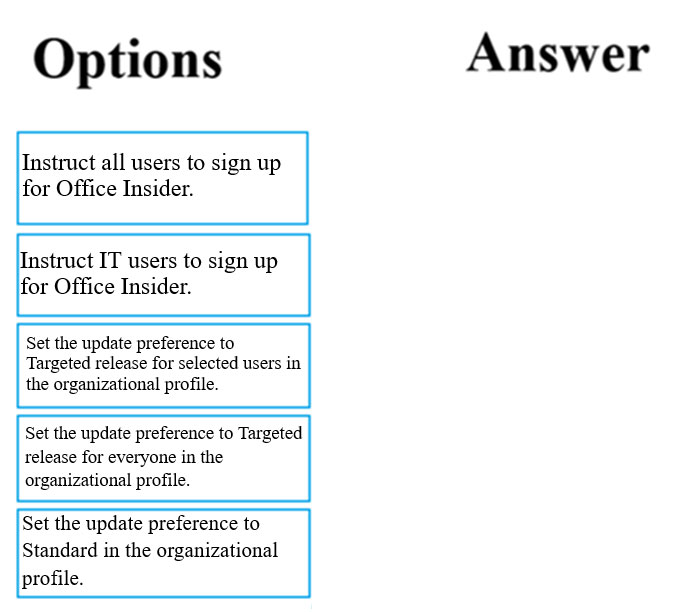
You have been tasked making sure that the IT department users can obtain Office 365 preview features prior to it being deployed to the rest of the company's users.
Which of the following are the two actions that would meet your goal? Answer by dragging the correct options from the list to the answer area.
Select and Place:
Correct Answer:
See interactive view.
Explanation:
The AI assistant agrees with the suggested answer.
The two actions that would meet the goal of ensuring IT department users can obtain Office 365 preview features prior to being deployed to the rest of the company's users are:
- Instruct IT users to sign up for Office Insider.
- Set the update preference to Targeted release for selected users in the organizational profile.
Reasoning for choosing these answers:
The task requires enabling IT department users to receive Office 365 preview features before the general company rollout. Both selected options are designed specifically for this purpose and are the primary methods available in Microsoft 365 for early access to features and updates.
- Instruct IT users to sign up for Office Insider: The Office Insider program allows individual users to opt-in for early access to pre-release builds and new features of Office applications. This directly addresses the need for IT users to get preview features. It provides users with early access to new Office builds to test and provide feedback.
- Set the update preference to Targeted release for selected users in the organizational profile: "Targeted release" (previously known as "First Release") is an administrative setting in the Microsoft 365 admin center that controls when an organization, or specific users within it, receive updates to Microsoft 365 services and features. By setting it for "selected users" (i.e., the IT department), administrators can ensure that this specific group receives new features and updates before the "Standard release" channel, which is typically used for the rest of the organization. This allows IT to test and validate new functionalities in a controlled environment before wider organizational deployment.
Reasoning for not choosing other answers:
- Instruct all users to sign up for Office Insider: This option is too broad. The requirement is specifically for IT users, not all users, to receive preview features. Enabling all users would defeat the purpose of "preview features prior to it being deployed to the rest of the company's users," as it would provide early access to the entire organization, not just the IT department for testing purposes.
- Set the update preference to Targeted release for everyone in the organizational profile: Similar to the previous point, this option is too broad. Setting Targeted release for everyone means the entire company would receive preview features simultaneously, which goes against the requirement of IT users getting them prior to others. This would lead to a broader rollout without the desired pre-testing phase by the IT department.
- Set the update preference to Standard in the organizational profile: "Standard release" is the default and most common release channel, where updates are rolled out after the targeted release. Choosing this would mean IT users receive features at the same time or after general availability, not prior to others. Therefore, it does not meet the objective of obtaining preview features early.
Citations:
- Office Insider Program
https://insider.office.com/en-us/
- Release options in Office 365
https://docs.microsoft.com/en-us/office365/admin/manage/release-options-in-office-365?view=o365-worldwide
About This Practice Material
This is independent study material to help you prepare for the Microsoft 365 Fundamentals (MS-900) exam. It is not affiliated with, endorsed by, or sponsored by Microsoft or any certification body. All product names, certification names, trademarks, and exam codes are the property of their respective owners and are used here for descriptive (nominative) purposes only.
We do not provide real exam questions, brain dumps, or any guarantee of passing. All questions are original practice items compiled from publicly available community discussions and AI-generated explanations, aligned to the publicly available exam objectives.