Microsoft Windows Server Hybrid Admin Assoc (AZ-800) Practice Questions & Study Guide
The Administering Windows Server Hybrid Core Infrastructure (AZ-800) is the premier certification for IT professionals who want to demonstrate their expertise in managing and securing Windows Server workloads across on-premises, hybrid, and cloud environments. As organizations increasingly adopt hybrid cloud models, the ability to build and manage robust, scalable, and secure infrastructures that bridge the gap between local data centers and Microsoft Azure has become a highly sought-after skill. The AZ-800 validates your core knowledge of Windows Server technologies, including identity, management, networking, and storage in a hybrid context. It is an essential milestone for any professional looking to lead in the age of modern hybrid administration.
Overview of the Exam
The AZ-800 exam is a rigorous assessment that covers the implementation and management of Windows Server hybrid core infrastructure. It is a 120-minute exam consisting of approximately 40-60 questions. The exam is designed to test your knowledge of Windows Server technologies and your ability to apply them to real-world hybrid scenarios. From identity and access management using Active Directory and Microsoft Entra ID to managing and monitoring Windows Server workloads, the AZ-800 ensures that you have the skills necessary to build and maintain modern hybrid environments. Achieving the AZ-800 certification proves that you are a highly skilled professional who can handle the technical demands of enterprise-grade hybrid administration.
Target Audience
The AZ-800 is intended for IT professionals who have a solid understanding of Windows Server and Microsoft Azure services. It is ideal for individuals in roles such as:
1. Windows Server Administrators
2. Hybrid Cloud Administrators
3. Systems Engineers
4. Network Administrators
To qualify for the Microsoft Certified: Windows Server Hybrid Administrator Associate certification, candidates must pass both the AZ-800 and the AZ-801 exams.
Key Topics Covered
The AZ-800 exam is organized into several main domains:
1. Deploy and Manage Active Directory Domain Services (AD DS) in On-Premises and Cloud Environments (30-35%): Implementing and managing identity solutions across hybrid environments.
2. Manage Windows Servers and Workloads in a Hybrid Environment (10-15%): Configuring and managing Windows Server workloads, including remote management.
3. Manage Virtual Machines and Containers (15-20%): Implementing and managing virtualized environments using Hyper-V and Azure VM.
4. Implement and Manage an On-Premises and Hybrid Networking Infrastructure (15-20%): Designing and implementing hybrid networking solutions, including DNS and IP addressing.
5. Manage Storage and File Services (15-20%): Configuring and managing storage solutions, including Azure File Sync and Storage Spaces Direct.
Benefits of Getting Certified
Earning the AZ-800 certification provides several significant benefits. First, it offers industry recognition of your specialized expertise in Microsoft's hybrid infrastructure technologies. As a leader in the hybrid cloud industry, Microsoft skills are in high demand across the globe. Second, it can lead to increased career opportunities and higher salary potential in a variety of roles. Third, it demonstrates your commitment to professional excellence and your dedication to staying current with the latest hybrid administration practices. By holding this certification, you join a global community of Microsoft professionals and gain access to exclusive resources and continuing education opportunities.
Why Choose NotJustExam.com for Your AZ-800 Prep?
The AZ-800 exam is challenging and requires a deep understanding of Windows Server's complex features in a hybrid context. NotJustExam.com is the best resource to help you master this material. Our platform offers an extensive bank of practice questions that are designed to mirror the actual exam’s format and difficulty.
What makes NotJustExam.com stand out is our focus on interactive logic and the accuracy of our explanations. We don’t just provide a list of questions; we provide a high-quality learning experience. Every question in our bank includes an in-depth, accurate explanation that helps you understand the technical reasoning behind the correct administration solutions. This ensures that you are truly learning the material and building the confidence needed to succeed on the exam. Our content is regularly updated to reflect the latest Microsoft features and exam updates. With NotJustExam.com, you can approach your AZ-800 exam with the assurance that comes from thorough, high-quality preparation. Start your journey toward becoming a Certified Hybrid Administrator today with us!
Free Microsoft Windows Server Hybrid Admin Assoc (AZ-800) Practice Questions Preview
-
Question 1
Note: This question is part of a series of questions that present the same scenario. Each question in the series contains a unique solution that might meet the stated goals. Some question sets might have more than one correct solution, while others might not have a correct solution.
After you answer a question in this section, you will NOT be able to return to it. As a result, these questions will not appear in the review screen.
Your network contains an Active Directory Domain Services (AD DS) domain named contoso.com.
You need to identify which server is the PDC emulator for the domain.
Solution: From Active Directory Domains and Trusts, you right-click Active Directory Domains and Trusts in the console tree, and then select Operations
Master.
Does this meet the goal?
Correct Answer:
B
Explanation:
I agree with the suggested answer B (No). The Active Directory Domains and Trusts console is used to manage the forest-wide Domain Naming Master role, whereas the PDC Emulator is a domain-level role managed via Active Directory Users and Computers.
Reason
Option B is correct because the proposed solution uses the wrong administrative tool. To identify the PDC Emulator, RID Master, or Infrastructure Master, an administrator should use the Active Directory Users and Computers (ADUC) snap-in, right-click the domain object, and select Operations Masters.
Why the other options are not as suitable
- Option A is incorrect because Active Directory Domains and Trusts only manages the Domain Naming Master role. Right-clicking the root of that console and selecting Operations Master will only show the server holding the forest-wide naming role, not the domain-specific PDC Emulator role.
Citations
-
Question 2
Note: This question is part of a series of questions that present the same scenario. Each question in the series contains a unique solution that might meet the stated goals. Some question sets might have more than one correct solution, while others might not have a correct solution.
After you answer a question in this section, you will NOT be able to return to it. As a result, these questions will not appear in the review screen.
Your network contains an Active Directory Domain Services (AD DS) domain named contoso.com.
You need to identify which server is the PDC emulator for the domain.
Solution: From a command prompt, you run netdom.exe query fsmo.
Does this meet the goal?
Correct Answer:
A
Explanation:
I agree with the suggested answer A (Yes). The command netdom.exe query fsmo is a standard and effective method for identifying all five Flexible Single Master Operation (FSMO) roles in an Active Directory environment, including the PDC Emulator.
Reason
The netdom query fsmo command retrieves the current role holders for the Schema master, Domain naming master, PDC, RID pool manager, and Infrastructure master. Including the .exe extension is syntactically valid in a Windows command prompt or PowerShell environment. Once executed, the output explicitly lists the PDC role holder next to its respective server name.
Why the other options are not as suitable
- Option B is incorrect because the proposed solution successfully achieves the stated goal. There is no technical limitation preventing netdom.exe from identifying the PDC emulator, provided the user has the necessary permissions and the Active Directory Domain Services tools are installed.
Citations
-
Question 3
You have an on premises Active Directory Domain Services (AD DS) domain that syncs with an Azure Active Directory (Azure AD) tenant.
You plan to implement self-service password reset (SSPR) in Azure AD.
You need to ensure that users that reset their passwords by using SSPR can use the new password resources in the AD DS domain.
What should you do?
- A. Deploy the Azure AD Password Protection proxy service to the on premises network.
- B. Run the Microsoft Azure Active Directory Connect wizard and select Password writeback.
- C. Grant the Change password permission for the domain to the Azure AD Connect service account.
- D. Grant the impersonate a client after authentication user right to the Azure AD Connect service account.
Correct Answer:
B
Explanation:
I agree with the suggested answer Option B. In a hybrid environment where Azure AD (now Microsoft Entra ID) syncs with an on-premises AD DS domain, Password Writeback is the specific feature required to ensure that password changes initiated in the cloud are updated in the local directory.
Reason
Option B is correct because Password Writeback is a component of Azure AD Connect (or Cloud Sync) that allows password changes in Azure AD to be written back to an on-premises directory in real time. This ensures that the user's new password is valid for local resources like domain-joined PCs and file shares immediately after an SSPR reset.
Why the other options are not as suitable
- Option A is incorrect because Azure AD Password Protection is used to block weak or custom banned passwords in the on-premises environment; it does not handle the synchronization of password resets from the cloud to on-premises.
- Option C is incorrect because while the Azure AD Connect service account does require specific permissions (like Reset Password and Unexpire Password) to perform the writeback, simply granting permissions without enabling the Password Writeback feature in the sync wizard will not establish the functional link.
- Option D is incorrect because the Impersonate a client after authentication user right is a local security policy setting and is not the mechanism used to enable SSPR synchronization functionality.
Citations
-
Question 4
DRAG DROP -
You create a new Azure subscription.
You plan to deploy Azure Active Directory Domain Services (Azure AD DS) and Azure virtual machines.
You need to ensure that the virtual machines can join to Azure AD DS.
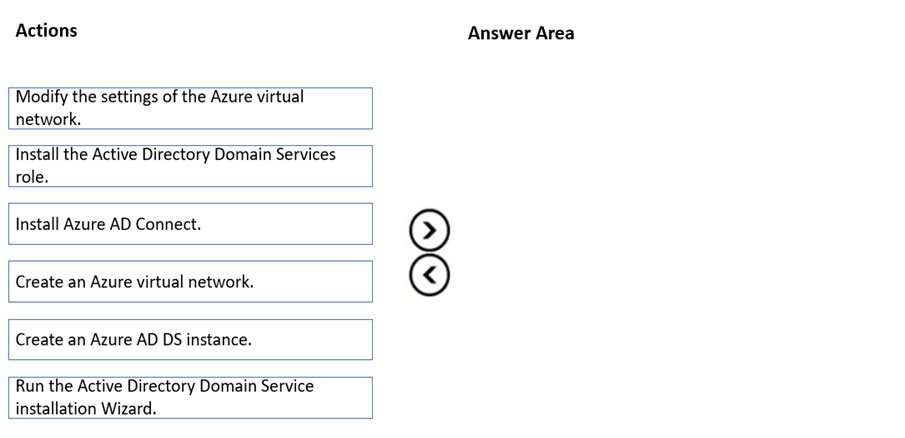
Which three actions should you perform in sequence? To answer, move the appropriate actions from the list of actions to the answer area and arrange them in the correct order.
Select and Place:
Correct Answer:
See interactive view.
Explanation:
I agree with the suggested answer and the community consensus. To deploy Azure AD DS so that virtual machines can join the domain, you must first have a network infrastructure, then deploy the managed domain service into that network, and finally update the network's DNS settings so VMs can locate the domain controllers.
Reason
Create an Azure virtual network is the first step because Azure AD DS requires a dedicated subnet within a virtual network to host its managed domain controllers. Create an Azure AD DS instance follows because the deployment wizard requires you to select an existing virtual network and subnet during configuration. Modify the settings of the Azure virtual network is the final step; once the instance is created, it provides two IP addresses for DNS. You must update the DNS servers settings of the virtual network to these IP addresses so that any VM connected to that network can resolve the domain name and perform a domain join.
Why the other options are not as suitable
Install the Active Directory Domain Services role is incorrect because this action is used to set up a traditional Windows Server domain controller on a VM, not for deploying the managed Azure AD DS service. Run the Active Directory Domain Service installation Wizard is incorrect as this refers to the legacy dcpromo process or the post-deployment configuration of a manual domain controller role. Install Azure AD Connect is incorrect because Azure AD Connect is used to synchronize on-premises identities to Azure AD (Microsoft Entra ID), which is a separate task from enabling managed domain services for VMs within Azure.
Citations
-
Question 5
HOTSPOT -
You have an Azure Active Directory Domain Services (Azure AD DS) domain.
You create a new user named Admin1.
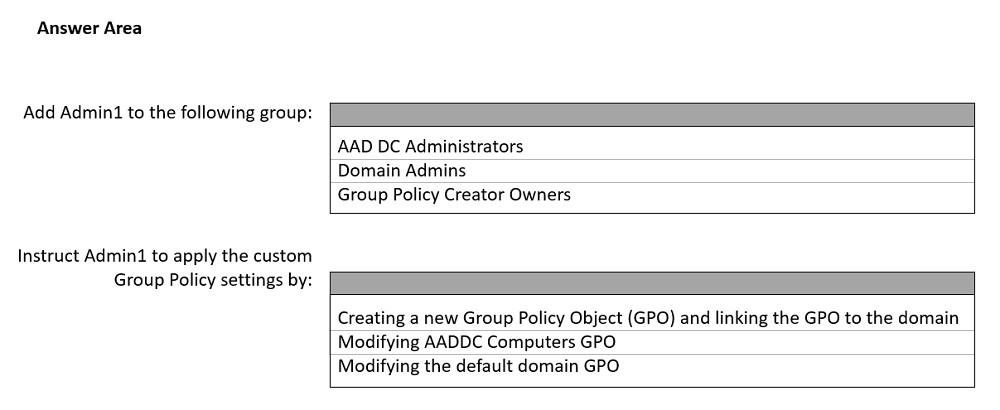
You need Admin1 to deploy custom Group Policy settings to all the computers in the domain. The solution must use the principle of least privilege.
What should you include in the solution? To answer, select the appropriate options in the answer area.
NOTE: Each correct selection is worth one point
Hot Area:
Correct Answer:
See interactive view.
Explanation:
I agree with the suggested answer shown in the second image. To manage Group Policy in Azure Active Directory Domain Services (Azure AD DS), a user must be a member of the AAD DC Administrators group and work within the specific permissions allowed in a managed domain.
Reason
For the first selection, AAD DC Administrators is correct because members of this group are granted administrative privileges on managed domain objects, including the ability to manage Group Policy. This is the standard group for administrative tasks in Azure AD DS. For the second selection, Modifying AADDC Computers GPO is correct because Azure AD DS includes two built-in GPOs: AADDC Computers GPO and AADDC Users GPO. Since the requirement is to apply settings to all computers and you do not have permissions to link GPOs at the domain level, modifying the built-in computers GPO is the most direct way to achieve the goal while adhering to the managed service constraints.
Why the other options are not as suitable
Domain Admins is incorrect because Azure AD DS is a managed service where you do not have Domain Admin or Enterprise Admin permissions; instead, administrative tasks are delegated to the AAD DC Administrators group. Group Policy Creator Owners is incorrect because while this group exists in standard AD for creating GPOs, in Azure AD DS, the AAD DC Administrators group is the designated group for these administrative tasks. Creating a new Group Policy Object (GPO) and linking the GPO to the domain is incorrect because users in Azure AD DS do not have the permissions required to link GPOs to the domain root; linking is only permitted at the AADDC Computers or AADDC Users OU levels (or custom OUs). Modifying the default domain GPO is incorrect because the Default Domain Policy and Default Domain Controllers Policy are not available for modification by users in a managed domain to ensure service stability.
Citations
-
Question 6
DRAG DROP -
Your network contains a single domain Active Directory Domain Services (AD DS) forest named contoso.com. The forest contains a single Active Directory site.
You plan to deploy a read only domain controller (RODC) to a new datacenter on a server named Server1. A user named User1 is a member of the local
Administrators group on Server1.
You need to recommend a deployment plan that meets the following requirements:
✑ Ensures that a user named User1 can perform the RODC installation on Server1
✑ Ensures that you can control the AD DS replication schedule to the Server1
✑ Ensures that Server1 is in a new site named RemoteSite1
Uses the principle of least privilege
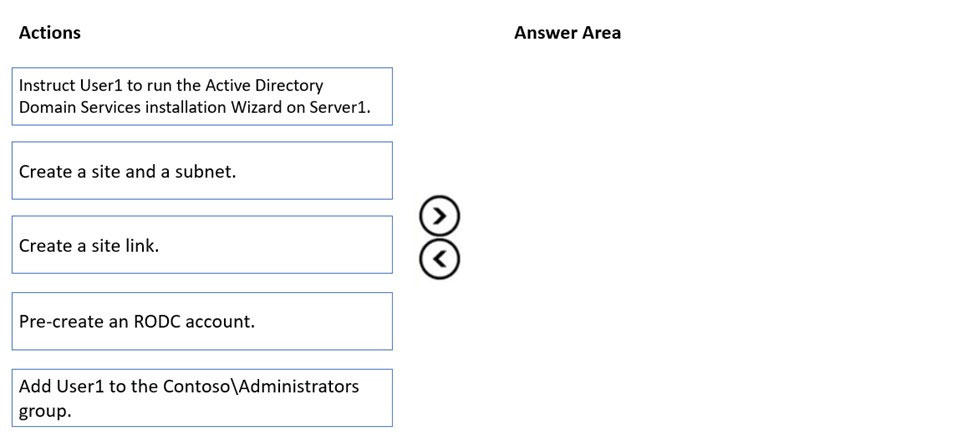
Which three actions should you recommend performing in sequence? To answer, move the appropriate actions from the list of actions to the answer area and arrange them in the correct order.
Select and Place:
Correct Answer:
See interactive view.
Explanation:
I agree with the suggested answer. The sequence correctly addresses the requirements for site placement, delegated administration, and least privilege in an Active Directory environment.
Reason
First, Create a site and a subnet is necessary to fulfill the requirement that the RODC resides in RemoteSite1 and to allow for replication control via the site link. Second, Pre-create an RODC account is the correct method to implement least privilege; it allows you to specify User1 as the delegated administrator for that specific RODC without making them a Domain Admin. Third, Instruct User1 to run the Active Directory Domain Services installation Wizard allows the delegated user to complete the promotion on Server1 by attaching it to the pre-created account.
Why the other options are not as suitable
Create a site link is unnecessary because a new site is automatically added to the DEFAULTIPSITELINK, which already allows for the management of the replication schedule. Add User1 to the Contoso\Administrators group violates the principle of least privilege, as giving a user Domain Admin rights is not required for RODC installation when using the pre-staging (pre-creation) method.
Citations
-
Question 7
Your network contains an Active Directory Domain Services (AD DS) domain. The network also contains 20 domain controllers, 100 member servers, and 100 client computers.
You have a Group Policy Object (GPO) named GPO1 that contains Group Policy preferences.
You plan to link GPO1 to the domain.
You need to ensure that the preference in GPO1 apply only to domain member servers and NOT to domain controllers or client computers. All the other Group
Policy settings in GPO1 must apply to all the computers. The solution must minimize administrative effort.
Which type of item level targeting should you use?
- A. Domain
- B. Operating System
- C. Security Group
- D. Environment Variable
Correct Answer:
B
Explanation:
I agree with the suggested answer Option B. While Security Group targeting is a valid technical method, Operating System targeting is the superior choice because it includes a built-in Computer Role filter that specifically distinguishes between Member Servers, Domain Controllers, and Workstations without requiring the manual creation or maintenance of groups.
Reason
Option B is correct because Item-level targeting for Operating System allows administrators to filter by Computer Role. By selecting the Member Server role within this targeting item, the preference is automatically applied to all domain-joined servers that are not domain controllers. This satisfies the requirement to exclude Domain Controllers and Client Computers (Workstations) with the minimize administrative effort constraint, as it leverages existing system attributes rather than manual group management.
Why the other options are not as suitable
- Option A is incorrect because Domain targeting only filters based on whether the computer or user is a member of a specific Active Directory domain; it cannot distinguish between different machine roles (member server vs. domain controller) within that domain.
- Option C is incorrect because while Security Group targeting works, it requires the manual creation of a group and the ongoing task of adding or removing 100+ member servers as the network scales, which does not minimize administrative effort as effectively as the built-in role filter.
- Option D is incorrect because Environment Variable targeting filters based on the presence or value of a specific variable on the host; while you could theoretically deploy a custom variable to all member servers, this would require significant manual configuration compared to using the native Operating System role attribute.
Citations
-
Question 8
DRAG DROP -
You deploy a new Active Directory Domain Services (AD DS) forest named contoso.com. The domain contains three domain controllers named DC1, DC2, and
DC3.
You rename Default-First-Site-Name as Site1.
You plan to ship DC1, DC2, and DC3 to datacenters in different locations.
You need to configure replication between DC1, DC2, and DC3 to meet the following requirements:
✑ Each domain controller must reside in its own Active Directory site.
✑ The replication schedule between each site must be controlled independently.
✑ Interruptions to replication must be minimized.
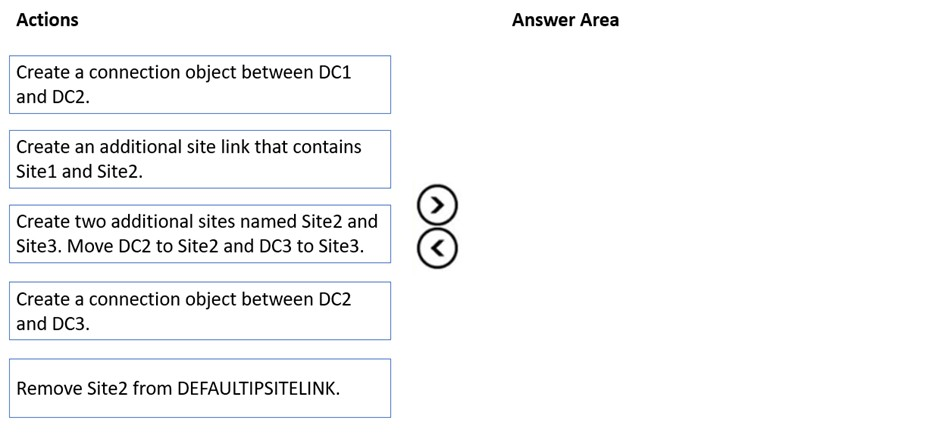
Which three actions should you perform in sequence in the Active Directory Sites and Services console? To answer, move the appropriate actions from the list of actions to the answer area and arrange them in the correct order.
Select and Place:
Correct Answer:
See interactive view.
Explanation:
I disagree with the provided solution images. The correct sequence should focus on creating the AD DS Site infrastructure and then managing Site Links to control replication schedules, rather than manually creating Connection Objects, which the KCC manages automatically.
Reason
The correct sequence is: 1. Create two additional sites named Site2 and Site3. Move DC2 to Site2 and DC3 to Site3: This satisfies the requirement that each DC must reside in its own site. 2. Create an additional site link that contains Site1 and Site2: This allows for an independent replication schedule between Site1 and Site2. 3. Remove Site2 from DEFAULTIPSITELINK: By removing Site2 from the default link, it is now exclusively managed by the new link for its connection to Site1. Site3 remains in the DEFAULTIPSITELINK with Site1. Because Site-link bridging is enabled by default, Site2 and Site3 can still replicate via Site1, and all schedules are now independently controllable via their respective links (the new link for Site2 and the default link for Site3).
Why the other options are not as suitable
Create a connection object between DC1 and DC2 is incorrect because Connection Objects represent the low-level replication path managed by the Knowledge Consistency Checker (KCC); manual creation is not recommended as it bypasses the KCC's ability to automatically optimize and heal the topology. Create a connection object between DC2 and DC3 is incorrect for the same reason; manual objects do not fulfill the requirement to control the replication schedule independently via a console-managed schedule, which is a property of Site Links, not individual connection objects.
Citations
-
Question 9
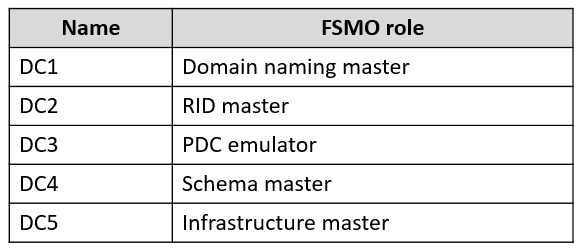
Your network contains an Active Directory Domain Services (AD DS) forest named contoso.com. The root domain contains the domain controllers shown in the following table.
A failure of which domain controller will prevent you from creating application partitions?
- A. DC1
- B. DC2
- C. DC3
- D. DC4
- E. DC5
Correct Answer:
A
Explanation:
I agree with the suggested answer and the community consensus that Option A (DC1) is the correct choice. The Domain Naming Master role is explicitly required for any structural changes to the forest-wide partition namespace, which includes adding or removing application directory partitions.
Reason
DC1 holds the Domain Naming Master FSMO role. This forest-wide role is the sole authority for making changes to the forest's partition configuration. According to Microsoft documentation, a Domain Controller must contact the Domain Naming Master whenever new instances of application directory partitions are added to the forest (for example, when setting up custom DNS partitions or AD integrated zones). If this DC is unavailable, these structural changes are blocked.
Why the other options are not as suitable
- Option B is incorrect because DC2 holds the RID Master role, which is responsible for allocating pools of relative IDs to Domain Controllers for the creation of security principals (users, groups, and computers), but it is not involved in partition management.
- Option C is incorrect because DC3 holds the PDC Emulator role, which handles password changes, time synchronization, and Group Policy updates, but does not manage directory partitions.
- Option D is incorrect because DC4 holds the Schema Master role; while it manages the 'definitions' of objects (attributes and classes) in the forest, it does not manage the creation of actual application partitions.
- Option E is incorrect because DC5 holds the Infrastructure Master role, which is responsible for updating cross-domain object references, which is unrelated to the creation of new application partitions.
Citations
-
Question 10
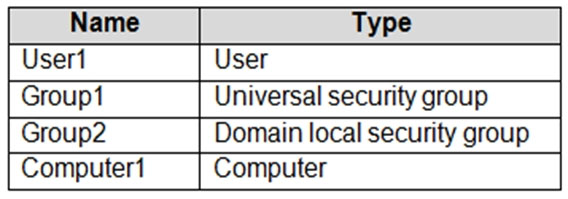
Your network contains an on-premises Active Directory Domain Services (AD DS) domain named contoso.com. The domain contains the objects shown in the following table.
You plan to sync contoso.com with an Azure Active Directory (Azure AD) tenant by using Azure AD Connect.
You need to ensure that all the objects can be used in Conditional Access policies.
What should you do?
- A. Select the Configure Hybrid Azure AD join option.
- B. Change the scope of Group1 and Group2 to Global.
- C. Clear the Configure device writeback option.
- D. Change the scope of Group2 to Universal.
Correct Answer:
A
Explanation:
I agree with the suggested answer A. To use on-premises objects in Azure AD Conditional Access policies, the objects must be represented in Azure AD (now Microsoft Entra ID). While users and groups sync by default, the Computer1 object requires Hybrid Azure AD join configuration to be recognized as a managed device for device-based compliance policies.
Reason
Option A is correct because Hybrid Azure AD join allows on-premises computer accounts to be registered in Azure AD. This registration is a prerequisite for Conditional Access policies that require a 'managed' or 'compliant' device. Without this, the Computer1 object cannot be targeted or evaluated by the policy engine. User1, Group1, and Group2 will sync via standard Azure AD Connect processes, but the device object specifically needs the hybrid join task to be completed.
Why the other options are not as suitable
- Option B is incorrect because Azure AD Connect can synchronize Universal, Global, and Domain Local security groups. Changing the scope to Global is unnecessary for synchronization or Conditional Access functionality.
- Option C is incorrect because it suggests 'clearing' (disabling) the device writeback option; device writeback is used for on-premises AD FS scenarios, and even if it were required, disabling it would not help achieve the goal.
- Option D is incorrect because Domain Local security groups (Group2) are supported for synchronization by Azure AD Connect as long as they are not used for granting permissions to resources in other domains, and changing the scope is not the primary blocker for using the objects in Conditional Access compared to the device registration requirement.
Citations
About This Practice Material
This is independent study material to help you prepare for the Microsoft Windows Server Hybrid Admin Assoc (AZ-800) exam. It is not affiliated with, endorsed by, or sponsored by Microsoft or any certification body. All product names, certification names, trademarks, and exam codes are the property of their respective owners and are used here for descriptive (nominative) purposes only.
We do not provide real exam questions, brain dumps, or any guarantee of passing. All questions are original practice items compiled from publicly available community discussions and AI-generated explanations, aligned to the publicly available exam objectives.