Microsoft Azure Database Admin Associate (DP-300) Practice Questions & Study Guide
The Administering Microsoft Azure SQL Solutions (DP-300) is the premier certification for database administrators who want to demonstrate their expertise in managing and securing SQL Server databases in Microsoft Azure. As organizations increasingly migrate their data workloads to the cloud, the ability to build and manage robust, scalable, and secure SQL infrastructures has become a highly sought-after skill. The DP-300 validates your core knowledge of Azure SQL services, performance tuning, and data protection. It is an essential milestone for any professional looking to lead in the age of modern cloud database administration.
Overview of the Exam
The DP-300 exam is a rigorous assessment that covers the implementation and management of SQL solutions in Azure. It is a 120-minute exam consisting of approximately 40-60 questions. The exam is designed to test your knowledge of Azure SQL technologies and your ability to apply them to real-world administration scenarios. From planning and implementing database resources to monitoring, optimizing, and securing data, the DP-300 ensures that you have the skills necessary to build and maintain modern cloud-managed database environments. Achieving the DP-300 certification proves that you are a highly skilled professional who can handle the technical demands of Azure SQL administration.
Target Audience
The DP-300 is intended for database administrators and data professionals who have a solid understanding of SQL Server and Microsoft Azure services. It is ideal for individuals in roles such as:
1. Azure Database Administrators
2. Systems Administrators
3. Data Engineers
4. IT Managers and Directors
To qualify for the Microsoft Certified: Azure Database Administrator Associate certification, candidates must pass the DP-300 exam.
Key Topics Covered
The DP-300 exam is organized into several main domains:
1. Plan and Implement Data Platform Resources (20-25%): Designing and implementing Azure SQL database resources, including SQL Server on Azure VMs and Azure SQL Database.
2. Implement a Secure Environment (15-20%): Implementing secure authentication and authorization solutions using Entra ID and managing data encryption.
3. Monitor and Optimize Operational Resources (15-20%): Monitoring performance and health of Azure SQL environments and optimizing query performance.
4. Optimize Query Performance (5-10%): Identifying and resolving query performance issues.
5. Perform Automation of Tasks (10-15%): Implementing automation solutions for database administration tasks using APIs and scripting.
6. Plan and Implement a High Availability and Disaster Recovery (HA/DR) Environment (15-20%): Designing and implementing HA/DR solutions for Azure SQL databases.
Benefits of Getting Certified
Earning the DP-300 certification provides several significant benefits. First, it offers industry recognition of your specialized expertise in Microsoft's cloud database technologies. As a leader in the cloud industry, Microsoft skills are in high demand across the globe. Second, it can lead to increased career opportunities and higher salary potential in a variety of roles. Third, it demonstrates your commitment to professional excellence and your dedication to staying current with the latest cloud database administration practices. By holding this certification, you join a global community of Microsoft professionals and gain access to exclusive resources and continuing education opportunities.
Why Choose NotJustExam.com for Your DP-300 Prep?
The DP-300 exam is challenging and requires a deep understanding of Azure SQL's complex features. NotJustExam.com is the best resource to help you master this material. Our platform offers an extensive bank of practice questions that are designed to mirror the actual exam’s format and difficulty.
What makes NotJustExam.com stand out is our focus on interactive logic and the accuracy of our explanations. We don’t just provide a list of questions; we provide a high-quality learning experience. Every question in our bank includes an in-depth, accurate explanation that helps you understand the technical reasoning behind the correct administration solutions. This ensures that you are truly learning the material and building the confidence needed to succeed on the exam. Our content is regularly updated to reflect the latest Microsoft features and exam updates. With NotJustExam.com, you can approach your DP-300 exam with the assurance that comes from thorough, high-quality preparation. Start your journey toward becoming a Certified Azure Database Administrator today with us!
Free Microsoft Azure Database Admin Associate (DP-300) Practice Questions Preview
-
Question 1
You have 20 Azure SQL databases provisioned by using the vCore purchasing model.
You plan to create an Azure SQL Database elastic pool and add the 20 databases.
Which three metrics should you use to size the elastic pool to meet the demands of your workload? Each correct answer presents part of the solution.
NOTE: Each correct selection is worth one point.
- A. total size of all the databases
- B. geo-replication support
- C. number of concurrently peaking databases * peak CPU utilization per database
- D. maximum number of concurrent sessions for all the databases
- E. total number of databases * average CPU utilization per database
Correct Answer:
ACE
Explanation:
The AI assistant agrees with the suggested answer: A, C, and E.
Reason for choosing these answers:
When sizing an Azure SQL Database elastic pool in the vCore purchasing model, the goal is to optimize cost and performance by allocating shared resources effectively across a group of databases. The chosen metrics directly contribute to this optimization:
- A. total size of all the databases: This metric is crucial because an elastic pool provisions shared storage for all its databases. The total data size across all databases determines the minimum storage capacity required for the pool, which directly impacts the chosen service tier and its associated cost. It ensures that there is enough physical space for all database files.
- C. number of concurrently peaking databases * peak CPU utilization per database: This factor accounts for the worst-case scenario. Elastic pools are designed to handle fluctuating workloads, where individual databases might burst in resource usage. By multiplying the number of databases that peak simultaneously by their peak vCore (CPU) utilization, you determine the maximum aggregate compute capacity required by the pool at any given moment. This prevents performance bottlenecks during high-demand periods.
- E. total number of databases * average CPU utilization per database: This metric provides an understanding of the baseline or average compute demand of all databases combined. It helps in determining the sustained vCore capacity needed for the pool. Azure SQL Database elastic pools aim to average out resource consumption, and this metric contributes to defining the minimum and average vCore allocation. The total vCore allocation for the pool is typically the maximum of this average utilization and the concurrently peaking utilization (from option C), ensuring both baseline and peak demands are met efficiently.
These three metrics (total storage, average vCore needs, and peak vCore needs) are fundamental in Microsoft's guidance for accurately sizing an elastic pool to meet workload demands and ensure cost-effectiveness, especially within the vCore model.
Reason for not choosing the other answers:
- B. geo-replication support: While geo-replication is an important feature for disaster recovery and business continuity in Azure SQL Database, it is a configuration option and a cost adder for a *secondary* replica, not a metric used for *sizing the primary elastic pool's compute (vCore) or storage resources*. The capacity of the primary pool is determined by the workload it serves, not by whether it has geo-replication enabled for a secondary.
- D. maximum number of concurrent sessions for all the databases: The number of concurrent sessions is generally a consequence of the workload and the underlying compute (vCore/DTU) and I/O capacity. It is not a primary input metric for *sizing* the elastic pool's vCores or storage. The vCore and IOPS allocated to the pool will implicitly handle a certain number of sessions. Microsoft's official documentation for sizing elastic pools primarily focuses on resource utilization like CPU, memory, I/O, and storage, not directly on the number of concurrent sessions as a sizing criterion.
Citations:
- Monitor and size an Azure SQL Database elastic pool, https://learn.microsoft.com/en-us/azure/azure-sql/database/elastic-pool-monitoring-sizing
- Resource limits for elastic pools - Azure SQL Database, https://learn.microsoft.com/en-us/azure/azure-sql/database/sql-database-vcore-resource-limits-elastic-pools
-
Question 2
DRAG DROP -
You have SQL Server 2019 on an Azure virtual machine that contains an SSISDB database.
A recent failure causes the master database to be lost.
You discover that all Microsoft SQL Server integration Services (SSIS) packages fail to run on the virtual machine.
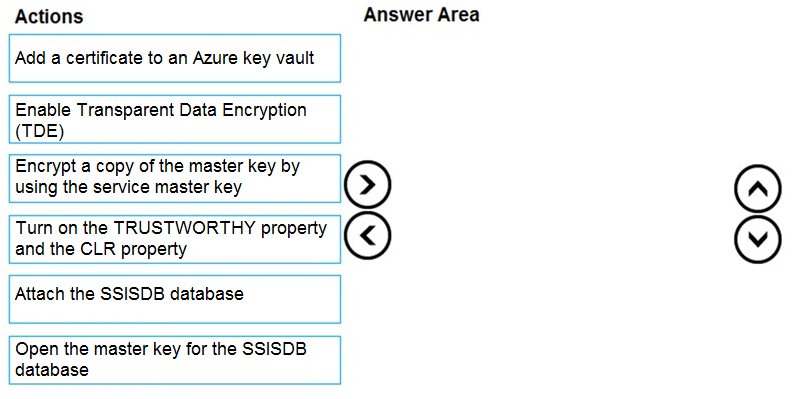
Which four actions should you perform in sequence to resolve the issue? To answer, move the appropriate actions from the list of actions to the answer area and arrange them in the correct.
Select and Place:
Correct Answer:
See interactive view.
Explanation:
The AI assistant agrees with the suggested answer and the conclusion from the discussion summary. The correct sequence of actions to resolve the issue of SSIS packages failing after the `master` database loss and to restore SSISDB functionality is:
- Step 1: Attach the SSISDB database
- Step 2: Turn on the TRUSTWORTHY property and the CLR property
- Step 3: Open the master key for the SSISDB database
- Step 4: Encrypt a copy of the master key by using the service master key
Reason for choosing this answer:
The recommended sequence is the only logical and functionally correct approach, aligning with official Microsoft documentation for restoring the SSISDB catalog.
- Step 1: Attach the SSISDB database: This is the foundational and prerequisite step. Before any configurations or operations related to the SSISDB can be performed, the database itself must first be physically present and recognized by the SQL Server instance. Without attaching the database, subsequent steps, which involve modifying database properties or accessing its internal components, would be impossible.
- Step 2: Turn on the TRUSTWORTHY property and the CLR property: After the SSISDB database is attached to the SQL Server instance, these properties are essential for its proper functioning. The `TRUSTWORTHY` property allows the database to access resources outside its own scope, which is critical for SSISDB operations, especially when executing packages that interact with external components. The Common Language Runtime (CLR) property must be enabled because the SSISDB catalog heavily relies on CLR assemblies for its internal procedures and functions. These properties are database-specific settings and can only be configured once the database exists on the instance.
- Step 3: Open the master key for the SSISDB database: The SSISDB catalog encrypts sensitive data, such as package connection strings and credentials, using a database master key. After the database is attached and its essential properties are set, this master key must be opened to allow the SSISDB to decrypt and access its encrypted data. This typically involves providing the password used when the SSISDB was originally created.
- Step 4: Encrypt a copy of the master key by using the service master key: This is a crucial security step. Once the database master key is opened, it should then be encrypted by the SQL Server instance's Service Master Key (SMK). This ensures that the database master key itself is securely protected by the SMK, and it also allows the SSISDB to be automatically decrypted and function correctly when the SQL Server service starts, without requiring manual intervention to open the key each time. This provides robust data protection and seamless operation of the catalog post-restoration.
Reason for not choosing the other answers:
The discussion summary correctly highlights the flaws in alternative proposed sequences:
- Proposing to open and encrypt the master key (F and C) before enabling TRUSTWORTHY and CLR properties (D): This order is incorrect because the database's fundamental operational properties (TRUSTWORTHY and CLR) are prerequisites for the full functionality of the SSISDB, including its ability to properly handle cryptographic operations. While security is paramount, the logical flow dictates that essential database configurations should be in place before delving into internal cryptographic key management.
- Proposing to enable TRUSTWORTHY and CLR (D) before attaching the database (E): This is functionally impossible. The `TRUSTWORTHY` and `CLR` properties are settings applied to a specific database. If the SSISDB database has not yet been attached to the SQL Server instance, there is no database object to which these properties can be applied, rendering this sequence unworkable.
Citations:
- SSIS Catalog
https://docs.microsoft.com/en-us/sql/integration-services/catalog/ssis-catalog
-
Question 3
You have an Azure SQL database that contains a table named factSales. FactSales contains the columns shown in the following table.
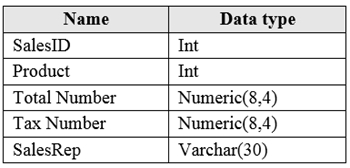
FactSales has 6 billion rows and is loaded nightly by using a batch process. You must provide the greatest reduction in space for the database and maximize performance.
Which type of compression provides the greatest space reduction for the database?
- A. page compression
- B. row compression
- C. columnstore compression
- D. columnstore archival compression
Correct Answer:
D
Explanation:
The AI assistant agrees with the suggested answer: D. Columnstore archival compression.
Reasoning for choosing this answer:
The question presents two key requirements for the `factSales` table, which has 6 billion rows: "greatest reduction in space for the database" and "maximize performance." While these two goals can sometimes be in tension, the use of the superlative "greatest" for space reduction points directly to Columnstore archival compression (option D).
Columnstore archival compression is specifically designed to provide the highest level of data compression available for columnstore indexes in Azure SQL Database. It employs the XPRESS9 compression algorithm, which delivers a significantly higher compression ratio than standard columnstore compression. For a massive table of 6 billion rows, achieving the absolute maximum space reduction is crucial for managing storage costs and optimizing database footprint. While it is true that archival compression results in slower data access and higher CPU consumption compared to standard columnstore compression, this trade-off is accepted when the primary goal is extreme data compression, often for historical or less frequently accessed data within a very large analytical dataset. Given the explicit demand for the "greatest reduction in space," this option uniquely fulfills that requirement. Columnstore indexes inherently maximize performance for analytical workloads on large datasets compared to rowstore indexes, and archival compression extends this, albeit with a performance penalty relative to unarchived columnstore data.
Reasons for not choosing the other answers:
-
A. Page compression: Page compression is a rowstore compression method. While it provides some space savings over uncompressed data or row compression, it is substantially less effective at reducing space compared to columnstore compression types, especially for a large analytical fact table with billions of rows. Furthermore, rowstore indexes are not optimized for the same level of analytical query performance as columnstore indexes.
-
B. Row compression: Row compression is the most basic form of rowstore compression and offers the least amount of space reduction among the given options. It would be highly inefficient for a table of this scale, providing minimal space savings and no significant performance benefits for analytical queries compared to columnstore indexes.
-
C. Columnstore compression: Standard columnstore compression is an excellent choice for large analytical fact tables. It provides significant space reduction (often 10x more effective than rowstore indexes) and delivers exceptional performance for analytical queries by enabling batch mode execution and data skipping. For many scenarios, this option strikes an optimal balance between compression and performance. However, the question specifically asks for the "greatest" reduction in space. Columnstore archival compression (D) offers an even higher level of compression than standard columnstore compression, making it the definitive answer when the absolute maximum space reduction is the explicit requirement. While standard columnstore compression would likely provide better overall query performance, it does not achieve the "greatest" space reduction as strictly as archival compression does.
Citations:
- Columnstore Index Architecture
https://learn.microsoft.com/en-us/sql/relational-databases/indexes/columnstore-indexes-overview?view=sql-server-ver16#columnstore-index-architecture
- Data Compression
https://learn.microsoft.com/en-us/sql/relational-databases/data-compression/data-compression?view=sql-server-ver16
- Columnstore Index Data Warehousing
https://learn.microsoft.com/en-us/sql/relational-databases/performance/columnstore-indexes-data-warehousing?view=sql-server-ver16
-
Question 4
You have a Microsoft SQL Server 2019 database named DB1 that uses the following database-level and instance-level features.
✑ Clustered columnstore indexes
✑ Automatic tuning
✑ Change tracking
✑ PolyBase
You plan to migrate DB1 to an Azure SQL database.
What feature should be removed or replaced before DB1 can be migrated?
- A. Clustered columnstore indexes
- B. PolyBase
- C. Change tracking
- D. Automatic tuning
Correct Answer:
B
Explanation:
The AI assistant agrees with the suggested answer B, which states that PolyBase should be removed or replaced before migrating DB1 to an Azure SQL Database.
The reason for choosing this answer is that PolyBase is a feature of SQL Server and Azure Synapse Analytics that is fundamentally not supported in Azure SQL Database (referring to the single database or elastic pool deployment models). PolyBase allows SQL Server to process Transact-SQL queries that read data from external data sources such as Hadoop, Azure Blob Storage, or other relational databases. Azure SQL Database is a platform-as-a-service (PaaS) offering primarily designed for relational database workloads, and its architecture does not include the distributed query processing capabilities for diverse external data sources that the full PolyBase framework provides in SQL Server on-premises or Azure Synapse Analytics. While Azure SQL Database does support external tables for querying data residing in Azure Blob Storage or Azure Data Lake Storage, this is achieved through external data sources using mechanisms like SAS tokens or managed identities, which is a more limited scope compared to the broad PolyBase functionality found in SQL Server or Azure Synapse Analytics. Therefore, any existing functionality in DB1 relying on the comprehensive PolyBase features would need to be re-architected using alternative methods or other Azure data services.
The reasons for not choosing the other answers are as follows:
- A. Clustered columnstore indexes: This feature is fully supported in Azure SQL Database. Clustered columnstore indexes are designed to improve performance for analytical and data warehousing workloads by storing and processing data in a columnar format.
- C. Change tracking: This feature is fully supported in Azure SQL Database. Change tracking provides a lightweight and efficient mechanism to track changes made to tables in a database, allowing applications to easily identify and retrieve modified data.
- D. Automatic tuning: This feature is not only supported but is a core intelligent performance feature of Azure SQL Database. Automatic tuning continuously monitors the workload and can automatically apply performance recommendations, such as creating or dropping indexes, or correcting query plan regressions, to optimize query performance without requiring manual intervention.
Based on the native feature set of Azure SQL Database, PolyBase is the only listed feature that would necessitate removal or a significant architectural change before migration.
Citations
- Overview of PolyBase in SQL Server
https://learn.microsoft.com/en-us/sql/relational-databases/polybase/polybase-guide?view=sql-server-ver16
- Differences between SQL Server, Azure SQL Database, and Azure SQL Managed Instance
https://learn.microsoft.com/en-us/azure/azure-sql/database/transact-sql-information?view=azuresql
- Columnstore indexes: Overview
https://learn.microsoft.com/en-us/sql/relational-databases/indexes/columnstore-indexes-overview?view=sql-server-ver16
- Automatic tuning in Azure SQL Database
https://learn.microsoft.com/en-us/azure/azure-sql/database/automatic-tuning-overview?view=azuresql
- Change tracking in SQL Server and Azure SQL Database
https://learn.microsoft.com/en-us/sql/relational-databases/track-changes/about-change-tracking?view=sql-server-ver16
-
Question 5
You have a Microsoft SQL Server 2019 instance in an on-premises datacenter. The instance contains a 4-TB database named DB1.
You plan to migrate DB1 to an Azure SQL Database managed instance.
What should you use to minimize downtime and data loss during the migration?
- A. distributed availability groups
- B. database mirroring
- C. Always On Availability Group
- D. Azure Database Migration Service
Correct Answer:
D
Explanation:
The AI assistant agrees with the suggested answer D.
Reason for choosing this answer:
Azure Database Migration Service (DMS) is the dedicated and recommended tool by Microsoft for migrating on-premises SQL Server databases to Azure SQL Managed Instance, especially for large databases like DB1 (4-TB) where minimizing downtime is critical. DMS supports online migrations, which means the source database remains operational and accessible to applications during most of the migration process. Downtime is limited to a brief cutover phase, significantly reducing the impact on business operations. This directly addresses the requirement to minimize both downtime and data loss during the migration, ensuring data integrity throughout the process. DMS provides a comprehensive framework for assessment, migration, and post-migration validation, making it the most suitable service for this scenario.
While the discussion correctly highlights the Managed Link feature for SQL Server 2019/2022 as an excellent option for near-zero downtime migrations to Azure SQL Managed Instance (which internally leverages distributed availability groups), this specific feature or "Managed Link" as an option is not available in the given choices. In its absence, Azure Database Migration Service remains the primary and most encompassing service for online migrations to Azure SQL Managed Instance.
Reasons for not choosing the other answers:
- A. distributed availability groups: Distributed Availability Groups (DAGs) are a feature in SQL Server 2016 and later for high availability and disaster recovery across different SQL Server Availability Groups. While the Managed Link feature for SQL Server 2019/2022 to Azure SQL Managed Instance *uses* distributed availability groups for replication, "distributed availability groups" by themselves are a technology component for replication and high availability, not the comprehensive end-to-end migration *service* that orchestrates the entire process including cutover, which DMS provides. Therefore, it is not the most direct answer for "What should you use" as a migration tool.
- B. database mirroring: Database mirroring is a deprecated feature in SQL Server, succeeded by Always On Availability Groups. It is not a recommended or supported method for migrating a production database, especially a large one, to Azure SQL Managed Instance with minimal downtime. Its limitations and deprecation make it an unsuitable choice for modern cloud migrations.
- C. Always On Availability Group: Always On Availability Groups (AGs) are a high availability and disaster recovery solution for SQL Server. While they ensure data synchronization between replicas, they are not inherently a *migration service* to a PaaS offering like Azure SQL Managed Instance. While AGs can be extended to Azure Virtual Machines or used as a source for migration tools, they do not facilitate the direct migration and cutover to Azure SQL Managed Instance as a managed service. Tools like Azure Database Migration Service leverage underlying technologies (which might include AGs or transactional replication) to achieve the migration goal.
Citations
- Azure Database Migration Service overview
https://learn.microsoft.com/en-us/azure/dms/dms-overview
- Online migration to Azure SQL Managed Instance with Azure Data Migration Service
https://learn.microsoft.com/en-us/azure/dms/tutorial-sql-server-to-managed-instance-online-dms
- Migrate SQL Server to Azure SQL Managed Instance with the Azure SQL Migration extension
https://learn.microsoft.com/en-us/azure/dms/sql-server-managed-instance-online-migration-extend-dms
-
Question 6
HOTSPOT -
You have an on-premises Microsoft SQL Server 2016 server named Server1 that contains a database named DB1.
You need to perform an online migration of DB1 to an Azure SQL Database managed instance by using Azure Database Migration Service.
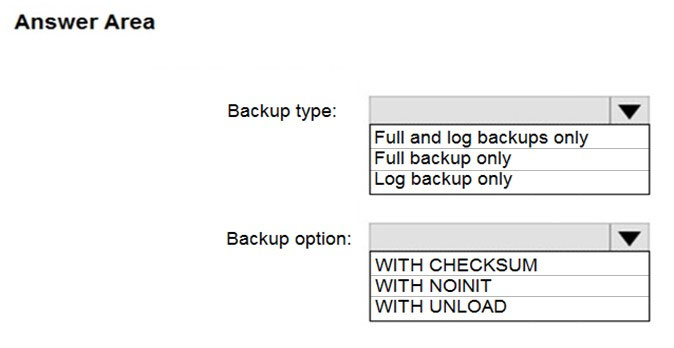
How should you configure the backup of DB1? To answer, select the appropriate options in the answer area.
NOTE: Each correct selection is worth one point.
Hot Area:
Correct Answer:
See interactive view.
Explanation:
The AI assistant has evaluated the question content, the suggested answer, and the discussion content in light of professional knowledge for the DP-300 exam, specifically concerning Azure Database Migration Service (DMS) for online migrations to Azure SQL Managed Instance.
For Box 1 (Backup Type): The AI assistant suggests another answer than the one provided in the question's suggested answer.
The correct selection for Box 1 should be: Full, differential, and log backups.
For Box 2 (Backup Option): The AI assistant agrees with the suggested answer provided in the question content.
The correct selection for Box 2 should be: WITH CHECKSUM.
Reason for choosing this answer:
-
For Box 1: Full, differential, and log backups
The reason for choosing this answer is based on the most current and comprehensive guidance from Microsoft documentation for online migrations using Azure Database Migration Service to Azure SQL Managed Instance. An online migration strategy requires an initial full backup, followed by continuous transaction log backups to ensure minimal downtime and real-time synchronization. Differential backups are highly recommended and often crucial in this process because they capture all changes since the last full backup. This significantly reduces the number of transaction log backups that need to be restored, especially for large databases or during extended migration periods, thereby optimizing the synchronization phase and accelerating potential recovery operations. This combined strategy ensures data consistency, efficiency, and robustness for a successful online migration. It is also explicitly stated in the Azure documentation that "Take full, differential, and log backups to separate backup files."
-
For Box 2: WITH CHECKSUM
The reason for choosing this answer is that Azure Database Migration Service (DMS) relies on the standard SQL Server backup and restore mechanism to transfer databases. DMS explicitly requires that all backup files are created with the WITH CHECKSUM option. This option ensures the integrity of the backup data by adding a checksum to each page and verifying it during the backup operation. This verification is critical for DMS to ensure that the backup files are not corrupted before attempting to restore them on the target Azure SQL Managed Instance, which is vital for a reliable and successful migration.
Reason for not choosing the other answers:
-
For Box 1:
-
Full and log backups only: While essential for online migration, this option is not the most comprehensive or fully optimized strategy as per Microsoft's latest recommendations for DMS online migrations. Omitting differential backups can lead to longer synchronization times or more complex recovery if a full re-initialization is needed, especially for large databases or prolonged migrations, as the entire log chain might need to be replayed. The official documentation explicitly includes differential backups in the recommended set for online migrations.
-
Full backups only: This option is suitable only for offline migrations, where the database is taken offline during the entire migration process. It does not provide the continuous synchronization capabilities required for an online migration, which aims to minimize downtime.
-
Full and differential backups only: This strategy is insufficient for an online migration. While it captures changes efficiently up to a point, it lacks the continuous, real-time synchronization provided by transaction log backups, which are essential for capturing ongoing changes and achieving minimal downtime during cutover.
-
For Box 2:
-
NOINIT: This option specifies that the backup set is appended to an existing media set. Azure Database Migration Service does not support backups that are appended to a single backup file; each backup must be in a separate file. Therefore, `NOINIT` is not suitable.
-
UNLOAD: This option is used for tape devices to specify that the tape should be automatically rewound and unloaded after the backup is finished. It is irrelevant to the integrity requirements or file structure needed for backups consumed by DMS.
-
NO_TRUNCATE: This option prevents the truncation of the transaction log after a log backup. While it relates to log backups, it is typically used for specific recovery scenarios (e.g., restoring a damaged database to the point of failure) and is not a general requirement for DMS to consume the backups for migration. The critical requirement for DMS is the integrity check provided by `WITH CHECKSUM`.
Citations
- Azure Database Migration Service - Known issues for online migrations to Azure SQL Managed Instance
https://docs.microsoft.com/en-us/azure/dms/known-issues-azure-sql-db-managed-instance-online
- Tutorial: Migrate SQL Server to Azure SQL Managed Instance online using DMS
https://learn.microsoft.com/en-us/azure/dms/tutorial-sql-server-to-sql-managed-instance-online-dms
-
Question 7
DRAG DROP -
You have a resource group named App1Dev that contains an Azure SQL Database server named DevServer1. DevServer1 contains an Azure SQL database named DB1. The schema and permissions for DB1 are saved in a Microsoft SQL Server Data Tools (SSDT) database project.
You need to populate a new resource group named App1Test with the DB1 database and an Azure SQL Server named TestServer1. The resources in App1Test must have the same configurations as the resources in App1Dev.
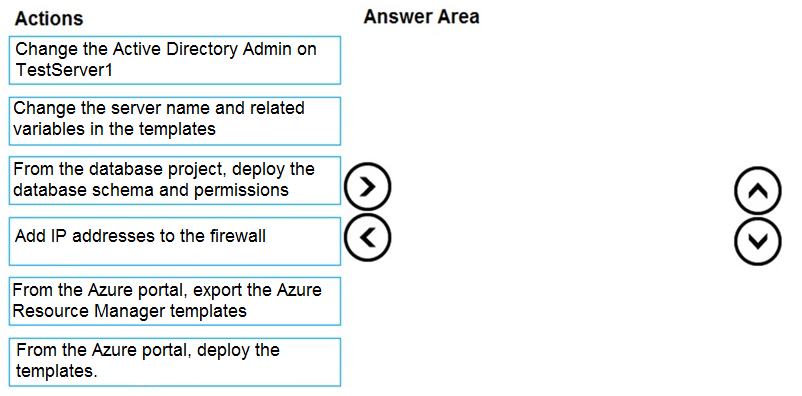
Which four actions should you perform in sequence? To answer, move the appropriate actions from the list of actions to the answer area and arrange them in the correct order.
Select and Place:
Correct Answer:
See interactive view.
Explanation:
The AI assistant agrees with the suggested answer based on the provided question context, discussion consensus, and standard best practices for Azure SQL Database deployment.
The recommended sequence of actions to populate the new resource group App1Test with DB1 database and an Azure SQL Server named TestServer1, ensuring the same configurations as App1Dev, is as follows:
- Export the Azure Resource Manager templates from the Azure portal.
- Change the server name and related variables in the exported templates.
- Deploy the modified templates from the Azure portal.
- Deploy the database schema and permissions from the database project.
Reason for choosing this answer:
This four-step sequence represents a
comprehensive, automated, and repeatable method for provisioning Azure SQL databases and deploying their schema. This approach aligns with Infrastructure as Code (IaC) principles and best practices for database lifecycle management (DLM) in Azure, ensuring
consistency and efficiency when replicating environments.
- Exporting the Azure Resource Manager templates from the Azure portal: This initial step captures the existing configuration of DevServer1 and DB1, including server properties, database settings, firewall rules, and other associated resources. ARM templates allow for defining the desired state of Azure resources in a declarative way.
- Changing the server name and related variables in the exported templates: The exported template will contain hardcoded values from the source environment (App1Dev, DevServer1). To deploy to a new environment (App1Test, TestServer1), these specific values (like server name, resource group name, possibly location) need to be parameterized or directly modified within the template. This makes the template reusable for different environments.
- Deploying the modified templates from the Azure portal: This action provisions the new Azure SQL Server (TestServer1) and the new Azure SQL Database (DB1, or a copy with the same name if suitable) in the target resource group (App1Test) based on the modified ARM template. This ensures that the infrastructure components are identical in configuration to the source environment.
- Deploying the database schema and permissions from the database project: After the infrastructure is provisioned, the schema (tables, views, stored procedures, functions, etc.) and permissions, which are maintained in the SQL Server Data Tools (SSDT) database project, are deployed to the newly created database. SSDT projects are crucial for source control, versioning, and repeatable deployments of database objects, ensuring that the logical structure of DB1 in App1Test is an exact replica of the schema defined for DB1.
This method is preferred as it combines infrastructure automation (ARM templates) with database object automation (SSDT projects), providing a robust and manageable solution for environment replication.
Reason for not choosing other answers:
The discussion summary explicitly states that
no other significant opinions or alternative solutions were presented during the extensive discussion period from Q3 2023 to Q4 2024. This indicates a strong consensus that the outlined ARM template and SSDT deployment approach is the most effective and widely accepted method for this scenario.
Alternative approaches, such as entirely manual creation of resources and database objects, would be time-consuming, prone to human error, and lack repeatability, making them unsuitable for consistent environment provisioning. Relying solely on database backup/restore might transfer data but typically does not automate the creation of the server, database configuration, or the precise application of schema and permissions from an SSDT project in an Infrastructure as Code manner.
Citations:
- Export an Azure Resource Manager template from the Azure portal, https://learn.microsoft.com/en-us/azure/azure-resource-manager/templates/export-template-portal?tabs=bicep
- Deploy resources with ARM templates and Azure portal, https://learn.microsoft.com/en-us/azure/azure-resource-manager/templates/deploy-portal
- Develop database projects by using SQL Server Data Tools (SSDT), https://learn.microsoft.com/en-us/sql/ssdt/develop-database-project-overview?view=sql-server-ver16#publishing-database-projects
-
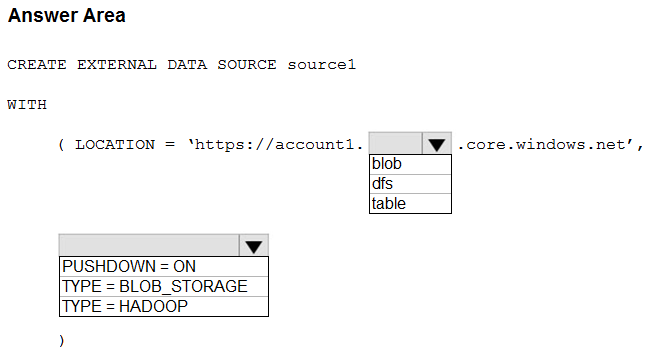
Question 8
HOTSPOT -
You have an Azure Synapse Analytics dedicated SQL pool named Pool1 and an Azure Data Lake Storage Gen2 account named Account1.
You plan to access the files in Account1 by using an external table.
You need to create a data source in Pool1 that you can reference when you create the external table.
How should you complete the Transact-SQL statement? To answer, select the appropriate options in the answer area.
NOTE: Each correct selection is worth one point.
Hot Area:
Correct Answer:
See interactive view.
Explanation:
The AI assistant agrees with the suggested answer provided.
Reason for choosing this answer:
- For Box 1 (LOCATION endpoint): dfs
When accessing Azure Data Lake Storage Gen2 (ADLS Gen2) from an Azure Synapse Analytics dedicated SQL pool, the correct endpoint to specify in the LOCATION URL of the external data source is dfs. ADLS Gen2 provides a hierarchical namespace on top of Azure Blob Storage, allowing it to behave more like a traditional file system. This hierarchical capability is exposed through the dfs.core.windows.net endpoint. This enables features such as atomic directory operations and POSIX-compliant access control lists, which are crucial for analytical workloads. The standard URI for ADLS Gen2 typically follows the format https://.dfs.core.windows.net//. The abfss:// (Azure Blob File System driver with SSL) URI scheme is also commonly used for secure access to ADLS Gen2 and internally resolves to this dfs endpoint.
- For Box 2 (TYPE): TYPE = HADOOP
For external data sources created in Azure Synapse Analytics dedicated SQL pools that point to Azure Blob Storage or Azure Data Lake Storage Gen2, the TYPE = HADOOP option is the correct and required setting. This configuration indicates that the external data source will interact with a Hadoop-compatible distributed file system. Both Azure Blob Storage and ADLS Gen2 are designed to be compatible with the Hadoop ecosystem, allowing Synapse SQL pools to efficiently query and process data stored within them. This type enables the SQL engine to understand and access the underlying storage structure correctly.
Reason for not choosing other answers:
- Not 'blob' for Box 1: While the
blob.core.windows.net endpoint is used for standard Azure Blob Storage containers (general-purpose blob storage without the hierarchical namespace feature enabled), Azure Data Lake Storage Gen2 specifically leverages the dfs.core.windows.net endpoint. This distinction is critical because `dfs` provides the hierarchical file system semantics that differentiate ADLS Gen2 from basic blob storage. Using `blob` for an ADLS Gen2 account would be incorrect for leveraging its full capabilities and might lead to connectivity or path resolution issues.
- Other TYPE options: Although not explicitly presented as alternatives in the image, other `TYPE` values for `CREATE EXTERNAL DATA SOURCE` (if they existed for different storage technologies) would not be applicable here. The `HADOOP` type is specifically designed for interoperability with Azure Storage (Blob and ADLS Gen2) within the context of Azure Synapse Analytics dedicated SQL pools.
Citations
- Create external table using dedicated SQL pool
https://docs.microsoft.com/en-us/azure/synapse-analytics/sql/develop-tables-external-tables
- Create external table using dedicated SQL pool (specifically for HADOOP type)
https://docs.microsoft.com/en-us/azure/synapse-analytics/sql/develop-tables-external-tables?tabs=hadoop
-
Question 9
HOTSPOT -
You plan to develop a dataset named Purchases by using Azure Databricks. Purchases will contain the following columns:
✑ ProductID
✑ ItemPrice
✑ LineTotal
✑ Quantity
✑ StoreID
✑ Minute
✑ Month
✑ Hour
✑ Year
✑ Day
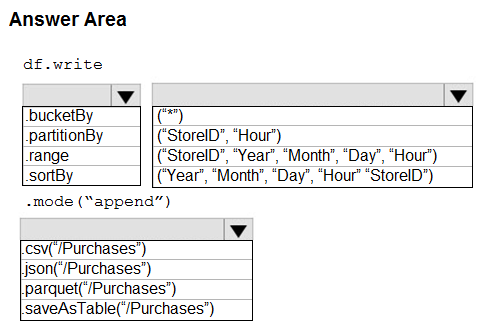
You need to store the data to support hourly incremental load pipelines that will vary for each StoreID. The solution must minimize storage costs.
How should you complete the code? To answer, select the appropriate options in the answer area.
NOTE: Each correct selection is worth one point.
Hot Area:
Correct Answer:
See interactive view.
Explanation:
The AI assistant agrees with the suggested answer. The proposed solution effectively addresses the requirements for supporting hourly incremental load pipelines that vary for each StoreID, while also minimizing storage costs in Azure Databricks.
Reason for choosing this answer:
The provided solution for completing the code is optimal for the described scenario:
- Box 1: .partitionBy
This is the standard Spark DataFrame API method used to specify columns for data partitioning. Partitioning physically organizes data on disk, creating a hierarchical directory structure based on the values of the specified columns. This is crucial for optimizing data access and management, especially in large-scale data lakes.
- Box 2: ("Year","Month","Day","Hour","StoreID")
This selection of partition keys is highly effective because:
- Efficient Incremental Loads: The requirement specifies "hourly incremental load pipelines that will vary for each StoreID." By partitioning down to `Year`, `Month`, `Day`, `Hour`, and `StoreID`, new data for a specific store at a particular hour will be written to a very precise and small set of files within a deep directory path (e.g., `/Purchases/Year=2023/Month=10/Day=26/Hour=14/StoreID=XYZ/`). This minimizes the amount of data that needs to be scanned or processed during append operations, making incremental updates highly efficient.
- Optimized Query Performance (Predicate Pushdown): When users query the `Purchases` dataset, especially filtering by specific time ranges or StoreIDs, Spark can leverage partition pruning (predicate pushdown). This means Spark will only read the relevant partitions, skipping entire directories of data that do not match the query filters. This significantly reduces I/O operations, speeds up queries, and consequently lowers compute costs.
- Minimizing Storage Costs: While partitioning itself doesn't directly reduce the byte size of data (Parquet format does that), efficient partitioning indirectly minimizes costs by:
- Reducing data scanned during queries, which lowers compute costs associated with data processing.
- Facilitating better management of file sizes. For hourly loads across many stores, without proper partitioning, you could end up with a few very large files that are difficult to update incrementally, or many tiny files (small file problem). Granular partitioning helps in creating appropriately sized files per partition.
- Parquet format, specified in Box 3, is a columnar storage format that offers excellent compression and encoding schemes, directly contributing to minimized storage footprint.
- Flexibility in Key Order: As noted in the discussion, the order of `StoreID` first or `Year` first (`("StoreID","Year","Month","Day","Hour")` vs. `("Year","Month","Day","Hour","StoreID")`) generally yields similar benefits for this type of query pattern. The suggested order is perfectly valid.
- Box 3: .parquet("/Purchases")
This specifies that the data should be written in Parquet format to the `/Purchases` directory. Parquet is the industry-standard columnar storage format for big data workloads due to its superior read performance (especially for analytical queries that select a subset of columns), excellent compression capabilities, and schema evolution support. It aligns perfectly with the goal of minimizing storage costs and supporting efficient analytical processing.
Reason for not choosing other answers (if implied):
Simpler partitioning schemes, such as only by `("StoreID")` or `("Hour")`, would not be as effective for this scenario. Partitioning only by `StoreID` would lead to very large partitions that would still require scanning all data within a store's partition for hourly updates or time-based queries. Conversely, partitioning only by a time component without `StoreID` would not efficiently handle the "vary for each StoreID" requirement for incremental loads, potentially forcing updates across a broader range of files. The composite key ensures the most granular and efficient data organization for the specified hourly, store-specific incremental loads.
This question is indeed more aligned with the DP-203 (Azure Data Engineer Associate) exam, as it directly involves data engineering concepts like data partitioning and efficient data storage formats in Azure Databricks (Spark). While DP-300 focuses on database administration, understanding efficient data handling in related data platforms can be beneficial.
Citations:
- How to Partition and Write DataFrame in Spark without Deleting Partitions with No New Data
https://intellipaat.com/community/11744/how-to-partition-and-write-dataframe-in-spark-without-deleting-partitions-with-no-new-data
- Apache Spark Partitioning Strategies – A Comprehensive Guide
https://www.databricks.com/blog/2018/09/18/apache-spark-partitioning-strategies-a-comprehensive-guide.html
- Optimizing Parquet Files for Apache Spark
https://www.databricks.com/blog/2021/06/28/optimizing-parquet-files-for-apache-spark.html
-
Question 10
You are designing a streaming data solution that will ingest variable volumes of data.
You need to ensure that you can change the partition count after creation.
Which service should you use to ingest the data?
- A. Azure Event Hubs Standard
- B. Azure Stream Analytics
- C. Azure Data Factory
- D. Azure Event Hubs Dedicated
Correct Answer:
D
Explanation:
The AI expert agrees with the suggested answer, D.
Reason for choosing this answer:
The question specifies the need to ingest variable volumes of data for a streaming solution and, critically, requires the ability to change the partition count after creation. Azure Event Hubs is the primary service designed for ingesting large volumes of streaming data. Among its various tiers, the Azure Event Hubs Dedicated tier is the only one that allows for the partition count to be changed after the Event Hub has been created. This flexibility is crucial for adapting to variable data volumes and scaling requirements over time without re-creating the entire Event Hub. The Dedicated tier provides single-tenant deployment and is designed for demanding, high-throughput scenarios, offering the necessary control over resources, including the dynamic adjustment of partitions.
Reasons for not choosing the other answers:
-
A. Azure Event Hubs Standard: While Azure Event Hubs Standard is a robust solution for streaming data ingestion, it does not meet the explicit requirement of changing the partition count after creation. For the Standard and Premium tiers, the number of partitions is fixed when the Event Hub is created and cannot be altered later. This limitation makes it unsuitable for scenarios requiring post-creation partition adjustments.
-
B. Azure Stream Analytics: Azure Stream Analytics is a real-time analytics engine primarily used for processing and analyzing streaming data, not for data ingestion itself. It typically consumes data from sources like Azure Event Hubs, Azure IoT Hub, or Azure Blob Storage. Its purpose is real-time data transformation, aggregation, and analysis, not as the initial ingestion point with adjustable partitions.
-
C. Azure Data Factory: Azure Data Factory is a cloud-based ETL (Extract, Transform, Load) and data integration service. It is designed for orchestrating and automating data movement and transformation across various data stores, typically for batch processing or scheduled data pipelines. It is not optimized for real-time streaming ingestion with variable volumes and dynamic partition management as required by this scenario.
Citations:
- Azure Event Hubs — A Big Data Streaming Platform
https://learn.microsoft.com/en-us/azure/event-hubs/event-hubs-overview
- Scale Azure Event Hubs throughput units automatically
https://learn.microsoft.com/en-us/azure/event-hubs/event-hubs-auto-inflate
- Azure Event Hubs Dedicated tier overview
https://learn.microsoft.com/en-us/azure/event-hubs/event-hubs-dedicated-overview
About This Practice Material
This is independent study material to help you prepare for the Microsoft Azure Database Admin Associate (DP-300) exam. It is not affiliated with, endorsed by, or sponsored by Microsoft or any certification body. All product names, certification names, trademarks, and exam codes are the property of their respective owners and are used here for descriptive (nominative) purposes only.
We do not provide real exam questions, brain dumps, or any guarantee of passing. All questions are original practice items compiled from publicly available community discussions and AI-generated explanations, aligned to the publicly available exam objectives.