Microsoft D365 Customer Service Functional Assoc (MB-230) Practice Questions & Study Guide
The Microsoft Certified: Dynamics 365 Customer Service Functional Consultant Associate (MB-230) is the premier certification for professionals who design and manage customer service solutions using the Microsoft Dynamics 365 platform. As organizations increasingly rely on CRM systems to drive their customer relationships and business operations, the ability to design robust, scalable, and secure customer service solutions has become a highly sought-after skill. The MB-230 validates your expertise in leveraging the full range of Dynamics 365 Customer Service features to provide seamless and efficient support experiences. It is an essential credential for any professional looking to lead in the age of modern customer service.
Overview of the Exam
The MB-230 exam is a rigorous assessment that covers the implementation and configuration of Microsoft Dynamics 365 Customer Service. It is a 120-minute exam consisting of approximately 40-60 questions. The exam is designed to test your technical expertise and your ability to apply Microsoft best practices to real-world customer service scenarios. From case management and knowledge management to service scheduling and service level agreements (SLAs), the MB-230 ensures that you have the skills necessary to build and maintain robust customer service infrastructures. Achieving the MB-230 certification proves that you are a highly skilled professional who can handle the technical demands of enterprise-grade customer service.
Target Audience
The MB-230 is intended for professionals who have a solid understanding of Microsoft Dynamics 365 and customer service operations. It is ideal for individuals in roles such as:
1. Functional Consultants
2. Customer Service Managers
3. Business Analysts
4. Systems Administrators
5. Solutions Architects
To be successful, candidates should have at least one to three years of experience in enterprise-grade customer service and a thorough understanding of the Dynamics 365 platform and its features.
Key Topics Covered
The MB-230 exam is organized into several main domains:
1. Configure Customer Service (20-25%): Configuring organization-wide settings and managing users and roles.
2. Manage Cases and Knowledge Management (20-25%): Designing and building effective case management and knowledge base solutions.
3. Manage Entitlements and Service Level Agreements (15-20%): Configuring and managing entitlements and SLAs to support customer service goals.
4. Manage Service Scheduling (10-15%): Configuring and managing service scheduling features.
5. Manage Voice of the Customer (10-15%): Configuring and managing customer feedback solutions.
6. Configure Customer Service Insights and Connected Customer Service (10-15%): Leveraging advanced insights and IoT integration to improve customer service.
Benefits of Getting Certified
Earning the MB-230 certification provides several significant benefits. First, it offers industry recognition of your specialized expertise in Microsoft Dynamics 365 technologies. As a leader in the CRM industry, Microsoft skills are in high demand across the globe. Second, it can lead to increased career opportunities and higher salary potential in a variety of roles. Third, it demonstrates your commitment to professional excellence and your dedication to staying current with the latest customer service practices. By holding this certification, you join a global community of Microsoft professionals and gain access to exclusive resources and continuing education opportunities.
Why Choose NotJustExam.com for Your MB-230 Prep?
The MB-230 exam is challenging and requires a deep understanding of Microsoft's complex features. NotJustExam.com is the best resource to help you master this material. Our platform offers an extensive bank of practice questions that are designed to mirror the actual exam’s format and difficulty.
What makes NotJustExam.com stand out is our focus on interactive logic and the accuracy of our explanations. We don’t just provide a list of questions; we provide a high-quality learning experience. Every question in our bank includes an in-depth, accurate explanation that helps you understand the technical reasoning behind the correct customer service solution. This ensures that you are truly learning the material and building the confidence needed to succeed on the exam. Our content is regularly updated to reflect the latest Microsoft features and exam updates. With NotJustExam.com, you can approach your MB-230 exam with the assurance that comes from thorough, high-quality preparation. Start your journey toward becoming a Certified Functional Consultant today with us!
Free Microsoft D365 Customer Service Functional Assoc (MB-230) Practice Questions Preview
-
Question 1
Note: This question is part of a series of questions that present the same scenario. Each question in the series contains a unique solution that might meet the stated goals. Some question sets might have more than one correct solution, while others might not have a correct solution.
After you answer a question in this section, you will NOT be able to return to it. As a result, these questions will not appear in the review screen.
You are configuring a business process flow for a case entity.
All cases must be flagged for review.
You need to complete configuration of the business process flow.
Solution: Set the input parameter type as Option set for the action.
Does the solution meet the goal?
Correct Answer:
B
Explanation:
The AI agrees with the suggested answer: No.
Reasoning: Setting the input parameter type as an Option set for the action will not meet the goal. Business Process Flow (BPF) action steps have limitations on the types of input parameters they can accept. Option sets, Entity, and Entity Reference types are specifically not allowed.
To achieve the goal of flagging all cases for review within a BPF, a more suitable approach would be to use a "Two Options" field (Yes/No) to indicate whether a case requires review. This field can then be incorporated into the BPF stages and steps.
Why other answers are incorrect:
- The "Yes" answer is incorrect because using an Option set as an input parameter for a BPF action step is not a supported configuration.
Citations:
- Business process flows overview, https://learn.microsoft.com/en-us/power-automate/business-process-flows-overview
- Blog on BPF limitations, [Invalid URL removed]
-
Question 2
Note: This question is part of a series of questions that present the same scenario. Each question in the series contains a unique solution that might meet the stated goals. Some question sets might have more than one correct solution, while others might not have a correct solution.
After you answer a question in this section, you will NOT be able to return to it. As a result, these questions will not appear in the review screen.
You are configuring a business process flow for a case entity.
All cases must be flagged for review.
You need to complete configuration of the business process flow.
Solution: For a new action named Ready for review, disable the As a business process flow action step option.
Does the solution meet the goal?
Correct Answer:
B
Explanation:
The AI agrees with the suggested answer.
The suggested answer is B (No).
Reasoning:
The goal is to flag all cases for review using a business process flow. The question describes a solution where the "As a business process flow action step" option is disabled for an action named "Ready for review". Business process flows are designed to guide users through a process and automate actions. If you want to trigger an action (like "Ready for review") from within a business process flow, that action *must* be configured to run as a business process flow action step. Disabling this option would prevent the action from being triggered within the flow, thus not meeting the stated goal.
Why other answers are incorrect:
Option A (Yes) is incorrect because disabling "As a business process flow action step" will prevent the action from being executable within the business process flow, failing to meet the requirement of flagging cases for review through the configured BPF.
-
Question 3
Note: This question is part of a series of questions that present the same scenario. Each question in the series contains a unique solution that might meet the stated goals. Some question sets might have more than one correct solution, while others might not have a correct solution.
After you answer a question in this section, you will NOT be able to return to it. As a result, these questions will not appear in the review screen.
You are configuring a business process flow for a case entity.
All cases must be flagged for review.
You need to complete configuration of the business process flow.
Solution: Create an action that generates a task record that is assigned to the case reviewer and appends the text Ready for review to the case topic.
Does the solution meet the goal?
Correct Answer:
A
Explanation:
The suggested answer is A (Yes).
Reasoning: The solution proposes creating an action that generates a task record for the case reviewer and appends "Ready for review" to the case topic. This directly addresses the requirement to flag all cases for review. Creating a task ensures that the reviewer is notified, and appending the text to the case topic provides a clear indication of its review status.
Why other answers are not correct: Option B (No) is incorrect because the proposed solution effectively meets the stated goal of flagging all cases for review. The creation of a task and the modification of the case topic are both suitable methods for drawing attention to cases requiring review. There are other approach e.g. adding field in business process flow, it is more complicated than generating task.
Citations:
- Add an action to a business process flow, https://docs.microsoft.com/en-us/business-applications-release-notes/april18/microsoft-flow/add-action-business-process-flow
-
Question 4
Note: This question is part of a series of questions that present the same scenario. Each question in the series contains a unique solution that might meet the stated goals. Some question sets might have more than one correct solution, while others might not have a correct solution.
After you answer a question in this section, you will NOT be able to return to it. As a result, these questions will not appear in the review screen.
You are a Dynamics 365 for Customer Service system administrator for Contoso, Ltd.
You need to automatically create cases from emails sent to the [email protected] email address.
Solution: Configure Dynamics 365 to automatically send responses to customers when the record is created.
Does the solution meet the goal?
Correct Answer:
B
Explanation:
The AI suggests the answer is B. No.
Reasoning: The problem requires automatic case creation from emails sent to [email protected]. The proposed solution is to configure Dynamics 365 to automatically send responses to customers when a record is created. This solution only addresses sending automatic responses and does not address the core requirement of creating cases from emails. Therefore, the solution does not meet the goal.
To achieve the goal, one would typically configure Automatic Record Creation (ARC) rules within Dynamics 365 Customer Service. ARC rules allow you to define conditions that, when met by an incoming email, will automatically create a case record.
Reasons for not choosing A: Option A suggests the solution meets the goal. However, sending auto-responses doesn't create cases from emails. Therefore, option A is incorrect.
Citations:
- Dynamics 365 Automatic Record Creation Rules, https://learn.microsoft.com/en-us/dynamics365/customer-service/automatic-record-creation-rules
-
Question 5
Note: This question is part of a series of questions that present the same scenario. Each question in the series contains a unique solution that might meet the stated goals. Some question sets might have more than one correct solution, while others might not have a correct solution.
After you answer a question in this section, you will NOT be able to return to it. As a result, these questions will not appear in the review screen.
You are a Dynamics 365 for Customer Service system administrator for Contoso, Ltd.
You need to automatically create cases from emails sent to the [email protected] email address.
Solution: Create an automatic record creation and update rule. Set the Source type to Email, and then select the queue. Configure autoresponse settings.
Does the solution meet the goal?
Correct Answer:
B
Explanation:
The AI recommends the answer "No".
The suggested answer is correct because the solution describes the initial steps for creating an automatic record creation rule but omits a crucial aspect: defining the conditions that trigger case creation. Without specifying these conditions, the rule will not automatically create cases from emails sent to the [email protected] email address. The conditions are essential for evaluating incoming emails and determining whether a case should be generated.
Creating an automatic record creation rule and linking it to a queue are necessary first steps, as mentioned in the solution. Configuring auto-response settings is also relevant for informing the sender that their email has been received and a case is being processed. However, without the conditions, the rule lacks the logic to identify which emails should be converted into cases.
To create cases automatically, you must configure conditions to evaluate and actions to take on the record creation and update rule.
For example, you can set up conditions to evaluate from which email address the email was sent, then perform actions to create a record (case) once the conditions are met.
These are the key steps to automatically create cases from email messages.
- Citations:
- Automatically create cases from email, https://learn.microsoft.com/en-us/dynamics365/customer-service/automatically-create-cases-email
-
Question 6
Note: This question is part of a series of questions that present the same scenario. Each question in the series contains a unique solution that might meet the stated goals. Some question sets might have more than one correct solution, while others might not have a correct solution.
After you answer a question in this section, you will NOT be able to return to it. As a result, these questions will not appear in the review screen.
You are a Dynamics 365 for Customer Service system administrator for Contoso, Ltd.
You need to automatically create cases from emails sent to the [email protected] email address.
Solution: Create an automatic record creation and update rule. Set the Source type to Service activity, and then select the queue.
Does the solution meet the goal?
Correct Answer:
B
Explanation:
The AI agrees with the suggested answer. The suggested answer is B (No).
Reasoning: To automatically create cases from emails sent to the [email protected] email address, the source type in the automatic record creation and update rule must be set to 'Email', not 'Service activity'. Setting the source type to 'Service activity' would look for service activities to create cases, which is not the requirement in this scenario. This configuration will not monitor incoming emails and consequently fail to create cases automatically from emails sent to the specified support email address.
Why other options are incorrect:
Option A (Yes) is incorrect because the proposed solution does not align with the requirement of creating cases from incoming emails. The source type should be 'Email', not 'Service Activity', to achieve the desired outcome.
- Citations:
- Dynamics 365 Automatic Record Creation Rules - Configure Automatic Record Creation Rules in Dynamics 365, https://learn.microsoft.com/en-us/dynamics365/customer-service/configure-automatic-record-creation-rules
-
Question 7
You use Dynamics 365 for Customer Service.
You need to create business process flows.
Which three entities can you use? Each correct answer presents part of the solution.
NOTE: Each correct selection is worth one point.
- A. Goal
- B. Case
- C. Letter
- D. Social activity
- E. Rollup queries
Correct Answer:
BCD
Explanation:
Based on the question and the discussion summary, the AI agrees with the suggested answer BCD.
Reasoning: Business process flows in Dynamics 365 for Customer Service are designed to guide users through specific processes related to customer interactions and issue resolution. Cases, Letters, and Social Activities are all entities directly involved in these customer service processes, making them suitable for use in business process flows.
Here's a breakdown:
- Case (B): Cases represent customer issues or requests and are a central part of customer service operations. Business process flows are commonly used to manage the lifecycle of a case, from creation to resolution.
- Letter (C): Letters represent a form of communication with the customer, that can be automated or manually triggered during different stages of customer service.
- Social Activity (D): Social activities track interactions with customers through social media channels. Incorporating these activities into business process flows allows for a cohesive view of customer interactions across all channels.
Reasons for excluding other options:
- Goal (A): Goals are used to track progress toward specific targets and are not directly related to managing customer service processes. They are more related to sales targets, but not case management.
- Rollup Queries (E): Rollup queries are used for aggregating data and are not entities that directly participate in business process flows.
Therefore, Cases, Letters and Social activities are the correct entities for building business process flows in Dynamics 365 for Customer Service.
Important Note: Business Process Flows (BPF) are associated with a specific entity, and guide users through the steps for completing a process. Only certain entities can be enabled for Business Process Flows, generally these are the key entities within the Dynamics 365 platform.
Citations:
- Dynamics 365 Business Process Flows, https://learn.microsoft.com/en-us/dynamics365/customerengagement/on-premises/customize/business-processes-flows
-
Question 8
You are configuring a single business process flow in Dynamics 365 for Customer Service.
You need to design the business process flow.
What should you do?
- A. Merge peer branches to a single stage when merging branches.
- B. Span the process across 10 unique entities.
- C. Combine multiple conditions in a rule by using both the AND and OR operators.
- D. Use 40 steps per stage.
Correct Answer:
A
Explanation:
The AI agrees with the suggested answer, A: Merge peer branches to a single stage when merging branches.
Reasoning:
Business process flows in Dynamics 365 have limitations and best practices that guide their design. Options B and D violate these limitations. Option C is technically incorrect regarding how conditions are structured within the rules of a business process flow.
Option A is related to the design of branching business process flows. When you have a branched process, you may need to merge the branches back together at some point. Merging peer branches into a single stage is a valid design consideration to streamline the process and guide users toward a unified path after diverging for a specific condition or task. This ensures a clear and concise user experience.
Reasons for not choosing the other options:
- B. Span the process across 10 unique entities: Business process flows are typically designed to guide users through processes related to a primary entity and potentially related entities. Spanning across 10 unique, unrelated entities is not a typical or recommended design and may indicate a need to re-evaluate the process requirements. This goes against the intended use of BPFs.
- C. Combine multiple conditions in a rule by using both the AND and OR operators: While business rules in Dynamics 365 (separate from business process flows) allow complex conditions with AND and OR, the conditions within the branching logic of a business process flow are generally structured as a series of sequential checks, often represented visually as a decision tree. The ability to arbitrarily combine AND/OR operators within a single condition of a BPF branch is limited, so while you can achieve complex logic through nested branches, this statement is misleading in the context of BPFs.
- D. Use 40 steps per stage: This is an excessive number of steps for a single stage in a business process flow. Stages are meant to represent logical groupings of actions, and having 40 steps in a single stage would make it unwieldy and difficult for users to navigate. The goal is to create a streamlined and efficient user experience, and an excessive number of steps per stage defeats this purpose.
Citations:
- Business process flows overview, https://learn.microsoft.com/en-us/dynamics365/customer-service/business-process-flows-overview
-
Question 9
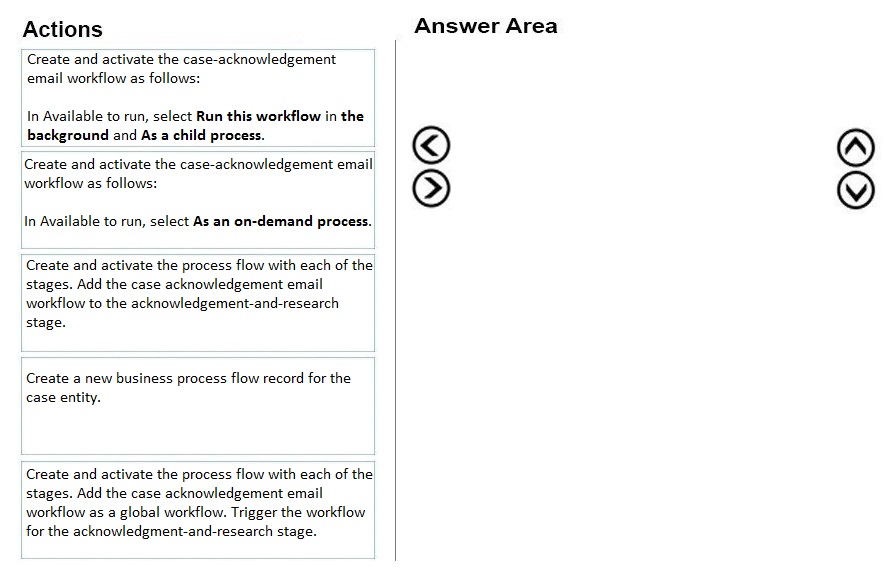
DRAG DROP -
You are a Dynamics 365 for Customer Service administrator.
Your company requires a new phone-to-case business process flow for customer service representatives to follow.
The stages are as follows:
1. Verification
2. Acknowledgement and research
3. Resolution
Customer service representatives must send an email to the customer when a case enters the acknowledgement-and-research stage.
You need to create the required business process flow and components.
Which three actions should you perform in sequence? To answer, move the appropriate actions from the list of actions to the answer area and arrange them in the correct order.
Select and Place:
Correct Answer:
See interactive view.
Explanation:
The AI agrees with the suggested answer (2, 4, 3).
The suggested answer is correct because it outlines the steps to create a business process flow (BPF) and an on-demand workflow to send an email during a specific stage of the BPF.
Here's a detailed breakdown:
- Create a new business process flow. This is the foundational step for guiding customer service representatives through the phone-to-case process.
- Create an on-demand workflow that sends an email. An on-demand workflow allows the user to trigger the email send at the appropriate time, in this case, when the case enters the "Acknowledgement and Research" stage. This meets the requirement that "Customer service representatives must send an email to the customer when a case enters the acknowledgement-and-research stage."
- Add a workflow step to the Acknowledgement and Research stage. This step triggers the on-demand workflow to send the email when the case enters this stage.
Reasons for not choosing other options:
- Creating a real-time workflow triggered by status changes (option 1) or global workflows (mentioned in discussion summary) are not appropriate here. The requirement is to send an email specifically when a case *enters* the "Acknowledgement and Research" stage, and that the CSR has some control over *when* to trigger the email. A real-time workflow reacting to status changes might send the email multiple times if the status changes within the stage.
- Creating a workflow that triggers on create or update of a case (implicit in other options) does not align with the requirement to send an email when a case enters a specific stage.
- Simply adding a step to the stage without the associated workflow (if implied in other options) does not fulfill the requirement of sending the email.
Citations:
- Dynamics 365 Business Process Flows: https://learn.microsoft.com/en-us/dynamics365/customer-service/create-business-process-flow
- Dynamics 365 Workflows: https://learn.microsoft.com/en-us/power-automate/
-
Question 10
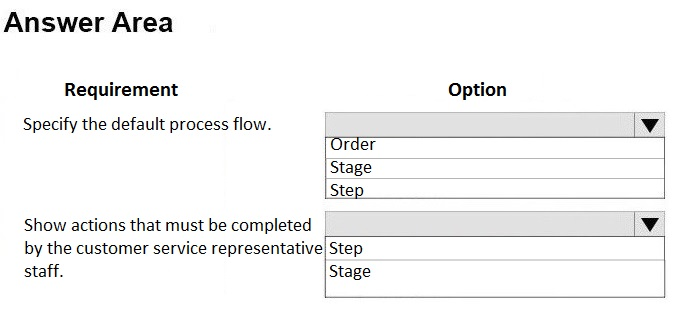
HOTSPOT -
You are a Dynamics 365 for Customer Service administrator.
You need to manage business process flows.
What should you configure? To answer, select the appropriate configuration in the answer area.
NOTE: Each correct selection is worth one point.
Hot Area:
Correct Answer:
See interactive view.
Explanation:
Based on the question and the discussion summary, the AI recommends agreeing with the suggested answer.
The question focuses on managing business process flows to guide users through specific actions in Dynamics 365 for Customer Service. The correct configurations are 'Order' and 'Stage'.
- Order: Determines the sequence in which different business process flows are displayed. This is important when multiple business process flows might be applicable in a given situation, as explained in: Business process flows overview.
- Stage: Represents a group of steps that users must complete. Stages organize related actions and provide a structured approach to guide users through the business process.
Therefore, to manage the order and the actions that must be completed by the user, we need to configure the
Order of business process flows, as well as the
Stages within each flow.
Other options, such as "Step", are less appropriate because a step only represents a single action. While important, managing individual steps is a subset of managing the overall stage, which encompasses multiple steps and a broader context.
Citations:
- Business process flows overview, https://learn.microsoft.com/en-us/dynamics365/customer-service/configure-business-process-flows
About This Practice Material
This is independent study material to help you prepare for the Microsoft D365 Customer Service Functional Assoc (MB-230) exam. It is not affiliated with, endorsed by, or sponsored by Microsoft or any certification body. All product names, certification names, trademarks, and exam codes are the property of their respective owners and are used here for descriptive (nominative) purposes only.
We do not provide real exam questions, brain dumps, or any guarantee of passing. All questions are original practice items compiled from publicly available community discussions and AI-generated explanations, aligned to the publicly available exam objectives.