Microsoft D365 Finance Functional Consultant (MB-310) Practice Questions & Study Guide
The Microsoft Certified: Dynamics 365 Finance Functional Consultant Associate (MB-310) is the premier certification for professionals who design and manage financial solutions using the Microsoft Dynamics 365 platform. As organizations increasingly rely on advanced enterprise resource planning (ERP) systems to drive their financial performance and competitiveness, the ability to design robust, scalable, and secure financial solutions has become a highly sought-after skill. The MB-310 validates your expertise in leveraging the full range of Dynamics 365 Finance features to provide seamless and efficient financial operations. It is an essential credential for any professional looking to lead in the age of modern financial management.
Overview of the Exam
The MB-310 exam is a rigorous assessment that covers the implementation and configuration of Microsoft Dynamics 365 Finance. It is a 120-minute exam consisting of approximately 40-60 questions. The exam is designed to test your technical expertise and your ability to apply Microsoft best practices to real-world financial scenarios. From general ledger and accounts payable/receivable to budget and fixed assets, the MB-310 ensures that you have the skills necessary to build and maintain robust financial infrastructures. Achieving the MB-310 certification proves that you are a highly skilled professional who can handle the technical demands of enterprise-grade financial management.
Target Audience
The MB-310 is intended for professionals who have a solid understanding of Microsoft Dynamics 365 and financial operations. It is ideal for individuals in roles such as:
1. Functional Consultants
2. Financial Analysts and Accountants
3. Business Analysts
4. Systems Administrators
5. Solutions Architects
To be successful, candidates should have at least one to three years of experience in enterprise-grade financial management and a thorough understanding of the Dynamics 365 platform and its features.
Key Topics Covered
The MB-310 exam is organized into several main domains:
1. Set Up and Configure Financial Management (20-25%): Configuring organization-wide financial settings and managing users and roles.
2. Implement and Manage Accounts Payable and Accounts Receivable (20-25%): Designing and implementing effective AP and AR solutions.
3. Manage Budgeting and Fixed Assets (15-20%): Configuring and managing budgeting and fixed asset features.
4. Manage Cash and Bank Management (10-15%): Configuring and managing cash and bank management solutions.
5. Manage Financial Reporting and Analytics (15-20%): Leveraging advanced financial reports and insights to improve financial performance.
Benefits of Getting Certified
Earning the MB-310 certification provides several significant benefits. First, it offers industry recognition of your specialized expertise in Microsoft Dynamics 365 Finance technologies. As a leader in the ERP industry, Microsoft skills are in high demand across the globe. Second, it can lead to increased career opportunities and higher salary potential in a variety of roles. Third, it demonstrates your commitment to professional excellence and your dedication to staying current with the latest financial management practices. By holding this certification, you join a global community of Microsoft professionals and gain access to exclusive resources and continuing education opportunities.
Why Choose NotJustExam.com for Your MB-310 Prep?
The MB-310 exam is challenging and requires a deep understanding of Microsoft's complex features. NotJustExam.com is the best resource to help you master this material. Our platform offers an extensive bank of practice questions that are designed to mirror the actual exam’s format and difficulty.
What makes NotJustExam.com stand out is our focus on interactive logic and the accuracy of our explanations. We don’t just provide a list of questions; we provide a high-quality learning experience. Every question in our bank includes an in-depth, accurate explanation that helps you understand the technical reasoning behind the correct financial solution. This ensures that you are truly learning the material and building the confidence needed to succeed on the exam. Our content is regularly updated to reflect the latest Microsoft features and exam updates. With NotJustExam.com, you can approach your MB-310 exam with the assurance that comes from thorough, high-quality preparation. Start your journey toward becoming a Certified Functional Consultant today with us!
Free Microsoft D365 Finance Functional Consultant (MB-310) Practice Questions Preview
-
Question 1
Note: This question is part of a series of questions that present the same scenario. Each question in the series contains a unique solution that might meet the stated goals. Some question sets might have more than one correct solution, while others might not have a correct solution.
After you answer a question in this section, you will NOT be able to return to it. As a result, these questions will not appear in the review screen.
You are configuring the year-end setup in Dynamics 365 Finance.
You need to configure the year-end setup to meet the following requirements:
✑ The accounting adjustments that are received in the first quarter must be able to be posted into the previous year's Period 13.
✑ The fiscal year closing can be run again, but only the most recent closing entry will remain in the transactions.
✑ All dimensions from profit and loss must carry over into the retained earnings.
✑ All future and previous periods must have an On Hold status.
Solution:
✑ Configure General ledger parameters.
- Set the Delete close of year transactions option to Yes.
- Set the Create closing transactions during transfer option to Yes.
- Set the Fiscal year status to permanently closed option to No.
✑ Define the Year-end close template.
- Designate a retained earnings main account for each legal entity.
- Set the Financial dimensions will be used on the Opening transactions option to No.
- Set the Transfer profit and loss dimensions option to Close All.
✑ Set all prior and future Ledger periods to a status of On Hold.
Does the solution meet the goal?
Correct Answer:
A
Explanation:
Based on the question's requirements and the provided solution, the AI recommends choosing 'No' (Option B) as the answer.
Reasoning:
The solution partially addresses the requirements, but contains a crucial flaw regarding the transfer of financial dimensions to the opening transactions. Here's a breakdown:
- Requirement 1: Accounting Adjustments in Period 13: The solution correctly sets the stage for posting adjustments to Period 13 by implication of general ledger parameter settings.
- Requirement 2: Only the Most Recent Closing Entry Remains: Setting "Delete close of year transactions" to "Yes" achieves this.
- Requirement 3: All Dimensions from Profit and Loss Carry Over: The solution aims to achieve this by setting "Transfer profit and loss dimensions" to "Close All." This is a correct step.
- Requirement 4: Holding Future and Previous Periods: This is correctly addressed by setting all prior and future ledger periods to a status of "On Hold."
The Critical Flaw: The problem lies with the statement: "Set the Financial dimensions will be used on the Opening transactions option to No." This contradicts the requirement that "All dimensions from profit and loss must carry over into the retained earnings." By setting this option to "No," the financial dimensions *will not* be used on the opening transactions, which means they won't be carried over to retained earnings. The 'Transfer profit and loss dimensions' functionality alone does not fully carry over the dimensions to the *opening* retained earnings transaction if the dimensions on opening transactions option is set to No.
Why not 'Yes' (Option A)?
While most of the configurations align with the requirements, the incorrect setting for "Financial dimensions will be used on the Opening transactions" makes the entire solution ineffective in meeting *all* stated goals. Therefore, the solution does not meet the goal.
Citations:
-
Question 2
Note: This question is part of a series of questions that present the same scenario. Each question in the series contains a unique solution that might meet the stated goals. Some question sets might have more than one correct solution, while others might not have a correct solution.
After you answer a question in this section, you will NOT be able to return to it. As a result, these questions will not appear in the review screen.
You are configuring the year-end setup in Dynamics 365 Finance.
You need to configure the year-end setup to meet the following requirements:
✑ The accounting adjustments that are received in the first quarter must be able to be posted into the previous year's Period 13.
✑ The fiscal year closing can be run again, but only the most recent closing entry will remain in the transactions.
✑ All dimensions from profit and loss must carry over into the retained earnings.
✑ All future and previous periods must have an On Hold status.
Solution:
✑ Configure General ledger parameters.
- Set the Delete close of year transactions option to Yes.
- Set the Create closing transactions during transfer option to Yes.
- Set the Fiscal year status to permanently closed option to Yes.
✑ Define the Year-end close template.
- Designate a retained earnings main account for each legal entity.
- Set the Financial dimensions will be used on the Opening transactions option to Yes.
- Set the Transfer profit and loss dimensions to Close All.
✑ Set all prior and future Ledger periods to a status of On Hold.
Does the solution meet the goal?
Correct Answer:
B
Explanation:
The suggested answer is B (No).
The solution, as described, does not fully meet the stated goals. While many configurations are correct, the "Fiscal year status to permanently closed option to Yes" setting prevents adjustments from being posted to the previous year's Period 13. This contradicts the stated requirement.
Here's a detailed breakdown:
- Requirement 1: "The accounting adjustments that are received in the first quarter must be able to be posted into the previous year's Period 13."
The solution configures "Fiscal year status to permanently closed" to "Yes". Setting the fiscal year status to permanently closed prevents any further postings to that fiscal year, including period 13. Therefore, this requirement is not met.
- Requirement 2: "The fiscal year closing can be run again, but only the most recent closing entry will remain in the transactions."
Setting "Delete close-of-year transactions" to "Yes" achieves this. Each subsequent year-end close will delete the previous closing entries.
- Requirement 3: "All dimensions from profit and loss must carry over into the retained earnings."
Setting "Financial dimensions will be used on the Opening transactions" to "Yes" and "Transfer profit and loss dimensions to Close All" achieves this.
- Requirement 4: "All future and previous periods must have an On Hold status."
The solution explicitly sets all prior and future Ledger periods to a status of On Hold, meeting this requirement.
The main reason why the solution does not meet the goal is the "Fiscal year status to permanently closed" setting. This setting directly conflicts with the requirement to allow postings to Period 13 of the previous fiscal year. If the fiscal year is permanently closed, no postings are allowed. The other settings are correctly configured to address the other requirements.
Therefore, the final answer is No.
Citations:
- Closing the Fiscal Year, https://dynamics-tips.com/2017/07/11/d365-closing-the-fiscal-year/
-
Question 3
Note: This question is part of a series of questions that present the same scenario. Each question in the series contains a unique solution that might meet the stated goals. Some question sets might have more than one correct solution, while others might not have a correct solution.
After you answer a question in this section, you will NOT be able to return to it. As a result, these questions will not appear in the review screen.
You are configuring the year-end setup in Dynamics 365 Finance.
You need to configure the year-end setup to meet the following requirements:
✑ The accounting adjustments that are received in the first quarter must be able to be posted into the previous year's Period 13.
✑ The fiscal year closing can be run again, but only the most recent closing entry will remain in the transactions.
✑ All dimensions from profit and loss must carry over into the retained earnings.
✑ All future and previous periods must have an On Hold status.
Solution:
✑ Configure General ledger parameters.
- Set the Delete close of year transactions option to No.
- Set the Create closing transactions during transfer option to No.
- Set the Fiscal year status to permanently closed option to No.
✑ Define the Year-end close template.
- Designate a retained earnings main account for each legal entity.
- Set the Financial dimensions will be used on the Opening transactions option to No.
- Set the Transfer profit and loss dimensions to Close All.
✑ Set all prior and future Ledger periods to a status of On Hold.
Does the solution meet the goal?
Correct Answer:
B
Explanation:
The AI agrees with the suggested answer of B (No).
Reasoning: The proposed solution contains configurations that directly contradict the requirements outlined in the problem. Setting "Delete close of year transactions" to "No" will prevent the year-end closing process from being run multiple times, conflicting with the need to re-run the fiscal year closing while keeping only the most recent entry. Furthermore, setting "Create closing transactions during transfer" to "No" prevents the necessary closing transactions from being generated to transfer profit and loss dimensions to retained earnings. Setting the "Financial dimensions will be used on the Opening transactions" to "No" prevents all dimensions from profit and loss from carrying over into the retained earnings. This directly violates another requirement. Therefore, the solution as a whole does not meet the specified goals.
Reasons for not choosing A (Yes): As explained above, specific configurations in the solution actively prevent the fulfillment of key requirements, making "Yes" an incorrect assessment. The provided settings regarding transaction deletion and closing transaction creation are counterproductive to the scenario's objectives.
-
Configure General ledger parameters.
- Set the Delete close of year transactions option to No. - Incorrect, this should be Yes to allow running year end close again.
- Set the Create closing transactions during transfer option to No. - Incorrect, this needs to be Yes to allow transfer of P&L to Retained Earnings.
- Set the Fiscal year status to permanently closed option to No.
Define the Year-end close template.
- Designate a retained earnings main account for each legal entity.
- Set the Financial dimensions will be used on the Opening transactions option to No. - Incorrect, This will prevent the financial dimensions from carrying over into retained earnings.
- Set the Transfer profit and loss dimensions to Close All.
Set all prior and future Ledger periods to a status of On Hold.
Therefore, the solution does not meet the goal.
-
Question 4
HOTSPOT -
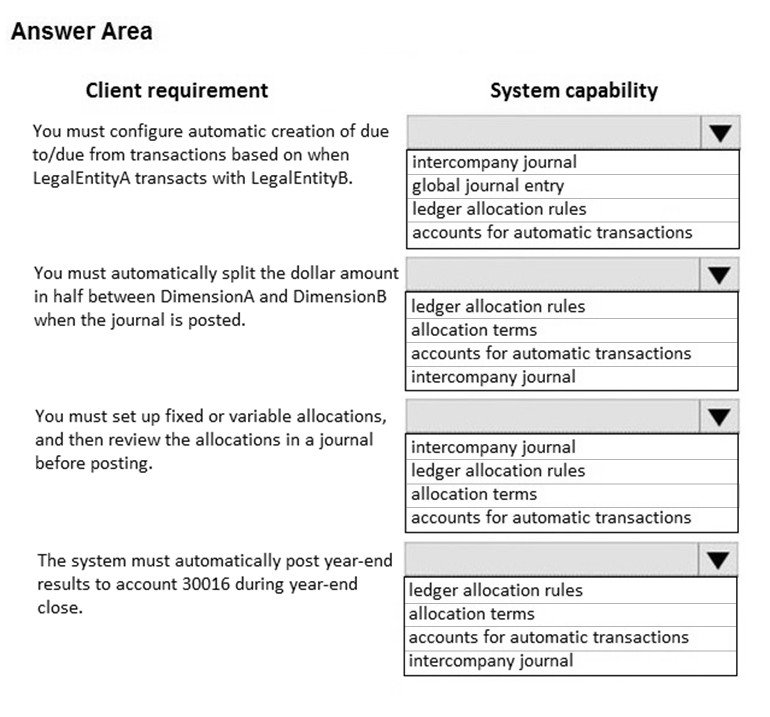
You are implementing a Dynamics 365 Finance general ledger module for a client that has multiple legal entities.
The client has the following requirements:
✑ Configure automatic creation of due to/due from transactions based on when LegalEntityA transacts with LegalEntityB.
✑ Automatically split the dollar amount in half between DimensionA and DimensionB when the journal is posted.
✑ Set up fixed or variable allocations, and then review the allocations in a journal before posting.
✑ Automatically post year-end results to account 30016 during year-end close.
You need to configure the system.
Which system capability should you configure? To answer, select the appropriate configuration in the answer area.
NOTE: Each correct selection is worth one point.
Hot Area:
Correct Answer:
See interactive view.
Explanation:
The AI agrees with the suggested answer.
The configuration options align directly with the requirements outlined in the question. Let's break down why each selection is appropriate:
Intercompany accounting addresses the requirement for automatic due to/due from transactions between legal entities. This feature automates the creation of balancing entries when transactions occur between different legal entities within the same Dynamics 365 Finance instance.
-
Reasoning: This directly fulfills the first requirement: "Configure automatic creation of due to/due from transactions based on when LegalEntityA transacts with LegalEntityB."
Allocation terms enable the automatic splitting of dollar amounts between dimensions during journal posting.
-
Reasoning: This directly fulfills the second requirement: "Automatically split the dollar amount in half between DimensionA and DimensionB when the journal is posted."
Ledger allocation rules provide the functionality to set up fixed or variable allocations and review them in a journal before posting.
-
Reasoning: This directly fulfills the third requirement: "Set up fixed or variable allocations, and then review the allocations in a journal before posting."
Accounts for automatic transactions are used to automatically post year-end results to a specified account during the year-end close process.
-
Reasoning: This directly fulfills the fourth requirement: "Automatically post year-end results to account 30016 during year-end close."
Reasoning for Choosing the Answers: Each selected capability directly addresses one of the client's specific requirements, making them the most suitable configurations.
Reasoning for Not Choosing Other Answers: Without additional context on non-selected configurations in Dynamics 365 Finance, it is difficult to give a complete answer, but based on the question and selections available the chosen answers are the best fit.
The selected configurations enable the automation and streamlining of various general ledger processes for the client, ensuring compliance and efficiency across multiple legal entities.
-
Question 5
A company is preparing to complete a year-end close process.
You need to configure the Dynamics 365 Finance general ledger module.
Which three configurations actions should you perform? Each correct answer presents part of the solution.
NOTE: Each correct selection is worth one point.
- A. Configure the Fiscal year close parameters
- B. Configure the ledger calendar for the new fiscal year
- C. Set up the year end close template
- D. Validate the main account type
- E. Create the next fiscal year
Correct Answer:
ACE
Explanation:
The AI agrees with the suggested answer ACE.
The year-end close process in Dynamics 365 Finance requires specific configurations within the general ledger module to ensure a smooth transition to the new fiscal year. The configurations are necessary to properly manage financial data and reporting across fiscal periods. Here's a detailed breakdown supporting the selection of options A, C, and E:
* **A. Configure the Fiscal year close parameters:** This is a crucial step as it defines how the system handles the closing entries, retained earnings, and other year-end adjustments. It sets the rules for transferring balances and preparing the ledger for the next fiscal year.
* **C. Set up the year end close template:** The year-end close template automates and standardizes the creation of closing entries. It defines the accounts to be closed, the offsetting accounts, and the process flow, ensuring consistency and accuracy in the closing process.
* **E. Create the next fiscal year:** Before closing the current fiscal year, the subsequent fiscal year must be created. This action allows the system to properly roll over balances and begin recording transactions for the new period.
**Reasons for not selecting the other options:**
* **B. Configure the ledger calendar for the new fiscal year:** While configuring the ledger calendar is important, it typically involves ensuring the periods are defined correctly and is a more general setup task rather than a specific year-end close configuration. The calendar should already be set up before the year-end close process begins.
* **D. Validate the main account type:** Validating the main account types is a part of the general ledger setup and data quality maintenance, but it is not specific to the year-end close configuration. This is a regular task to ensure the integrity of financial data, not a configuration step directly related to closing the fiscal year.
Citations:
- Dynamics 365 Finance documentation on Fiscal Year Close, https://learn.microsoft.com/en-us/dynamics365/finance/general-ledger/fiscal-year-close
-
Question 6
A client has unique accounting needs that sometimes require posting definitions.
You need to implement posting definitions.
In which situation should you implement posting definitions?
- A. when financial dimensions need to default from the vendor record onto an invoice
- B. when only certain dimensions are allowed to post with certain main account combinations
- C. when creating multiple balanced ledger entries based on transaction types or accounts
- D. when the system needs to automatically post a transaction to the accounts receivable account on invoice posting
Correct Answer:
C
Explanation:
The AI agrees with the suggested answer.
The suggested answer is C: when creating multiple balanced ledger entries based on transaction types or accounts.
Reasoning: Posting definitions in Dynamics 365 Finance and Operations are specifically designed to handle scenarios where a single transaction needs to generate multiple, balanced ledger entries. This is particularly useful for complex accounting scenarios that require splitting a transaction across different accounts or dimensions based on certain conditions or criteria. This functionality is well-documented and a core feature of posting definitions.
Reasons for not choosing the other options:
- A: Financial dimensions defaulting from the vendor record onto an invoice is typically handled through dimension defaulting rules or master data setup, not posting definitions.
- B: Limiting dimension posting with main account combinations is usually managed via account structures and advanced rule structures.
- D: Automatically posting to accounts receivable on invoice posting is a standard system function controlled by posting profiles and ledger setup, not posting definitions.
- Posting definitions overview, https://learn.microsoft.com/en-us/dynamics365/finance/general-ledger/posting-definitions
-
Question 7
An organization is setting up a cost accounting.
You need to set up fiscal calendars for Dynamics 365 Finance.
What are three uses for fiscal calendars? Each correct answer presents a complete solution.
NOTE: Each correct selection is worth one point.
- A. standard work hours
- B. financial transactions
- C. fixed asset depreciation
- D. budget cycles
- E. shift work hours
Correct Answer:
BCD
Explanation:
The AI supports the suggested answer of BCD.
The reasoning behind this choice is that fiscal calendars in Dynamics 365 Finance are fundamentally linked to financial transactions, fixed asset depreciation, and budget cycles. These three functionalities rely on the defined fiscal periods to correctly record and manage financial data over time.
Here's a breakdown:
- B. financial transactions: Fiscal calendars are essential for posting and reporting financial transactions within the correct accounting periods.
- C. fixed asset depreciation: Depreciation calculations and postings are tied to fiscal periods defined in the fiscal calendar.
- D. budget cycles: Budget cycles align with fiscal years and periods, enabling organizations to plan and track their financial performance against the budget.
Options A and E are not directly related to fiscal calendars. Standard and shift work hours are managed by human resources and time management modules, which operate independently from the fiscal calendar setup.
Therefore, selecting B, C, and D provides a complete solution for the uses of fiscal calendars in Dynamics 365 Finance.
Reasons for rejecting other answers:
- A. Standard work hours: This is typically related to HR and time management configurations, not fiscal calendars.
- E. Shift work hours: Similar to standard work hours, this relates to labor management and is not directly tied to fiscal calendars.
Citations:
- Dynamics 365 Finance Documentation, https://dynamics.microsoft.com/en-us/
-
Question 8
You are configuring automatic bank reconciliation functionality for a company that has multiple bank accounts. The company wants to import their bank statements.
You need to import electronic bank statements to reconcile the bank accounts.
Which three actions can you perform? Each correct answer presents a complete solution.
NOTE: Each correct selection is worth one point.
- A. Select all the bank accounts for the bank statement files, and then upload all files
- B. Select Account reconciliation on the bank account form
- C. Import bank statements from the Data management workspace
- D. Navigate to Import statement on the Bank Statements page of Cash and Bank Management
- E. Select Import statement for multiple bank accounts in all legal entities, and then upload a zip file
Correct Answer:
CDE
Explanation:
The AI assistant agrees with the suggested answer of CDE.
Reasoning:
The question requires identifying the correct methods for importing electronic bank statements for automatic bank reconciliation in Dynamics 365 Finance and Operations.
Here's a breakdown of why each option is either correct or incorrect:
-
C - Import bank statements from the Data management workspace: This is a valid method for importing bank statements. The Data Management workspace provides tools for importing various types of data, including bank statements.
-
D - Navigate to Import statement on the Bank Statements page of Cash and Bank Management: This is also a correct method. The Cash and Bank Management module provides a dedicated page for managing bank statements, which includes an option to import them.
-
E - Select Import statement for multiple bank accounts in all legal entities, and then upload a zip file: This option correctly describes a process for importing bank statements for multiple bank accounts across different legal entities using a zip file, which is supported by the system.
Reasons for Incorrect Answers:
-
A - Select all the bank accounts for the bank statement files, and then upload all files: This option is incorrect because the system typically requires a specific import process rather than simply selecting accounts and uploading files in an ad-hoc manner. The files are processed via Data Management or Bank Statement page.
-
B - Select Account reconciliation on the bank account form: This is incorrect. Selecting "Account reconciliation" on the bank account form simply enables or configures the reconciliation process; it does not directly import bank statements. It is a prerequisite but not the action of importing.
Supporting Documentation:
Based on the professional experience and the linked documentation, options C, D, and E are the correct approaches to import bank statements in Dynamics 365 Finance and Operations.
Answer choice details:
- C is correct because it utilizes the Data Management workspace, a central area for importing data.
- D is correct because the Cash and Bank Management module provides a direct import function.
- E is correct as it correctly details importing statements for multiple bank accounts across multiple legal entities using the zip file method.
The suggested answer aligns with the standard procedures for importing bank statements in Dynamics 365 Finance and Operations.
Therefore, CDE is the recommended answer.
Citations:
- Microsoft Dynamics 365 Finance Documentation, https://dynamics.microsoft.com/en-us/
-
Question 9
A company plans to create a new allocation rule for electric utilities expenses.
The allocation rule must meet the following requirements:
✑ Distribute overhead utility expense to each department.
✑ Define how and in what proportion the source amounts must be distributed on various destination lines.
You need to configure the allocation rule.
Which allocation method should you use?
- A. Distribute the source document amount equally
- B. Fixed weight
- C. Equally
- D. Basis
Correct Answer:
D
Explanation:
The AI agrees with the suggested answer of D. Basis.
Reasoning:
The question requires distributing overhead utility expenses to each department and defining how and in what proportion the source amounts must be distributed. The 'Basis' allocation method is the most suitable choice because it allows for defining specific proportions or percentages for the allocation across destination lines. This aligns directly with the requirement to define "in what proportion" the source amounts are distributed. Utility expenses often depend on variable factors (e.g., square footage, number of employees, machine hours), and the 'Basis' method enables using these factors as the basis for allocation.
Reasons for not choosing the other options:
- A. Distribute the source document amount equally: This method distributes the amount equally without considering any proportions, which does not satisfy the requirement to define "in what proportion".
- B. Fixed weight: While 'Fixed weight' allows for allocation based on predefined weights, it is less flexible than 'Basis' when dealing with variable factors that may change over time. The question implies a need for a more dynamic allocation based on specific proportions, making 'Basis' a better fit.
- C. Equally: This is similar to option A, and does not allow to define proportions.
Citations:
- Overhead allocation in cost accounting, https://www.dynamics365ax.com/2010/09/overhead-allocation-in-cost-accounting.html
-
Question 10
HOTSPOT -
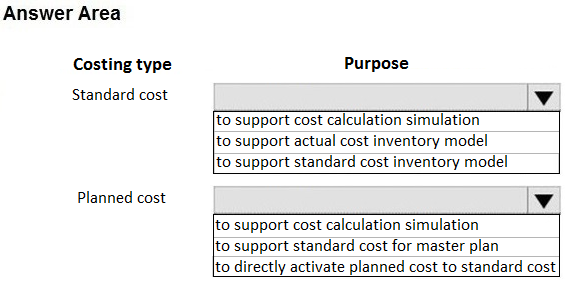
A food manufacturer uses commodities such as beans, corn, and chili peppers as raw materials. The prices of the commodities fluctuate frequently. The manufacturer wants to use cost versions to simulate these fluctuations.
You need to set up cost versions and prices to accomplish the manufacturer's goal.
For which purpose should you use each costing type? To answer, select the appropriate options in the answer area.
NOTE: Each correct selection is worth one point.
Hot Area:
Correct Answer:
See interactive view.
Explanation:
The AI agrees with the suggested answer.
Reasoning:
The scenario requires simulating commodity price fluctuations using cost versions. The core concept is to understand the difference between 'Standard cost' and 'Planned cost'.
-
Standard Cost: As described in the Microsoft documentation, the standard cost inventory model requires the use of costing versions. The costing version serves as a container for these costs.
-
Planned Cost: Costing versions can contain planned costs. Planned costs are prospective and can be used for simulations before being activated as standard costs. This directly addresses the requirement to simulate fluctuations.
Therefore, the matching of "Standard cost" with "Should be used for an inventory model, and the costing version serves as a container for these costs" and "Planned cost" with "Can contain a set of planned cost records" is correct.
Why other options are incorrect:
There are no other options provided in the context, so we cannot analyze incorrect options in details.
Suggested Answer breakdown:

Citation:
- Costing versions, https://docs.microsoft.com/en-us/dynamics365/unified-operations/supply-chain/cost-management/costing-versions
About This Practice Material
This is independent study material to help you prepare for the Microsoft D365 Finance Functional Consultant (MB-310) exam. It is not affiliated with, endorsed by, or sponsored by Microsoft or any certification body. All product names, certification names, trademarks, and exam codes are the property of their respective owners and are used here for descriptive (nominative) purposes only.
We do not provide real exam questions, brain dumps, or any guarantee of passing. All questions are original practice items compiled from publicly available community discussions and AI-generated explanations, aligned to the publicly available exam objectives.