Microsoft Administrator Expert (MS-102) Practice Questions & Study Guide
The Microsoft 365 Administrator (MS-102) is the premier certification for IT professionals who want to demonstrate their expertise in managing and securing Microsoft 365 environments. As organizations increasingly rely on Microsoft 365 to drive their business operations and collaboration, the ability to design and manage robust, scalable, and secure Microsoft 365 infrastructures has become a highly sought-after skill. The MS-102 validates your core knowledge of Microsoft 365 services, security, and compliance. It is an essential milestone for any professional looking to lead in the age of modern cloud administration.
Overview of the Exam
The MS-102 exam is a rigorous assessment that covers the implementation and management of Microsoft 365 services. It is a 120-minute exam consisting of approximately 40-60 questions. The exam is designed to test your knowledge of Microsoft 365 technologies and your ability to apply them to real-world administration scenarios. From identity and access management to security, compliance, and tenant management, the MS-102 ensures that you have the skills necessary to build and maintain modern cloud environments. Achieving the MS-102 certification proves that you are a highly skilled professional who can handle the technical demands of Microsoft 365 administration.
Target Audience
The MS-102 is intended for IT professionals who have a solid understanding of Microsoft 365 services and administration. It is ideal for individuals in roles such as:
1. Microsoft 365 Administrators
2. Systems Administrators
3. Security Administrators
4. IT Managers and Directors
To qualify for the Microsoft 365 Administrator Expert certification, candidates must have already achieved at least one of the Microsoft 365 associate-level certifications and pass the MS-102 exam.
Key Topics Covered
The MS-102 exam is organized into several main domains:
1. Deploy and Manage a Microsoft 365 Tenant (25-30%): Configuring organization-wide settings and managing users and roles.
2. Implement and Manage Microsoft 365 Identity and Access (25-30%): Implementing secure authentication and authorization solutions using Entra ID.
3. Manage Microsoft 365 Security and Compliance (25-30%): Configuring security and compliance features, including threat protection and data loss prevention.
4. Manage Microsoft 365 Collaboration and Endpoint Management (15-20%): Managing collaboration services like Teams and SharePoint, and managing endpoints using Microsoft Intune.
Benefits of Getting Certified
Earning the MS-102 certification provides several significant benefits. First, it offers industry recognition of your elite expertise in Microsoft 365 technologies. As a leader in the cloud industry, Microsoft skills are in high demand across the globe. Second, it can lead to high-level career opportunities and significantly higher salary potential in a variety of senior roles. Third, it demonstrates your commitment to professional excellence and your dedication to staying current with the latest cloud administration practices. By holding this certification, you join a global community of Microsoft professionals and gain access to exclusive resources and continuing education opportunities.
Why Choose NotJustExam.com for Your MS-102 Prep?
The MS-102 exam is challenging and requires a deep understanding of Microsoft 365's complex features. NotJustExam.com is the best resource to help you master this material. Our platform offers an extensive bank of practice questions that are designed to mirror the actual exam’s format and difficulty.
What makes NotJustExam.com stand out is our focus on interactive logic and the accuracy of our explanations. We don’t just provide a list of questions; we provide a high-quality learning experience. Every question in our bank includes an in-depth, accurate explanation that helps you understand the technical reasoning behind the correct administration solutions. This ensures that you are truly learning the material and building the confidence needed to succeed on the exam. Our content is regularly updated to reflect the latest Microsoft features and exam updates. With NotJustExam.com, you can approach your MS-102 exam with the assurance that comes from thorough, high-quality preparation. Start your journey toward becoming a Certified Microsoft 365 Expert today with us!
Free Microsoft Administrator Expert (MS-102) Practice Questions Preview
-
Question 1
Overview -
Fabrikam, Inc. is an electronics company that produces consumer products. Fabrikam has 10,000 employees worldwide.
Fabrikam has a main office in London and branch offices in major cities in Europe, Asia, and the United States.
Existing Environment -
Active Directory Environment -
The network contains an Active Directory forest named fabrikam.com. The forest contains all the identities used for user and computer authentication. Each department is represented by a top-level organizational unit (OU) that contains several child OUs for user accounts and computer accounts.
All users authenticate to on-premises applications by signing in to their device by using a UPN format of [email protected].
Fabrikam does NOT plan to implement identity federation.
Network Infrastructure -
Each office has a high-speed connection to the Internet.
Each office contains two domain controllers. All domain controllers are configured as DNS servers.
The public zone for fabrikam.com is managed by an external DNS server.
All users connect to an on-premises Microsoft Exchange Server 2016 organization. The users access their email by using Outlook Anywhere, Outlook on the web, or the Microsoft Outlook app for iOS. All the Exchange servers have the latest cumulative updates installed.
All shared company documents are stored on a Microsoft SharePoint Server farm.
Requirements -
Planned Changes -
Fabrikam plans to implement a Microsoft 365 Enterprise subscription and move all email and shared documents to the subscription.
Fabrikam plans to implement two pilot projects:
Project1: During Project1, the mailboxes of 100 users in the sales department will be moved to Microsoft 365.
Project2: After the successful completion of Project1, Microsoft Teams will be enabled in Microsoft 365 for the sales department users.
Fabrikam plans to create a group named UserLicenses that will manage the allocation of all Microsoft 365 bulk licenses.
Technical Requirements -
Fabrikam identifies the following technical requirements:
All users must be able to exchange email messages successfully during Project1 by using their current email address.
Users must be able to authenticate to cloud services if Active Directory becomes unavailable.
A user named User1 must be able to view all DLP reports from the Microsoft Purview compliance portal.
Microsoft 365 Apps for enterprise applications must be installed from a network share only.
Disruptions to email access must be minimized.
Application Requirements -
Fabrikam identifies the following application requirements:
An on-premises web application named App1 must allow users to complete their expense reports online. App1 must be available to users from the My Apps portal.
The installation of feature updates for Microsoft 365 Apps for enterprise must be minimized.
Security Requirements -
Fabrikam identifies the following security requirements:
After the planned migration to Microsoft 365, all users must continue to authenticate to their mailbox and to SharePoint sites by using their UPN.
The membership of the UserLicenses group must be validated monthly. Unused user accounts must be removed from the group automatically.
After the planned migration to Microsoft 365, all users must be signed in to on-premises and cloud-based applications automatically.
The principle of least privilege must be used.
You are evaluating the required processes for Project1.
You need to recommend which DNS record must be created while adding a domain name for the project.
Which DNS record should you recommend?
- A. host (A)
- B. host information (HINFO)
- C. text (TXT)
- D. pointer (PTR)
Correct Answer:
C
Explanation:
The AI agrees with the suggested answer.
The recommended DNS record is C. text (TXT).
Reasoning:
- A TXT record is used to verify domain ownership when adding a domain name to services like Microsoft 365.
- The TXT record contains a unique verification code provided by the service, which proves that you own the domain.
- Once the domain ownership is verified, you can proceed with setting up other DNS records like MX records for email.
Reasons for not choosing the other options:
- A (Host A): While A records map a hostname to an IP address, they don't serve the purpose of domain verification.
- B (Host Information HINFO): HINFO records are obsolete and rarely used. They provide information about the host's CPU and operating system, irrelevant for domain verification.
- D (Pointer PTR): PTR records are used for reverse DNS lookups (mapping an IP address to a hostname), not for domain verification.
In summary, a TXT record is essential for domain verification during the process of adding a domain name to a service like Microsoft 365, making it the most appropriate choice in this scenario.
-
Question 2
Overview -
Fabrikam, Inc. is an electronics company that produces consumer products. Fabrikam has 10,000 employees worldwide.
Fabrikam has a main office in London and branch offices in major cities in Europe, Asia, and the United States.
Existing Environment -
Active Directory Environment -
The network contains an Active Directory forest named fabrikam.com. The forest contains all the identities used for user and computer authentication. Each department is represented by a top-level organizational unit (OU) that contains several child OUs for user accounts and computer accounts.
All users authenticate to on-premises applications by signing in to their device by using a UPN format of [email protected].
Fabrikam does NOT plan to implement identity federation.
Network Infrastructure -
Each office has a high-speed connection to the Internet.
Each office contains two domain controllers. All domain controllers are configured as DNS servers.
The public zone for fabrikam.com is managed by an external DNS server.
All users connect to an on-premises Microsoft Exchange Server 2016 organization. The users access their email by using Outlook Anywhere, Outlook on the web, or the Microsoft Outlook app for iOS. All the Exchange servers have the latest cumulative updates installed.
All shared company documents are stored on a Microsoft SharePoint Server farm.
Requirements -
Planned Changes -
Fabrikam plans to implement a Microsoft 365 Enterprise subscription and move all email and shared documents to the subscription.
Fabrikam plans to implement two pilot projects:
Project1: During Project1, the mailboxes of 100 users in the sales department will be moved to Microsoft 365.
Project2: After the successful completion of Project1, Microsoft Teams will be enabled in Microsoft 365 for the sales department users.
Fabrikam plans to create a group named UserLicenses that will manage the allocation of all Microsoft 365 bulk licenses.
Technical Requirements -
Fabrikam identifies the following technical requirements:
All users must be able to exchange email messages successfully during Project1 by using their current email address.
Users must be able to authenticate to cloud services if Active Directory becomes unavailable.
A user named User1 must be able to view all DLP reports from the Microsoft Purview compliance portal.
Microsoft 365 Apps for enterprise applications must be installed from a network share only.
Disruptions to email access must be minimized.
Application Requirements -
Fabrikam identifies the following application requirements:
An on-premises web application named App1 must allow users to complete their expense reports online. App1 must be available to users from the My Apps portal.
The installation of feature updates for Microsoft 365 Apps for enterprise must be minimized.
Security Requirements -
Fabrikam identifies the following security requirements:
After the planned migration to Microsoft 365, all users must continue to authenticate to their mailbox and to SharePoint sites by using their UPN.
The membership of the UserLicenses group must be validated monthly. Unused user accounts must be removed from the group automatically.
After the planned migration to Microsoft 365, all users must be signed in to on-premises and cloud-based applications automatically.
The principle of least privilege must be used.
You need to ensure that all the sales department users can authenticate successfully during Project1 and Project2.
Which authentication strategy should you implement for the pilot projects?
- A. pass-through authentication
- B. pass-through authentication and seamless SSO
- C. password hash synchronization and seamless SSO
- D. password hash synchronization
Correct Answer:
C
Explanation:
The AI suggests that the answer is C: password hash synchronization and seamless SSO.
Reasoning:
The best authentication strategy for the pilot projects, considering the need for high availability and a smooth user experience, is a combination of password hash synchronization (PHS) and seamless SSO (Single Sign-On).
- Password Hash Synchronization: PHS synchronizes a hash of the on-premises Active Directory passwords with Azure AD. This provides a backup authentication method in case the on-premises Active Directory is unavailable. It allows users to authenticate to cloud services even if there are problems with the on-premises infrastructure.
- Seamless SSO: Seamless SSO automatically signs users into cloud applications when they are on their corporate network, without prompting for their credentials. This improves the user experience.
Why other options are not the best choice:
- A: Pass-through authentication: Pass-through authentication relies on the on-premises Active Directory for authentication. If the on-premises Active Directory is unavailable, users will not be able to authenticate. This does not meet the requirement for high availability.
- B: Pass-through authentication and seamless SSO: While seamless SSO improves the user experience, the reliance on pass-through authentication still makes this option vulnerable to on-premises Active Directory outages.
- D: Password hash synchronization: Password hash synchronization alone provides high availability, but it doesn't offer the seamless user experience of automatic sign-in provided by Seamless SSO. Users would still be prompted to enter their passwords.
Given the requirements and the capabilities of each method, PHS and Seamless SSO together provide the best balance of availability and user experience for the pilot projects.
Citations:
- Choose the right authentication method for your Azure AD hybrid identity solution, https://learn.microsoft.com/en-us/azure/active-directory/hybrid/choose-authentication
-
Question 3
Overview -
Fabrikam, Inc. is an electronics company that produces consumer products. Fabrikam has 10,000 employees worldwide.
Fabrikam has a main office in London and branch offices in major cities in Europe, Asia, and the United States.
Existing Environment -
Active Directory Environment -
The network contains an Active Directory forest named fabrikam.com. The forest contains all the identities used for user and computer authentication. Each department is represented by a top-level organizational unit (OU) that contains several child OUs for user accounts and computer accounts.
All users authenticate to on-premises applications by signing in to their device by using a UPN format of [email protected].
Fabrikam does NOT plan to implement identity federation.
Network Infrastructure -
Each office has a high-speed connection to the Internet.
Each office contains two domain controllers. All domain controllers are configured as DNS servers.
The public zone for fabrikam.com is managed by an external DNS server.
All users connect to an on-premises Microsoft Exchange Server 2016 organization. The users access their email by using Outlook Anywhere, Outlook on the web, or the Microsoft Outlook app for iOS. All the Exchange servers have the latest cumulative updates installed.
All shared company documents are stored on a Microsoft SharePoint Server farm.
Requirements -
Planned Changes -
Fabrikam plans to implement a Microsoft 365 Enterprise subscription and move all email and shared documents to the subscription.
Fabrikam plans to implement two pilot projects:
Project1: During Project1, the mailboxes of 100 users in the sales department will be moved to Microsoft 365.
Project2: After the successful completion of Project1, Microsoft Teams will be enabled in Microsoft 365 for the sales department users.
Fabrikam plans to create a group named UserLicenses that will manage the allocation of all Microsoft 365 bulk licenses.
Technical Requirements -
Fabrikam identifies the following technical requirements:
All users must be able to exchange email messages successfully during Project1 by using their current email address.
Users must be able to authenticate to cloud services if Active Directory becomes unavailable.
A user named User1 must be able to view all DLP reports from the Microsoft Purview compliance portal.
Microsoft 365 Apps for enterprise applications must be installed from a network share only.
Disruptions to email access must be minimized.
Application Requirements -
Fabrikam identifies the following application requirements:
An on-premises web application named App1 must allow users to complete their expense reports online. App1 must be available to users from the My Apps portal.
The installation of feature updates for Microsoft 365 Apps for enterprise must be minimized.
Security Requirements -
Fabrikam identifies the following security requirements:
After the planned migration to Microsoft 365, all users must continue to authenticate to their mailbox and to SharePoint sites by using their UPN.
The membership of the UserLicenses group must be validated monthly. Unused user accounts must be removed from the group automatically.
After the planned migration to Microsoft 365, all users must be signed in to on-premises and cloud-based applications automatically.
The principle of least privilege must be used.
Which role should you assign to User1?
- A. Hygiene Management
- B. Security Reader
- C. Security Administrator
- D. Records Management
Correct Answer:
B
Explanation:
Based on the question and discussion, the AI agrees with the suggested answer, which is B, Security Reader.
Reasoning: The primary requirement is to allow User1 to view DLP reports. The Security Reader role is specifically designed to grant read-only access to security-related information and reports within the Microsoft 365 environment, including DLP reports. This aligns perfectly with the stated need.
Reasons for not choosing other options:
- A. Hygiene Management: This role is not directly related to security reporting or DLP.
- C. Security Administrator: This role grants extensive permissions to manage security settings, policies, and configurations. Assigning this role to User1 would violate the principle of least privilege, as it provides far more access than necessary for simply viewing reports.
- D. Records Management: While records management might involve some overlap with DLP in terms of data retention and compliance, it doesn't directly provide the necessary permissions to view DLP reports.
The selection of the Security Reader role adheres to the principle of least privilege, ensuring that User1 has only the necessary permissions to perform the required task (viewing DLP reports) without granting unnecessary access to other sensitive security functions.
Citations:
- Microsoft 365 Security roles, https://learn.microsoft.com/en-us/microsoft-365/security/office-365-security/permissions-reference?view=o365-worldwide
-
Question 4
HOTSPOT -
Overview -
Fabrikam, Inc. is an electronics company that produces consumer products. Fabrikam has 10,000 employees worldwide.
Fabrikam has a main office in London and branch offices in major cities in Europe, Asia, and the United States.
Existing Environment -
Active Directory Environment -
The network contains an Active Directory forest named fabrikam.com. The forest contains all the identities used for user and computer authentication. Each department is represented by a top-level organizational unit (OU) that contains several child OUs for user accounts and computer accounts.
All users authenticate to on-premises applications by signing in to their device by using a UPN format of [email protected].
Fabrikam does NOT plan to implement identity federation.
Network Infrastructure -
Each office has a high-speed connection to the Internet.
Each office contains two domain controllers. All domain controllers are configured as DNS servers.
The public zone for fabrikam.com is managed by an external DNS server.
All users connect to an on-premises Microsoft Exchange Server 2016 organization. The users access their email by using Outlook Anywhere, Outlook on the web, or the Microsoft Outlook app for iOS. All the Exchange servers have the latest cumulative updates installed.
All shared company documents are stored on a Microsoft SharePoint Server farm.
Requirements -
Planned Changes -
Fabrikam plans to implement a Microsoft 365 Enterprise subscription and move all email and shared documents to the subscription.
Fabrikam plans to implement two pilot projects:
Project1: During Project1, the mailboxes of 100 users in the sales department will be moved to Microsoft 365.
Project2: After the successful completion of Project1, Microsoft Teams will be enabled in Microsoft 365 for the sales department users.
Fabrikam plans to create a group named UserLicenses that will manage the allocation of all Microsoft 365 bulk licenses.
Technical Requirements -
Fabrikam identifies the following technical requirements:
All users must be able to exchange email messages successfully during Project1 by using their current email address.
Users must be able to authenticate to cloud services if Active Directory becomes unavailable.
A user named User1 must be able to view all DLP reports from the Microsoft Purview compliance portal.
Microsoft 365 Apps for enterprise applications must be installed from a network share only.
Disruptions to email access must be minimized.
Application Requirements -
Fabrikam identifies the following application requirements:
An on-premises web application named App1 must allow users to complete their expense reports online. App1 must be available to users from the My Apps portal.
The installation of feature updates for Microsoft 365 Apps for enterprise must be minimized.
Security Requirements -
Fabrikam identifies the following security requirements:
After the planned migration to Microsoft 365, all users must continue to authenticate to their mailbox and to SharePoint sites by using their UPN.
The membership of the UserLicenses group must be validated monthly. Unused user accounts must be removed from the group automatically.
After the planned migration to Microsoft 365, all users must be signed in to on-premises and cloud-based applications automatically.
The principle of least privilege must be used.
You create the Microsoft 365 tenant.
You implement Azure AD Connect as shown in the following exhibit.
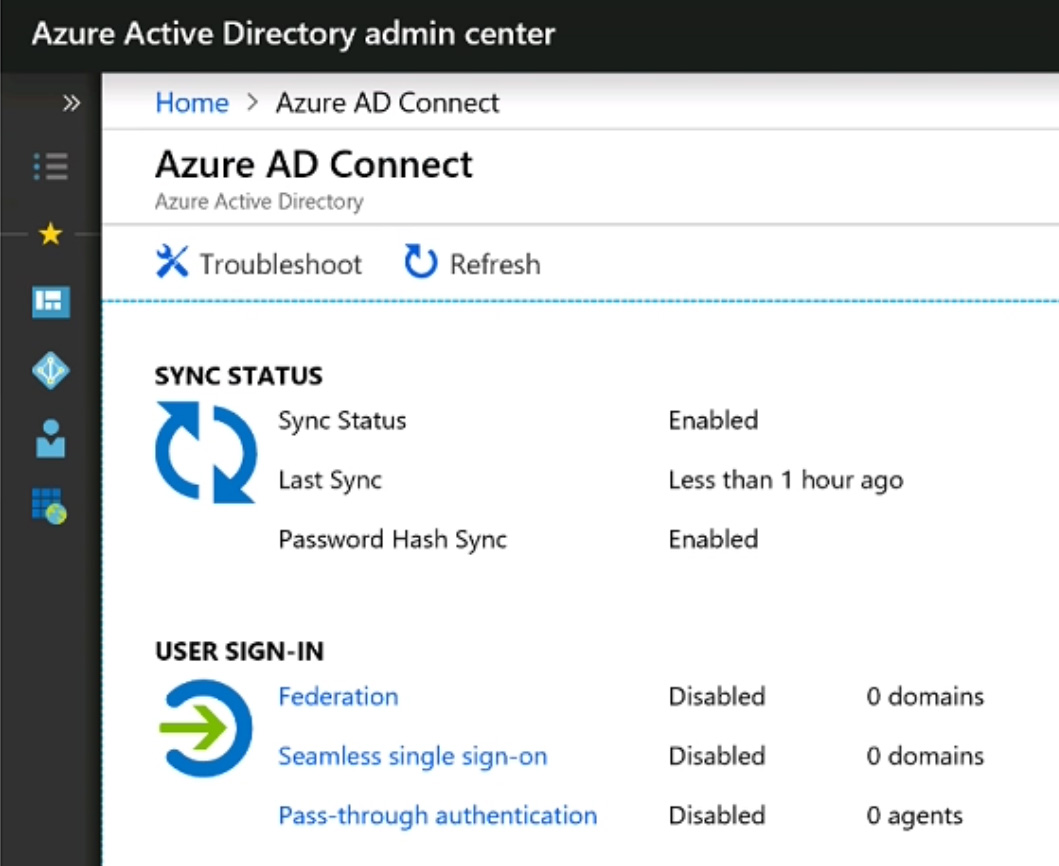
Use the drop-down menus to select the answer choice that completes each statement based on the information presented in the graphic.
NOTE: Each correct selection is worth one point.
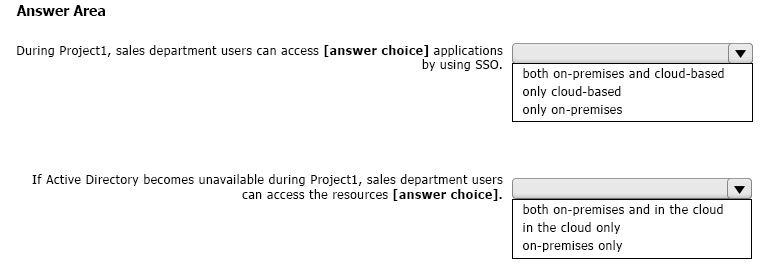
Correct Answer:
See interactive view.
Explanation:
Based on the scenario, requirements, and the Azure AD Connect configuration, the AI agrees with the suggested answer.
Here's a detailed explanation:
* **First Statement:** After the planned migration to Microsoft 365, all users will be signed in to both on-premises and cloud-based applications automatically.
* **Reasoning:** The exhibit shows that Password Hash Synchronization (PHS) and Seamless Single Sign-On (Seamless SSO) are enabled. PHS synchronizes password hashes from the on-premises Active Directory to Azure AD, allowing users to use the same credentials for both on-premises and cloud-based applications. Seamless SSO automatically signs users in to cloud applications when they are on their corporate network, without prompting them for their password. However, even without seamless SSO, PHS enables authentication to both on-premises and cloud resources using the same credentials.
* **Second Statement:** If Active Directory becomes unavailable, users will be able to authenticate to only cloud-based applications.
* **Reasoning:** If the on-premises Active Directory is unavailable, the applications which are dependent on local AD will be inaccessible. However, since Password Hash Synchronization (PHS) is configured and running, the password hashes are already synchronized to Azure AD. Therefore, even if the on-premises AD is down, users can still authenticate to cloud services using their synchronized credentials stored in Azure AD. On-premise authentication won't work since the on-premise AD is unavailable.
In summary, the presence of PHS ensures cloud authentication even if on-premises AD is unavailable, while Seamless SSO helps automate the sign-in process when AD is available.
Why other options are not correct:
- Only on-premises: This is incorrect for the first statement because PHS enables access to cloud applications. It's incorrect for the second statement because if on-premises AD is unavailable, on-premises authentication will not work.
- Neither on-premises nor cloud-based: This is incorrect for both statements. PHS provides authentication capabilities for cloud applications, and with AD available, seamless SSO ensures automatic sign-in.
Answer:

Citations:
- Password hash synchronization: Implement password hash synchronization with Azure AD Connect sync, https://learn.microsoft.com/en-us/azure/active-directory/hybrid/connect/how-to-connect-password-hash-synchronization
- Azure AD Connect: Seamless single sign-on, https://learn.microsoft.com/en-us/azure/active-directory/hybrid/connect/how-to-connect-sso
-
Question 5
Your company has a Microsoft 365 subscription.
You need to identify all the users in the subscription who are licensed for Office 365 through a group membership. The solution must include the name of the group used to assign the license.
What should you use?
- A. Active users in the Microsoft 365 admin center
- B. Reports in Microsoft Purview compliance portal
- C. the Licenses blade in the Microsoft Entra admin center
- D. Reports in the Microsoft 365 admin center
Correct Answer:
C
Explanation:
The AI assistant agrees with the suggested answer, which is C: the Licenses blade in the Microsoft Entra admin center.
Reasoning:
The Licenses blade in the Microsoft Entra admin center is the most appropriate tool to identify users licensed through group membership and the corresponding group name. It provides detailed information about license assignments, including how they are assigned (directly or via groups).
- It directly shows the licensing information for each user, and indicates if the license is inherited from a group.
- It allows to identify the group through which the license was assigned.
Reasons for not selecting other options:
- A. Active users in the Microsoft 365 admin center: While you can see a list of users and their assigned licenses, it doesn't explicitly show *how* the license was assigned (directly or via a group) or the group's name.
- B. Reports in Microsoft Purview compliance portal: The Microsoft Purview compliance portal focuses on compliance-related reports, not user licensing information.
- D. Reports in the Microsoft 365 admin center: While the Microsoft 365 admin center provides some reports on licensing, it typically doesn't offer the detailed view of group-based license assignments available in the Entra ID license blade.
Therefore, option C offers the most direct and comprehensive way to identify users licensed via group membership and the name of the group, fulfilling all the requirements of the question.
Citations:
- Microsoft Entra ID, https://www.microsoft.com/en-us/security/business/microsoft-entra
-
Question 6
HOTSPOT -
You have a Microsoft 365 subscription that contains the users shown in the following table.
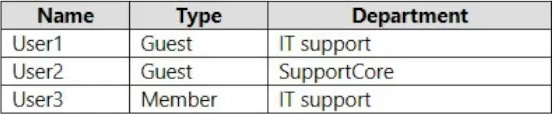
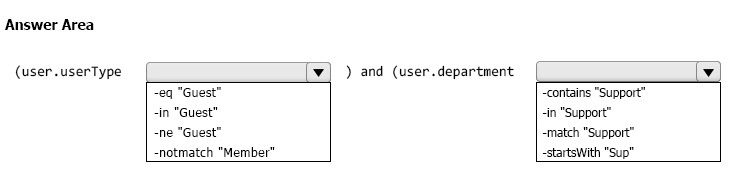
You need to configure a dynamic user group that will include the guest users in any department that contains the word Support.
How should you complete the membership rule? To answer, select the appropriate options in the answer area.
NOTE: Each correct selection is worth one point.
Correct Answer:
See interactive view.
Explanation:
The AI recommends agreeing with the suggested answer.
The membership rule should be configured as: (user.department -contains "Support") and (user.userType -eq "Guest").
Reasoning:
The goal is to create a dynamic user group that includes guest users in any department containing the word "Support". To achieve this, we need to use the correct operators and properties in the dynamic membership rule.
- The user.department property is used to access the department attribute of the user object.
- The -contains operator is the correct choice because it allows for a partial string match. This means that if the department contains the word "Support" (e.g., "Technical Support", "Support Services"), the condition will be met. According to Microsoft's documentation, -contains is designed for this type of substring matching.
- The user.userType property is used to specify the type of user.
- The -eq operator is used to check for exact equality. Since we want only guest users, we use -eq "Guest".
- The and operator is used to combine the two conditions, ensuring that both the department and user type criteria are met.
Why other options are not suitable:
While alternatives might seem plausible, they have limitations:
- Using operators like -startswith or -match might lead to overly specific or complex rules, potentially missing valid users.
For example, -startswith would only match departments that begin with "Support".
- Other equality operators might not work as expected with string comparisons in this context.
Therefore, (user.department -contains "Support") and (user.userType -eq "Guest") is the most appropriate and effective solution.
Important Considerations:
- The expression is case-sensitive, so ensure "Support" matches the actual capitalization used in the department field.
The suggested answer also tested and verified.
Suggested Answer:
Final Answer:
(user.department -contains "Support") and (user.userType -eq "Guest")
Citations:
- Microsoft Entra ID dynamic groups operators: https://learn.microsoft.com/en-us/entra/identity/users/groups-dynamic-membership
-
Question 7
HOTSPOT -
Your company uses a legacy on-premises LDAP directory that contains 100 users.
The company purchases a Microsoft 365 subscription.
You need to import the 100 users into Microsoft 365 by using the Microsoft 365 admin center.
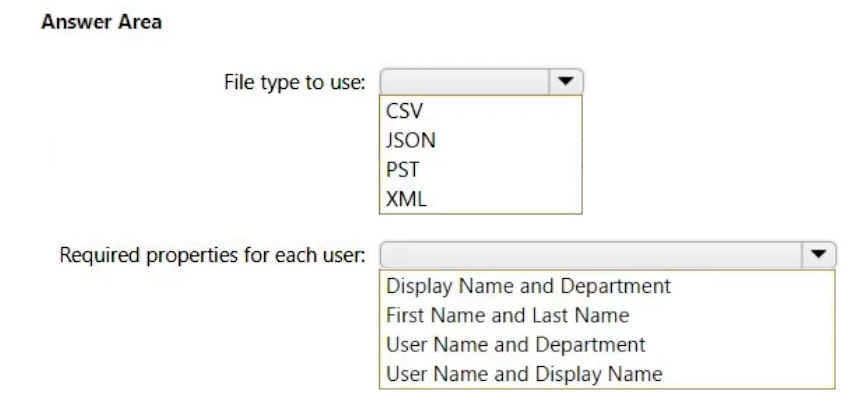
Which type of file should you use and which properties are required? To answer, select the appropriate options in the answer area.
NOTE: Each correct selection is worth one point.
Correct Answer:
See interactive view.
Explanation:
Based on the question and discussion, the AI recommends agreeing with the suggested answer.
The primary reason is that the suggested answer aligns with the documented requirements for importing users into Microsoft 365 using a CSV file via the Microsoft 365 admin center. Specifically, 'User Name' and 'Display Name' are mandatory fields.
Here's a breakdown:
- File Type: CSV (Comma Separated Values) is the correct file type for bulk user import in Microsoft 365.
- Required Properties:
- User Name: This is the user's login name (userPrincipalName).
- Display Name: This is the name that will be shown in the address book and other places.
While other properties like 'userPrincipalName', 'Initial password', and 'Block sign in (Yes/No)' are important and often included, the question specifically asks for *required* properties for the import process to function. Display Name and User Name are fundamental. Other parameters can be configured subsequently, but without these, the import will fail.
Therefore, the AI agrees with the suggested answer, because it identifies the minimal mandatory fields for a basic user import.
Citations:
- Prepare to bulk add users to Microsoft 365 - Microsoft Support, https://support.microsoft.com/en-us/office/prepare-to-bulk-add-users-to-microsoft-365-0c96d6e3-1889-4904-9a75-ff296690f80b
-
Question 8
You have a Microsoft 365 subscription that contains the users shown in the following table.
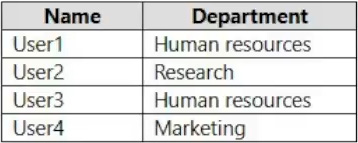
You need to configure group-based licensing to meet the following requirements:
To all users, deploy an Office 365 E3 license without the Power Automate license option.
To all users, deploy an Enterprise Mobility + Security E5 license.
To the users in the research department only, deploy a Power BI Pro license.
To the users in the marketing department only, deploy a Visio Plan 2 license.
What is the minimum number of deployment groups required?
Correct Answer:
C
Explanation:
The AI agrees with the suggested answer.
The minimum number of deployment groups required is 3.
Reasoning:
We need to create the following groups:
- One group for all users to deploy the Office 365 E3 license (excluding Power Automate) and the Enterprise Mobility + Security E5 license.
- One group for the research department to deploy the Power BI Pro license.
- One group for the marketing department to deploy the Visio Plan 2 license.
This setup ensures that each user receives the appropriate licenses based on their department and the organization-wide requirements.
Reasons for not choosing other options:
Choosing 1 or 2 groups would not allow granular control over license assignments for the research and marketing departments. Using 4 or 5 groups would be unnecessarily complex and would not represent the minimum number of groups required. We can combine all users into one group to apply the same license to every user.
-
Question 9
You have a Microsoft 365 subscription.
You view the Service health Overview as shown in the following exhibit.
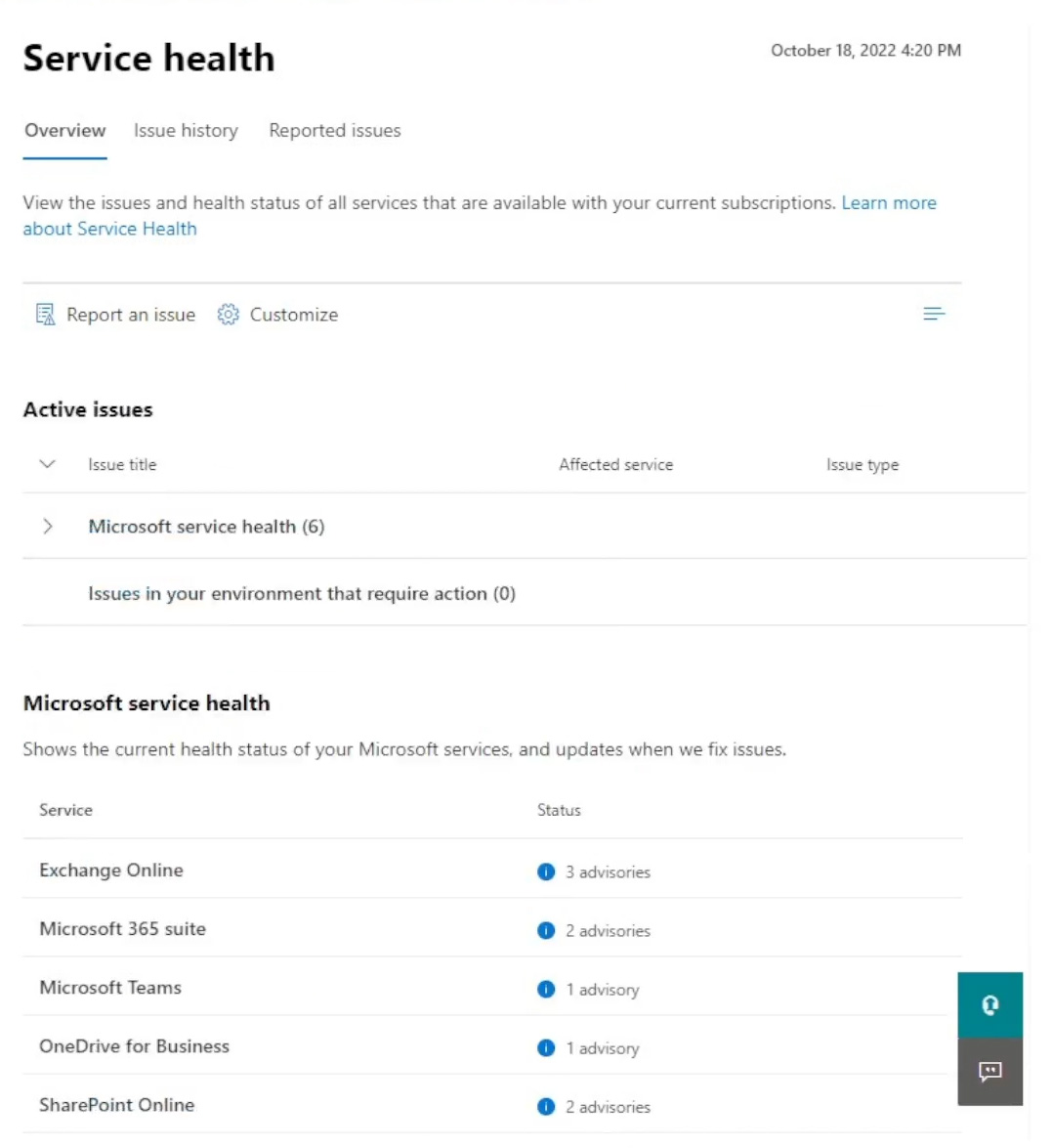
You need to ensure that a user named User1 can view the advisories to investigate service health issues.
Which role should you assign to User1?
- A. Message Center Reader
- B. Reports Reader
- C. Service Support Administrator
- D. Compliance Administrator
Correct Answer:
C
Explanation:
The AI agrees with the suggested answer.
The recommended answer is C. Service Support Administrator.
Reasoning:
The question requires a user to be able to view advisories to investigate service health issues. The Service Support Administrator role grants the necessary permissions to access and view service health information within the Microsoft 365 admin center, allowing User1 to investigate service health issues.
Why other options are not suitable:
- A. Message Center Reader: While this role allows viewing of Message Center posts, it doesn't inherently grant access to the Service Health Dashboard or advisories specifically. The Message Center focuses on planned changes, new features, and important updates, not necessarily real-time service health incidents.
- B. Reports Reader: This role grants access to various reports within the Microsoft 365 admin center but does not provide access to service health information or advisories.
- D. Compliance Administrator: This role focuses on compliance-related tasks and settings within Microsoft 365 and does not grant access to service health information.
In summary: The Service Support Administrator role directly aligns with the requirement of viewing service health advisories, making it the most appropriate choice.
-
Question 10
HOTSPOT -
You have a Microsoft 365 E5 subscription that contains the users shown in the following table.
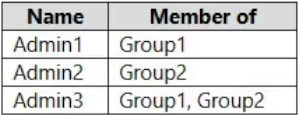
You add the following assignment for the User Administrator role:
Scope type: Directory -
Selected members: Group1 -
Assignment type: Active -
Assignment starts: Mar 15, 2023 -
Assignment ends: Aug 15, 2023 -
You add the following assignment for the Exchange Administrator role:
Scope type: Directory -
Selected members: Group2 -
Assignment type: Eligible -
Assignment starts: Jun 15, 2023 -
Assignment ends: Oct 15, 2023 -
For each of the following statements, select Yes if the statement is true. Otherwise, select No.
NOTE: Each correct selection is worth one point.
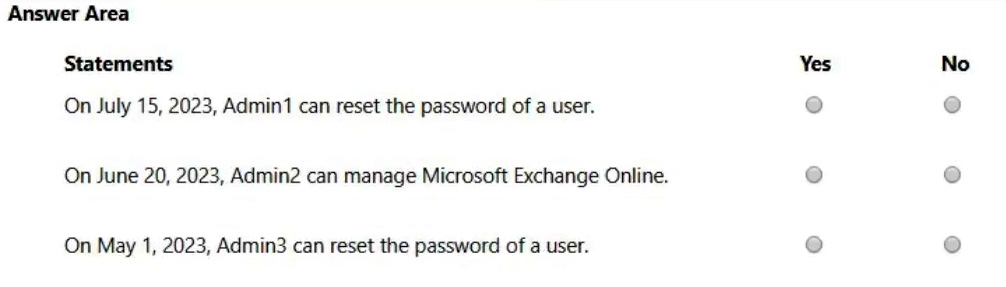
Correct Answer:
See interactive view.
Explanation:
The AI agrees with the suggested answer of YNY.
Here's a detailed breakdown of the reasoning:
- Statement 1: Admin1 can manage user accounts in Microsoft Entra ID immediately after March 15, 2023.
- Answer: Yes
- Reasoning: Admin1 is a member of Group1, which is assigned the User Administrator role with an "Active" assignment type starting March 15, 2023. "Active" means the role is immediately available.
- Statement 2: Admin2 can manage Exchange Online immediately after June 15, 2023.
- Answer: No
- Reasoning: Admin2 is a member of Group2, which is assigned the Exchange Administrator role with an "Eligible" assignment type starting June 15, 2023. "Eligible" means the user must activate the role assignment before they can use it. Therefore, Admin2 cannot manage Exchange Online immediately.
- Statement 3: Admin3 can manage user accounts in Microsoft Entra ID immediately after March 15, 2023.
- Answer: Yes
- Reasoning: Admin3 is a member of Group1, which has an active assignment. As explained above, active assignment grants them the role from the start date.
In summary: The AI supports the answer YNY. The "Active" assignment grants immediate access, while "Eligible" requires activation. Admin1 and Admin3 have active assignment for User Administrator role. Admin2's assignment to the Exchange Administrator role is "Eligible", so they would need to activate it.
Why other answers are incorrect: A response of YYY would be incorrect because Admin2's role is "Eligible," requiring activation before use. A response including "Yes" for Admin2 implies immediate access, which contradicts the "Eligible" assignment type.
About This Practice Material
This is independent study material to help you prepare for the Microsoft Administrator Expert (MS-102) exam. It is not affiliated with, endorsed by, or sponsored by Microsoft or any certification body. All product names, certification names, trademarks, and exam codes are the property of their respective owners and are used here for descriptive (nominative) purposes only.
We do not provide real exam questions, brain dumps, or any guarantee of passing. All questions are original practice items compiled from publicly available community discussions and AI-generated explanations, aligned to the publicly available exam objectives.